EasyManua.ls Logo

LG LH-T3526S - User Manual

LG LH-T3526S
24 pages
Print Icon
To Next Page IconTo Next Page
Loading...
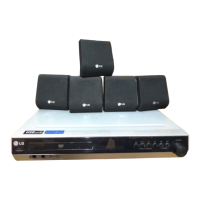
DVD/CD RECEIVER
OWNER’S MANUAL
MODEL: LH-T3526S
LH-T3526S
SH32SD-SZ, SH32SD-WZ
Before connecting, operating or adjusting this product,
please read this instruction booklet carefully and
completely.
HT352SD_X8_DKAZLLS_ENG_5855
R
USB

Questions and Answers

  • D
    daniellerodgersSep 18, 2025
    How to fix LG LH-T3526S Receiver not starting playback?
    • B
      bbaileySep 18, 2025
      If your LG DVD/CD Receiver does not start playback, consider the following: * Insert a disc if there isn't one already. * Ensure you are using a playable disc. * Place the disc with the playback side down. * Make sure the disc is placed correctly within the guide on the disc tray. * Clean the disc if it is dirty. * If a menu is on the TV screen, press the SETUP button to turn it off. * Cancel the Rating function or change the rating level if it is set.
  • S
    Sean OlsonAug 25, 2025
    Why is there no sound from my LG Receiver?
    • S
      Sheila ThompsonAug 25, 2025
      If your LG Receiver has no sound or very low sound, make sure the equipment connected with the audio cable is set to receive the DVD audio signal output. Check that the audio cables are securely connected and that the connected equipment is powered on. If the issue persists, try replacing the audio connecting cable, as it may be damaged.
  • J
    jeffreypriceAug 25, 2025
    How to fix LG LH-T3526S remote control that is not working?
    • R
      ramseyjustinAug 26, 2025
      If the remote control for your LG Receiver isn't working, make sure you're pointing it directly at the receiver's remote sensor. Ensure you are within 23 ft (7 m) of the receiver and that there are no obstacles in the way. If it still doesn't work, replace the batteries with new ones.
  • J
    Jennifer VazquezAug 27, 2025
    Why is there no sound coming from my LG Receiver?
    • J
      Jonathan ColeAug 27, 2025
      If you experience no sound or very low sound from your LG Receiver, consider the following: * Verify that the equipment connected with the audio cable is set to receive DVD audio signal output. Select the correct input mode on the receiver. * Ensure the audio cables are securely connected to the jacks. * Check that the equipment connected with the audio cable is turned on. * If the audio connecting cable is damaged, replace it with a new one.
  • J
    Jasmine MitchellSep 18, 2025
    How to tune radio stations on my LG LH-T3526S?
    • K
      kayla81Sep 18, 2025
      If you're unable to tune into radio stations on your LG Receiver, try the following: * Connect the antenna securely. * Tune in the station manually if the signal strength is weak. * Preset the stations if none are preset or if preset stations have been cleared.
  • S
    Sara NelsonSep 23, 2025
    How to brighten the display on my LG LH-T3526S?
    • M
      Michelle WilsonSep 23, 2025
      If the front panel display on your LG DVD/CD Receiver is too dim, press DIMMER on the remote control.
  • N
    Nicholas MooreSep 9, 2025
    Why can't I tune in radio stations on my LG LH-T3526S Receiver?
    • C
      Christine NovakSep 9, 2025
      If you're unable to tune into radio stations on your LG Receiver, ensure the antenna is securely connected. If using automatic tuning, the signal strength may be too weak, so try tuning in the station manually. If tuning by scanning preset stations, preset the stations.
  • J
    James EvansSep 10, 2025
    How to fix dim front panel display on LG LH-T3526S Receiver?
    • J
      Jason AyersSep 10, 2025
      To brighten the front panel display on your LG Receiver, press DIMMER on the remote control.
  • M
    Michelle RamirezSep 3, 2025
    How to brighten the front panel display on my LG LH-T3526S Receiver?
    • L
      Laura HaleSep 3, 2025
      If the front panel display on your LG Receiver is too dim, press the DIMMER button on the remote control.
  • M
    Meredith MurraySep 1, 2025
    What to do if the playback picture is poor on my LG LH-T3526S?
    • S
      Shaun MartinezSep 1, 2025
      If the playback picture on your LG Receiver is poor, start by cleaning the disc. Ensure a playable disc is inserted correctly (label side up) and placed within the guide on the disc tray. If a menu is on the screen, press the SETUP button to turn it off. Also, check if the Rating level is set and, if so, cancel the Rating function or change the rating level.

LG LH-T3526S Specifications

General IconGeneral
Channels5.1
DVD playerYes
DVD functionsPlayback
Supported digital audio standardsDolby Digital, DTS
USB PortYes
HDMI OutputYes
BluetoothNo

Related product manuals