EasyManua.ls Logo

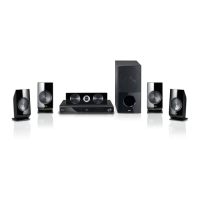
LG LHB336 - User Manual

LG LHB336
74 pages
Print Icon
To Next Page IconTo Next Page
Loading...
OWNER’S MANUAL
Network 3D Blu-ray
Home Theater
Please read this manual carefully before operating
your set and retain it for future reference.
LHB336
www.lg.com
P/NO : SAC35095601

Table of Contents

Other manuals for LG LHB336

Questions and Answers

  • S
    Steven BennettAug 14, 2025
    What to do if my LG LHB336 unit is plugged in, but the power will not turn on or off?
    • J
      Jason StewartAug 14, 2025
      You can reset the unit by pressing and holding the POWER button for at least five seconds to force it to power off and then back on. Alternatively, unplug the power cord, wait at least five seconds, and then plug it in again.
  • H
    Henry MorganAug 18, 2025
    Why won't my LG LHB336 Home Theater System remote control work properly?
    • H
      Hannah TranAug 18, 2025
      The remote control may not work because it is not pointed at the remote sensor of the unit, it is too far from the unit, there is an obstacle in the path between the remote control and the unit, or the batteries in the remote control are exhausted.
  • D
    Destiny PruittAug 20, 2025
    What to do if my LG LHB336 has no picture?
    • M
      Mr. Roy Rios Jr.Aug 20, 2025
      Make sure you have selected the appropriate video input mode on your TV so that the picture from the unit appears on the screen, the video connection is secure, the [HDMI Color Setting] in the [Setup] menu is set to the appropriate item that conforms to your video connection and that your TV supports the resolution you have set on the player.
  • S
    sbellAug 25, 2025
    Why does my LG Home Theater System unit not start playback?
    • M
      Mrs. Joyce FlemingAug 25, 2025
      The unit might not start playback for several reasons: ensure you've inserted a playable disc, checking its type, color system, and regional code. Also, make sure the disc is placed with the playback side down, correctly positioned inside the guide on the disc tray, and that the disc is clean. Finally, cancel the Rating function or change the rating level.
  • J
    jeffrey27Aug 27, 2025
    Why is there no sound or distorted sound on my LG LHB336 Home Theater System?
    • C
      caseyonealAug 27, 2025
      The unit may be in scan, slow motion, or pause mode. Also, the sound volume might be low. Check the speaker cable connection.
  • J
    Joseph GonzalesAug 31, 2025
    Why is my LG Home Theater System streaming video stopping or buffering?
    • W
      William PhillipsAug 31, 2025
      Your broadband service speed may not be fast enough to stream video services. Contact your Internet Service Provider (ISP) and increasing the broadband speed is recommended.
  • V
    Vanessa Diaz MDSep 3, 2025
    How to fix BD-LIVE feature that does not work on my LG LHB336?
    • R
      Rhonda GonzalezSep 4, 2025
      The connected USB storage may not have enough space, so connect the USB storage with at least 1GB free space. Ensure that the unit is correctly connected to the local area network and can access the internet. Your broadband speed may not fast enough to use the BD-LIVE features, so contacting your Internet Service Provider (ISP) and increasing the broadband speed is recommended. Check that the [BD-LIVE connection] option in the [Setup] menu is set to [Permitted].
  • G
    gmoralesSep 6, 2025
    Why is access point not displayed on the 'Access point name' list on my LG Home Theater System?
    • V
      vmoodySep 6, 2025
      The access point or wireless LAN router may not broadcast its SSID, so set your access point to broadcast its SSID through your computer. Your network device such as access point may not set with available frequency range and channel that this player can support, so try setting the frequency range and channel on the network device setting.
  • D
    Debra GonzalesSep 10, 2025
    How to fix Blu-ray 3D disc playback that does not output 3D views on LG LHB336?
    • J
      jesse30Sep 10, 2025
      Connect the player to your TV with HDMI cable (Type A, High Speed HDMI™ Cable with Ethernet). Ensure that the [3D Mode] option in the [Setup] menu is set to [On].

Summary

Getting Started

Safety Information

Crucial safety precautions and warnings for operating the device.

Connecting

Speaker Connection

Instructions for connecting speakers to the player using color-coded wires.

Connecting to Your TV

Methods for connecting the player to a television for audio and video output.

HDMI Connection

Detailed steps for connecting via HDMI for high-quality audio/video.

Home Network Connection

Steps for connecting the player to a home network for services.

System Setting

Operating

Troubleshooting

General Troubleshooting

Solutions for common issues like power, playback, and remote control problems.

Power and Playback Issues

Troubleshooting when the unit won't turn on or start playback.

Network Troubleshooting

Resolving issues with BD-LIVE, streaming, and network connectivity.

Picture and Sound Troubleshooting

Resolving no picture, picture noise, 3D playback, and sound problems.

Picture Issues

Solutions for missing pictures, noise, and incorrect 3D output.

Appendix

LG LHB336 Specifications

General IconGeneral
Disc loading typeTray
Disc types supportedBD-R, BD-RE, BD-ROM, CD, CD-R, CD-RW, DVD, DVD+R, DVD+RW, DVD-R, DVD-RW
Playback disc formatsBlu-Ray video, CD audio
Number of optical discs1 discs
Optical disc player typeBlu-Ray player
Internet TVYes
Built-in HDDNo
Image formats supportedJPG
Apple docking compatibilityiPhone, iPod
Video formats supportedAVI, DIVX, MKV, MPEG1, MPEG4, TS
Analog signal format systemNTSC
Audio decodersDolby Digital, Dolby Digital Plus, Dolby TrueHD, DTS, DTS-HD Master Audio
RMS rated power1100 W
Audio output channels5.1 channels
Audio formats supportedAAC, LPCM, MP3, WMA
AM band range522 - 1620 kHz
FM band range87.5 - 108 MHz
Supported radio bandsAM, FM
Preset stations quantity50
Front speakers RMS power180 W
Soundbar speaker RMS power200 W
Subwoofer typePassive subwoofer
Product colorBlack
Cables includedAV
HDMI in1
USB version2.0
SCART ports quantity0
AC input voltage120 V
AC input frequency60 Hz
Power consumption (typical)150 W
Package weight16010 g
Weight and Dimensions IconWeight and Dimensions
Main unit weight3751 g
Subwoofer weight4990 g
Center speaker weight1211 g
Main unit dimensions (WxDxH)434.3 x 281.9 x 58.42 mm
Subwoofer dimensions (WxDxH)190.5 x 358.1 x 386.1 mm
Front speaker dimensions (WxDxH)93.98 x 83.82 x 182.9 mm
Center speaker dimensions (WxDxH)327.7 x 76 x 99.06 mm

Related product manuals