EasyManua.ls Logo

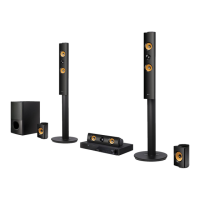
LG LHB976 - User Manual

LG LHB976
78 pages
Print Icon
To Next Page IconTo Next Page
Loading...
OWNER’S MANUAL
Network 3D Blu-ray
Home Theater
Please read this manual carefully before operating
your set and retain it for future reference.
LHB976
P/NO : SAC35095601
www.lg.com

Table of Contents

Other manuals for LG LHB976

Questions and Answers

  • D
    Denise ChavezAug 19, 2025
    What to do if my LG Home Theater System remote control does not work properly?
    • M
      Michael ThomasAug 19, 2025
      If the remote control for your LG Home Theater System isn't working correctly, it could be due to several reasons: * The remote control is not pointed at the remote sensor of the unit. * The remote control is too far from the unit. * There is an obstacle in the path of the remote control and the unit. * The batteries in the remote control are exhausted.
  • J
    Jennifer JohnsonAug 21, 2025
    What to do if my LG Home Theater System is plugged in, but the power will not turn on or off?
    • L
      lblackwellAug 21, 2025
      If your LG Home Theater System is plugged in but won't turn on or off, you can try resetting it: 1. Press and hold the POWER button for at least five seconds. This should force the unit to power off, then turn it back on. 2. If that doesn't work, unplug the power cord, wait at least five seconds, and then plug it in again.
  • J
    James RossAug 23, 2025
    How to fix LG Home Theater System when there is no picture?
    • R
      Robert MaxwellAug 23, 2025
      If there's no picture on your LG Home Theater System, try the following: * Select the appropriate video input mode on the TV so the picture from the unit appears on the TV screen. * Connect the video connection securely. * Check the [HDMI Color Setting] in the [Setup] menu to ensure it matches your video connection. * Change the resolution to one that your TV accepts, as your TV may not support the current resolution. Also, the player’s HDMI OUT jack may be connected to a DVI device that does not support copyright protection.
  • B
    Brianna YoungAug 26, 2025
    How to fix LG LHB976 Home Theater System when the unit does not start playback?
    • L
      Leonard DanielsAug 26, 2025
      If your LG Home Theater System isn't starting playback, check these things: * Make sure you've inserted a playable disc, checking its type, color system, and regional code. * Place the disc with the playback side down. * Ensure the disc is correctly placed on the disc tray inside the guide. * Clean the disc. * Cancel the Rating function or change the rating level.
  • M
    Megan JacksonAug 28, 2025
    What causes no sound or distorted sound on LG LHB976 Home Theater System?
    • K
      kimkarenAug 28, 2025
      If you're experiencing no sound or distorted sound on your LG Home Theater System, it could be because the unit is in scan, slow motion, or pause mode, or the sound volume is low. Also check the speaker cable connection.
  • N
    Natalie SchroederAug 30, 2025
    Why are streaming video services often stopped during playback on my LG Home Theater System?
    • P
      Patrick JacksonAug 30, 2025
      If streaming video services like YouTube™ often stop or buffer during playback on your LG Home Theater System, it might be because your broadband service speed isn't fast enough. Contact your Internet Service Provider (ISP) and ask them to increase your broadband speed.
  • C
    corey67Sep 1, 2025
    Why shared folders are not displayed on device list of my LG Home Theater System?
    • A
      Alexander MacdonaldSep 1, 2025
      If shared folders or files from your PC or a media server aren't showing up on the device list of your LG Home Theater System, it might be because the firewall or anti-virus software on your media server is running. Try turning off the firewall or anti-virus software running on your PC or media server.
  • A
    Ana GrantSep 4, 2025
    How do I fix picture noise on my LG LHB976 Home Theater System?
    • M
      Mrs. Jessica MoodySep 4, 2025
      If you're seeing picture noise on your LG Home Theater System, it could be because you're playing a disc recorded in a color system different from your TV. Also, try setting the resolution to one that your TV accepts.
  • C
    Christine NguyenSep 6, 2025
    Why I cannot connect my LG Home Theater System to the access point?
    • B
      bdiazSep 6, 2025
      If you cannot connect your LG Home Theater System to the access point or wireless LAN router, it might be because the wireless communication is being interrupted by household devices using radio frequencies. Try moving the player away from them.
  • K
    Kendra WilsonSep 8, 2025
    Why is my LG LHB976 Blu-ray 3D disc not outputting 3D views?
    • R
      rodriguezericSep 9, 2025
      If your LG Home Theater System isn't outputting 3D views during Blu-ray 3D disc playback, check the following: * Connect the player to your TV with an HDMI cable (Type A, High Speed HDMI™ Cable with Ethernet). * Ensure that the [3D Mode] option in the [Setup] menu is set to [On]. Your TV may not support “HDMI 1.4 3D mandatory format”.

Summary

Safety Information

CAUTION concerning the Power Cord

Warnings and guidelines regarding the use of the power cord.

Introduction

Playable Discs and symbols used in this manual

Information on supported disc types and their symbols.

File compatibility

Video files

Details on supported video file formats and codecs.

Remote control

Battery Installation

Instructions for installing batteries in the remote control.

Front panel

Rear panel

Connecting

Connecting to Your TV

Connecting the player to a TV using an HDMI cable.

Connecting to your Home Network

Setting up network connections for online features.

USB device connection

Connecting and playing files from USB devices.

System Setting

[DISPLAY] Menu

Adjusting display settings like aspect ratio and resolution.

[NETWORK] Menu

Configuring network settings for online services and updates.

Operating

Playing a Disc

Procedures for playing various disc types.

Playing Blu-ray 3 D disc

Instructions for playing 3D Blu-ray discs.

Basic operations for video and audio content

Common playback controls for video and audio.

Advanced Playback

Features like repeat playback and repeating portions.

Radio Operations

Tuning and managing radio stations.

Using the TV Apps

Downloading and using LG applications.

Troubleshooting

General

Solutions for common operational issues.

Picture

Resolving issues with video display.

Sound

Resolving issues with audio output.

Appendix

Network Software Update

Steps to update the player's software.

Specifications

Technical specifications of the home theater system.

Maintenance

Instructions for cleaning and maintaining the unit.

LG LHB976 Specifications

General IconGeneral
ModelLHB976
TypeHome Theater System
Number of Channels5.1
Total Output Power1000W
Blu-ray PlaybackYes
3D PlaybackYes
Smart TV FeaturesYes
Wi-FiYes
HDMI Inputs4
USB Ports1
BluetoothNo
EthernetYes
HDMI Output1

Related product manuals