Connecting18
Connecting
2
y
Depending on the disc type or playing
status, some SIMPLINK operation may dier
from your purpose or not work.
y
The function is automatically changed
to optical when you change the speaker
setting of simplink to external, no matter
what kind of the function you are using.
,
Note
Video Connection
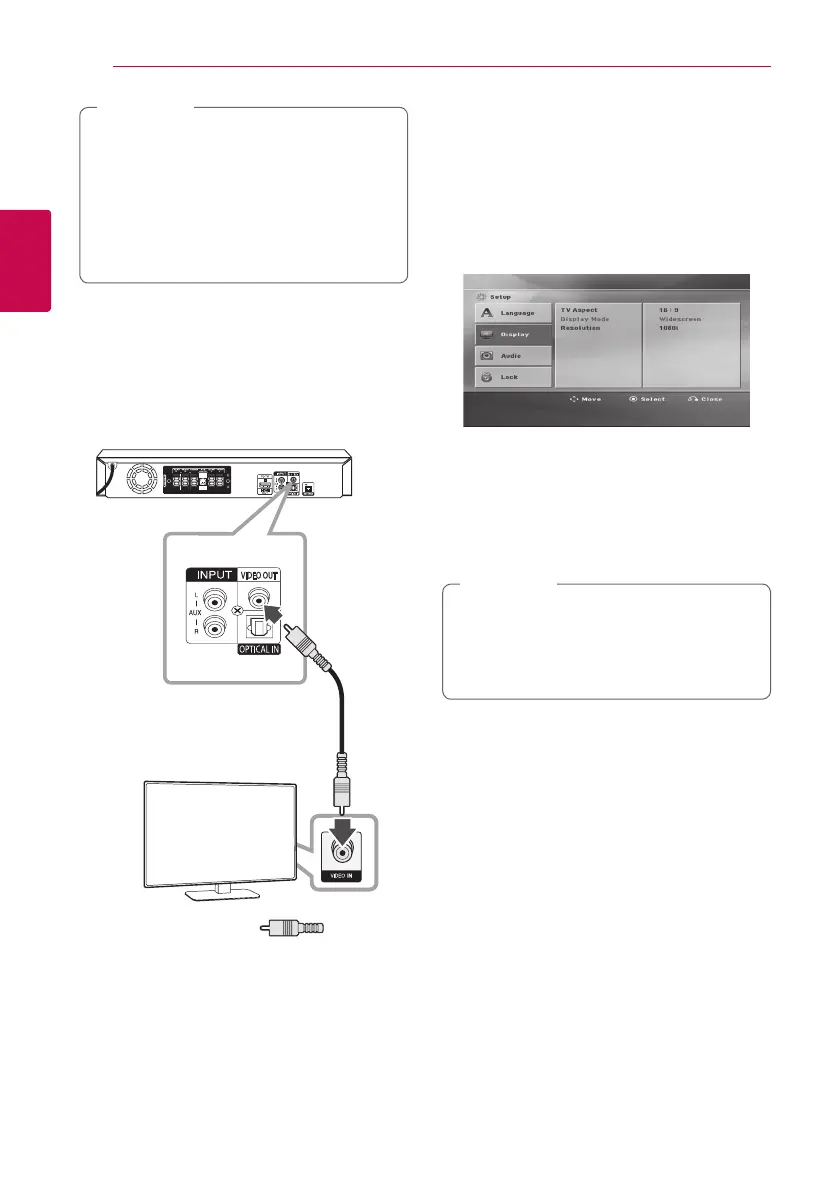
Connect the VIDEO OUT jack on the unit to the
video in jack on the TV using a video cable.
You can hear the sound through the system’s
speakers.
Unit
TV
Yellow
Resolution Setting
The unit provides several output resolutions for
HDMI OUT.
You can change the resolution using [Setup] menu.
1. Press
n
HOME.
2. Use
A/D
to select the [Setup] and press
b
ENTER. The [Setup] menu appears.
3. Use
W/S
to select [Display] option then press
D
to move to the second level.
4. Use
W/S
to select the [Resolution] option
then press
D
to move to the third level.
5. Use
W/S
to select the desired resolution then
press
b
ENTER to confirm your selection.
If your TV does not accept the resolution you
have set on the player, you can set resolution
to 480p (or 576p) as follows:
Press
Z
STOP for more than 5 seconds.
,
Note
Video Output
Resolution
Displayed resolution in display window and
outputted resolution may dierent according to
connection type.
[HDMI OUT] : 1080p, 1080i, 720p and 480p (or
576p) and 480i (or 576i)
[VIDEO OUT] : 480i (or 576i)



 To Next Page
 Loading...