5
Before use
Before use
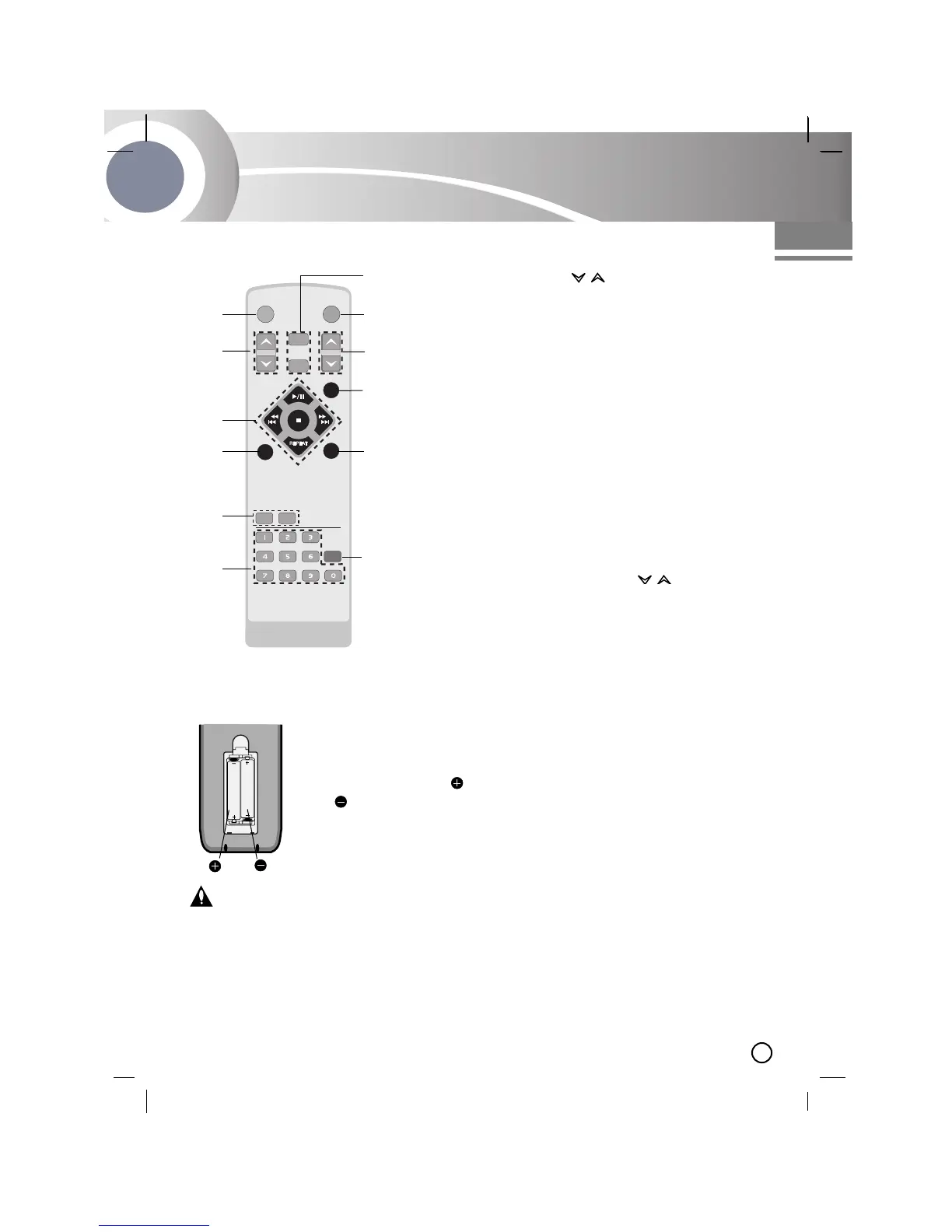
Detach the battery cover on
the rear of the remote con-
trol, and insert two R03
(size AAA) batteries with
and aligned correctly.
Caution:
Do not mix old and new batteries. Never mix dif-
ferent types of batteries
(standard, alkaline, etc.).
Point the remote control at the remote sensor
and press the buttons.
•
Distance: About 23 ft (7 m) from the front of the
remote sensor.
•
Angle: About 30° in each direction of the front of
the remote sensor.
Remote Control battery installation
Remote Control Operation Range
Remote control
1
2
3
4
5
6
7
8
9
10
1. POWER button
2. PRESET ( ) buttons
3. • CD PLAY/ PAUSE (
BB
/
[]
) buttons
• CD STOP(
x
) button
• TUNING (+/-) buttons -TUNER
• CD SKIP/SEARCH (.m/M>)
buttons
• REPEAT button
4. D.SKIP button
5. • EQUALIZER PATTERN (EQ PATT.) button
• XDSS button
6. NUMBER buttons
7. MP3 file information display (MP3 Info)
button
8. PROGRAM/ MEMO. button
9. SLEEP button
10. VOLUME CONTROL ( ) buttons
11. MUTE button
12. • USB button
• FUNCTION SELECT (FUNCTION) button
(FM/ AM/ CD/ TAPE /AUX/ USB)


 To Next Page