7
Connections
PREPARATION
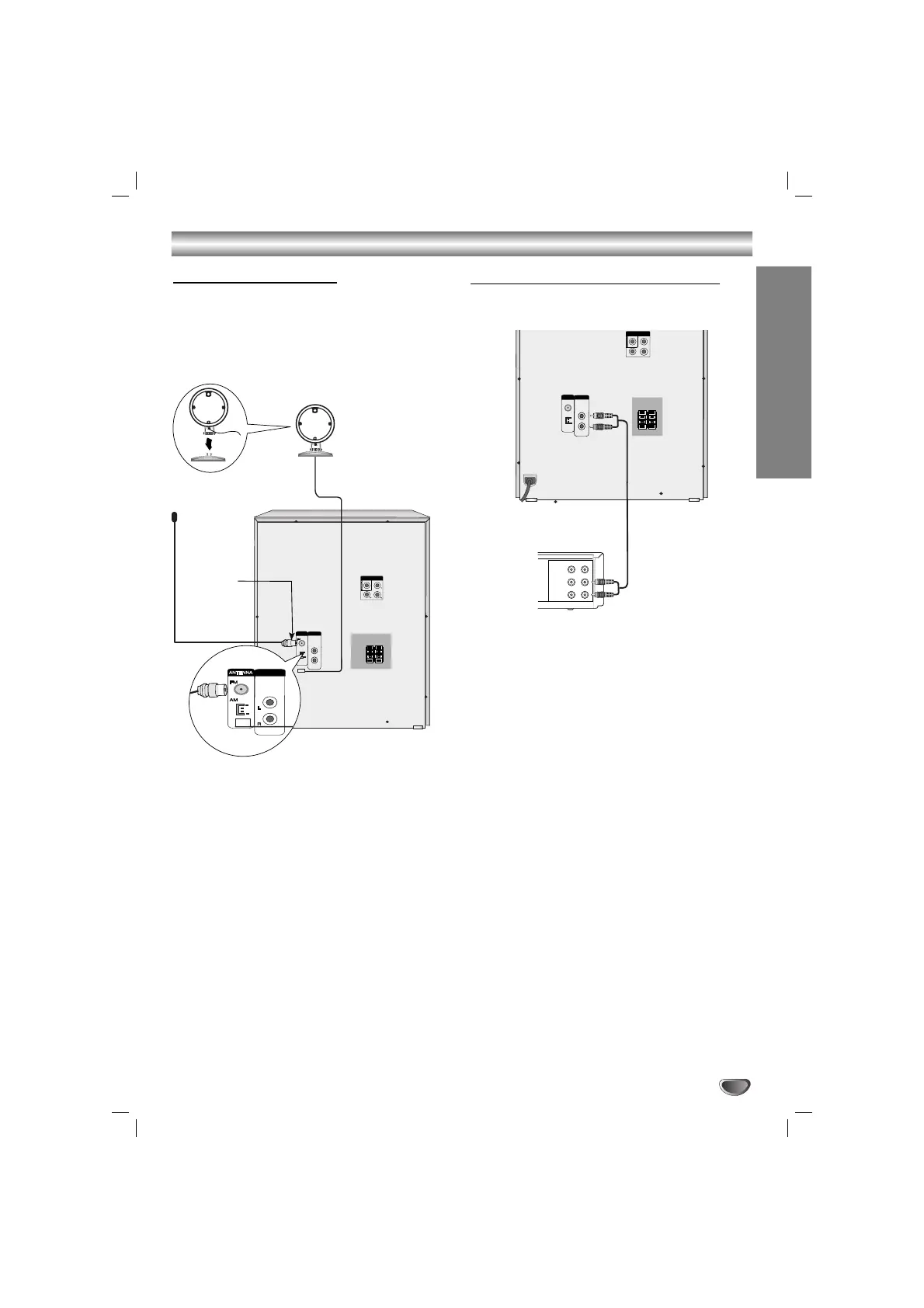
Connecting to Antenna
Connect the supplied FM/AM antennas to listen to the
radio.
• Connect the AM loop antenna to the AM antenna
connector.
• Connect the FM wire antenna to the FM antenna
connector.
Note
Note
•To prevent noise pickup, keep the AM loop antenna
away from the unit and other component.
• Be sure to fully extend the FM wire antenna.
• After connecting the FM wire antenna, keep it as
horizontal as possible.
AM(MW) loop
antenna (aerial)
(Supplied)
For AM(MW) reception, con-
nect the loop antenna (aerial)
to the terminal marked AM
FM wire
antenna
(supplied)
Connecting to Auxiliary Equipment
You can use VCR or other unit connected to the AUX
connector.
1
Connect a VCR or auxiliary device, etc to the AUX
connector.
2
Press the AUX button on the front panel or the
remote control until the “AUX” indicator is
displayed in the display window.


 To Next Page