28
Operation with KARAOKE
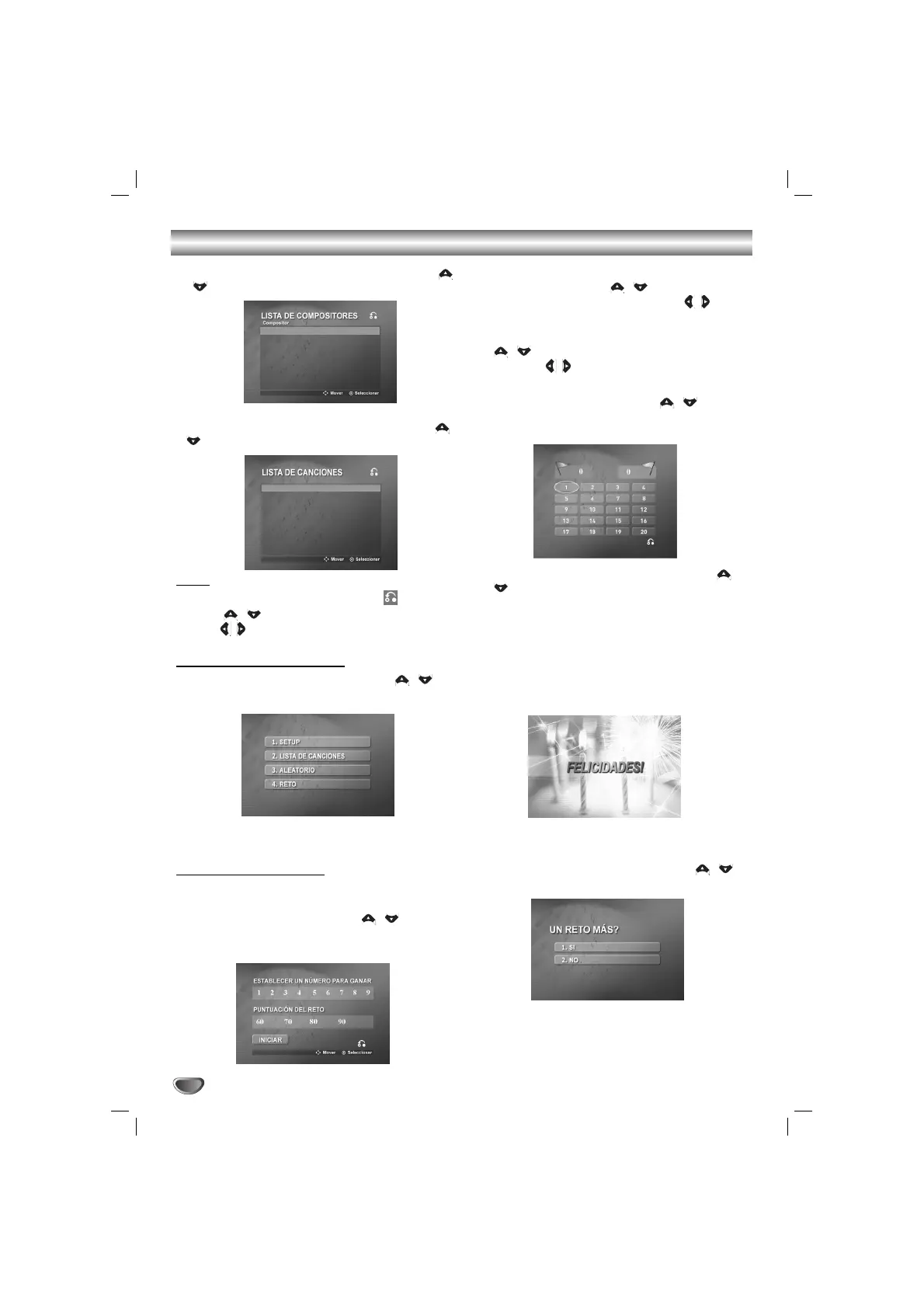
2 Select the composer you want by pressing the
/ , and press
SELECT/ ENTER
.
3 Select the song title you want by pressing the /
, and press
SELECT/ ENTER
.
Note
Note
• To move the previous mode, select the by press-
ing the / , then press
SELECT/ ENTER
• Press / to move to the previous or next page.
RANDOM (ALEATORIO)
11
Select
“3. ALEATORIO”
by pressing / on
the main menu.
22
Press SELECT/ENTER to begin randomly.
CHALLENGE (RETO)
It has a function which enjoy a song game with two
teams divided into red team &blue team.
11
Select
“4. RETO”
by pressing / on the
main menu.
It appears as below.
22
Select
“ESTABLECER UN NÚMERO PARA
GANAR”
by pressing / , and select one of
NUMERIC buttons 1~9 by pressing / to set
number to win , then press
SELECT/ ENTER
.
33
Select
“PUNTUACIÓN DEL RETO”
by pressing
/ , and select one of 60,70,80 or 90 by
pressing / to set challenge score, then
press SELECT/ ENTER.
44
Select
“INICIAR”
by pressing / , then
press SELECT/ ENTER.
It appears as below.
55
Select the number you want by pressing /
and press
SELECT/ ENTER
.
Sing along with the accompaniment.
66
Repeat the step 5.
The team of red team or blue team changes in turn.
77
When reaching the targeted winning number,
the
“FELICIDADES!”
will be shown on the TV
screen.
It appears as below.
88
Whether you keep going the song game or not,
select “1. SI” or
“
2. NO” by pressing / as
below.
BACH
BEETHOVEN
BELLINI
BIZET
BRAHMS
1084
CONCERTO FOR VIO...
1085
CONCERTO FOR VIO...
1086
CONCERTO FOR VIO...
1096
DAS WOHLTEMPERIE...
1118
FANTASTIC AND FUG...
1143
FUGUES IN Q MINOR
1211
MASSES IN B MINOR
1212
MENUET
BACH
BACH
BACH
BACH
BACH
BACH
BACH
BACH



 To Next Page