Connections
8
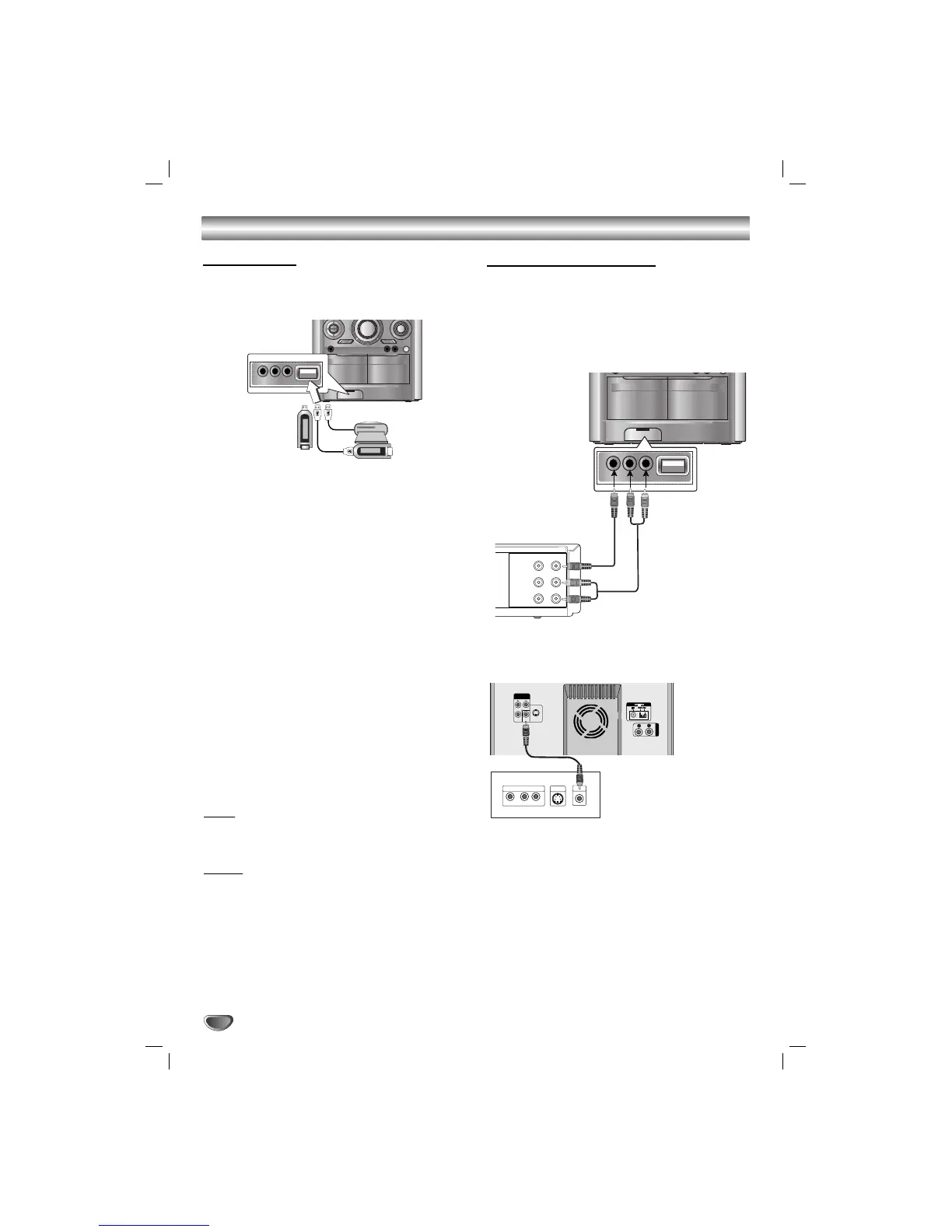
USB Memory,
MP3 Player (or
Memory Card
Reader, etc.)
Connecting to GAME LINK
Optional Equipment Connections
Connnection of the TV/Monitor, Video Game or
DVD, etc.
1
Connect the video/audio output connector of auxil-
iary device to the GAME LINK INPUT (VIDEO IN,
AUDIO L/R) connector.
22
Connect the video input connector of TV/Monitor to
the MONITOR OUT connector.
33
Press A/V button on the front panel or AUX button
on the remote control to select A/V (Audio/ Video)
function.
“A/V” will be shown in the display window.
Rear of TV
USB Function
You can enjoy the media files such as tunes
(MP3/WMA) saved in an MP3 player or USB memory
by connecting the storage device to the USB port of
this unit.
Basic Playback
1
Connect the USB device to the USB connector of your
unit.
2
Press USB to select USB function.
“CHECKING” appears in the display window, and then the
total number of files is displayed.
3
Press PLAY
BB
.
In addition, you can also play using the
NUMERIC buttons.
To Remove the USB from the unit
1
Choose the other functions except USB
function in order to remove the USB.
2
. Remove the USB from the unit.
Note
Note
Besides Basic Playback, if you want to operate other
functions, see the CD Playback section.
Notes
Notes
• Do not extract the USB device in operating.
•Aback up demands to prevent a data damage.
• If you use a USB extension cable or USB hub, the
USB device might not be recognized.
•Adevice using NTFS file system is not supported.
(Only FAT (16/32) file system is supported.)
• The USB function of this unit does not support all
USB devices.
• Digital camera and mobile phone are not supported.
• This unit is not supported when the total number of
files is 1000 or more.
Compatible Devices
1
Devices which require additional program installa-
tion when you have connected it to a computer, are
not supported.
22
MP3 Player : Flash type MP3 player.
T
he MP3 player requiring installation of a driver is
not supported.
33
USB Flash Drive : Devices that support USB2.0 or
USB1.1.


 To Next Page