EasyManua.ls Logo

LG MultiV Series - Wiring Connection

LG MultiV Series
23 pages
Print Icon
To Next Page IconTo Next Page
To Previous Page IconTo Previous Page
Loading...
Installation Manual 9
Installation
ENGLISH
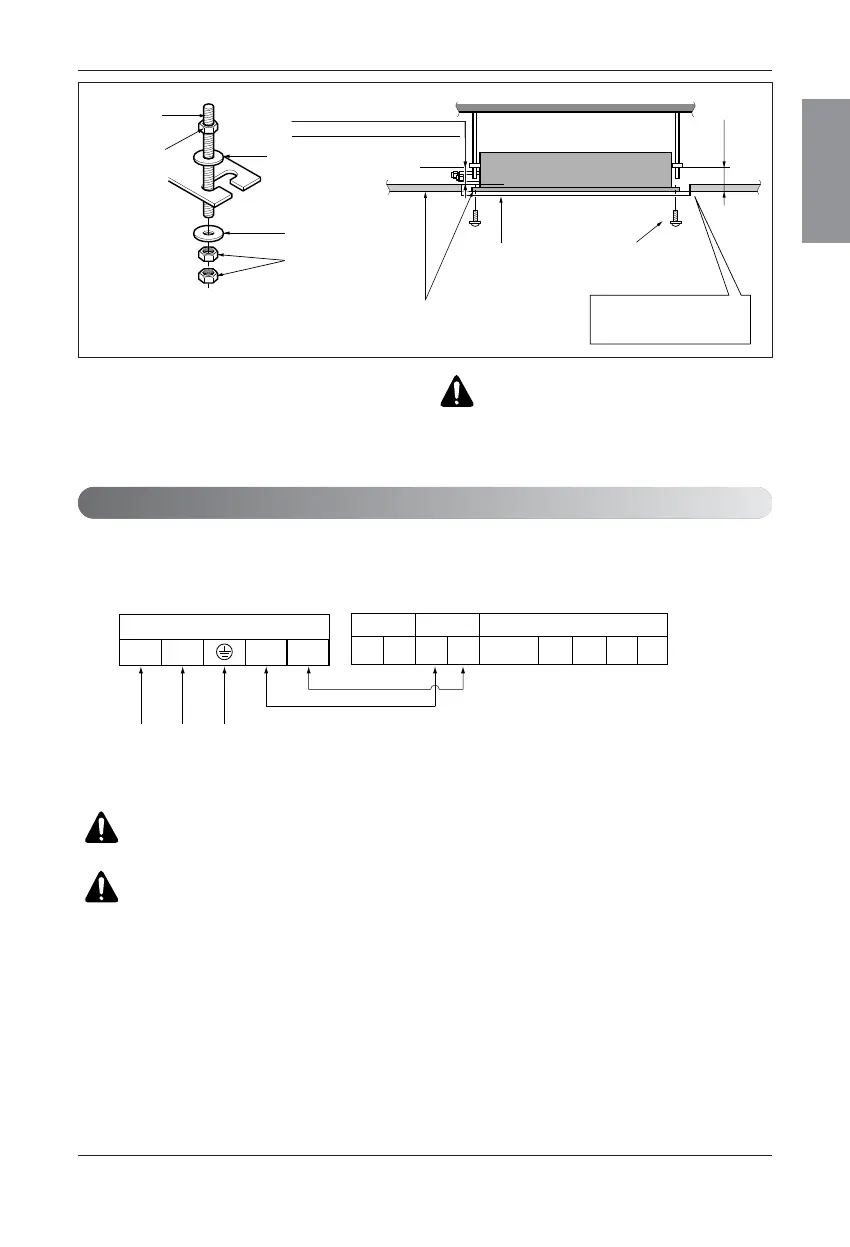
Set screw of
paper pattern (4 pieces)
Paper pattern
for installation
False ceiling board
90mm
Adjust the same height
False
ceiling board
Ceiling
Flat washer for M10
(accessory)
Keep the length of the bolt
from the bracket to 40mm
Open the ceiling board
along the outer edge of the
paper pattern
Flat washer for M10
(accessory)
Hanging bolt
(W3/8 or M10)
Nut
(W3/8 or M10)
Nut
(W3/8 or M10)
Air Conditioner body
• The following parts are local purchasing.
Hanging Bolt - W 3/8 or M10
Nut - W 3/8 or M10
Spring Washer - M10
Plate Washer - M10
Connect the wires to the terminals on the control board individually according to the outdoor unit connection.
• Ensure that the color of the wires of outdoor unit and the terminal No. are the same as those of indoor unit respectively.
Wiring Connection
WARNING : Make sure that the screws of the terminal are free from looseness.
CAUTION : The Power cord connected to the unit should be selected according
to the following specifications.
CAUTION : Tighten the nut and bolt
to prevent the unit from falling.


Related product manuals