EasyManua.ls Logo

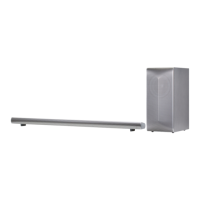
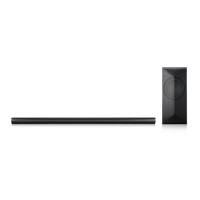
LG MUSICFLOW LAS751M - User Manual

LG MUSICFLOW LAS751M
71 pages
Print Icon
To Next Page IconTo Next Page
Loading...
Model : MUSICFLOW LAS751M
SMART Hi-Fi AUDIO
Wireless Multi-room Sound Bar
Please read this manual carefully before
operating your speaker and retain it for future
reference.
ENGLISH | OWNER’S MANUAL

Table of Contents

Other manuals for LG MUSICFLOW LAS751M

Questions and Answers

  • M
    Michael RiddleAug 19, 2025
    Why is there no sound coming from my LG Speakers?
    • C
      Charles DoyleSep 12, 2025
      If no sound is coming from your LG Speakers, there might be a few reasons: * The volume could be set to the minimum. Try adjusting the volume. * If connected to an external device, the volume level of that device might be too low. Adjust the volume level of the external device. * The mute function might be activated. Deactivate it by pressing the mute button or adjusting the volume. * The wrong input source might be selected. Check the input source and select the correct one.
  • A
    adam27Aug 21, 2025
    Why won't my LG Speakers power on?
    • W
      William HensleyAug 21, 2025
      If your LG Speakers won't power on, make sure the power cord is securely plugged into the outlet.
  • H
    Heather PhillipsAug 23, 2025
    How to fix LG Speakers when the unit does not work properly?
    • S
      Shawn WileyAug 23, 2025
      If your LG Speakers unit isn't working correctly, try these steps: * Turn off the power of both the unit and any connected external devices (TV, woofer, DVD player, amplifier, etc.), then turn them back on. * Disconnect the power cord of the unit and connected external devices, and then reconnect them.
  • N
    nathangillAug 26, 2025
    What to do if my LG Speakers function does not work when the button is pressed?
    • G
      gguzmanAug 26, 2025
      If a function on your LG Speakers doesn't work when the button is pressed, it could be due to static electricity. Disconnect the power plug and then reconnect it.
  • B
    Bruce SmithAug 28, 2025
    Why can't I connect my LG Speakers to my home network?
    • A
      Amy PattonAug 28, 2025
      If you're unable to connect your LG Speakers to your home network, it might be due to wireless interference. Move the speaker away from household devices that use radio frequencies.
  • J
    Jessica KleinAug 30, 2025
    What to do if Music Flow Player doesn’t work properly with my LG Speakers?
    • C
      Carl GeorgeAug 30, 2025
      If the Music Flow Player isn't working correctly with your LG Speakers, try the following: * Ensure the Music Flow Player is plugged in. * Check that the LAN cable is properly connected to both the wireless router and the Music Flow Player. * If the Music Flow Player’s LED doesn't indicate proper operation, try moving the speaker closer to the wireless router or the Music Flow Player. * Turn the speaker’s power off and on again. * Perform a factory reset and set up the network connection for the speaker.
  • C
    Cody SmithSep 2, 2025
    What to do if my LG Speakers remote control is not working?
    • G
      Gregory JenningsSep 2, 2025
      If the remote control for your LG Speakers isn't working, consider these potential causes: * The remote might be too far from the unit. Try operating it within 7 meters. * There might be an obstacle blocking the signal. Remove any obstacles between the remote and the unit. * The batteries might be exhausted. Replace them with new ones.
  • S
    Sara BakerSep 4, 2025
    Why is there no woofer sound from my LG Speakers?
    • A
      Alexander JohnsonSep 4, 2025
      If you're not getting any sound from the woofer of your LG Speakers, check the following: * Ensure the subwoofer is properly plugged into the wall outlet. * Verify the pairing between the main unit and the subwoofer. If disconnected, reconnect them.
  • Z
    zduncanSep 6, 2025
    What to do if LG Sound Sync is not working with my LG Speakers?
    • J
      Janice RobertsonSep 6, 2025
      If LG Sound Sync isn't working with your LG Speakers, please check the following: * Confirm that your LG TV supports LG Sound Sync. * Check the connection of LG Sound Sync. * Review the sound settings on both your TV and the speaker unit.
  • C
    Caitlin WolfSep 8, 2025
    What to do if the AUTO POWER function is not working on my LG Speakers?
    • S
      Sandra GillespieSep 9, 2025
      If the AUTO POWER function isn't working on your LG Speakers, try these steps: * Check the connection of the external device, such as a TV, DVD/Blu-Ray player, or Bluetooth device. * Check the status of SIMPLINK and try turning it off. * Be aware that depending on the connected device, this function may not operate.

Summary

Getting Started

Safety Information and Precautions

Covers general safety warnings, power cord, adapter, FCC compliance, and RF exposure.

Product Features and Installation

Details main features, accessories, panel layouts, remote control, and installation methods.

Connecting

Audio and Subwoofer Connections

Guides for connecting power, subwoofer, TV via optical/HDMI, and portable devices.

Network Setup and App Integration

Connecting to home network (wired/wireless), installing app, and adding speakers.

Operating

Using the Music Flow Player App

Navigating the app, playing music, managing playlists, and customizing playback.

Advanced Features and Settings

Covers LG HomeChat, Bluetooth, speaker settings, and other operational features.

Troubleshooting

General Troubleshooting and Solutions

Addresses issues with unit operation, sound, remote control, and feature malfunctions.

Network and Software Issues

Solutions for network connectivity problems, playback errors, and app issues.

Appendix

Technical Specifications and Requirements

Details file formats, specifications, system requirements, and trademarks.

Handling, Terms, and Licenses

Guides for speaker handling, network service info, terms of use, and licenses.

LG MUSICFLOW LAS751M Specifications

General IconGeneral
Speaker TypeSoundbar
Channels4.1
Wireless SubwooferYes
Wi-FiYes
BluetoothYes
EthernetYes
HDMI Input1
HDMI Output1
Optical Input1
Multi-room CapabilityYes

Related product manuals