Operating 43
Operating
3
[General] Menu
Sets for easier use of the speaker.
Lock Screen Setting (Android only)
This function allows you to display the Music Flow
Player on the lock screen. (Lock screen setting is
[ON] by default.)
[Lock Screen Setting] may dier from Music
Flow Player app depending on the Android’s
version.
,
Note
User Guide
This function allows you to display or delete the
guide on the menu.
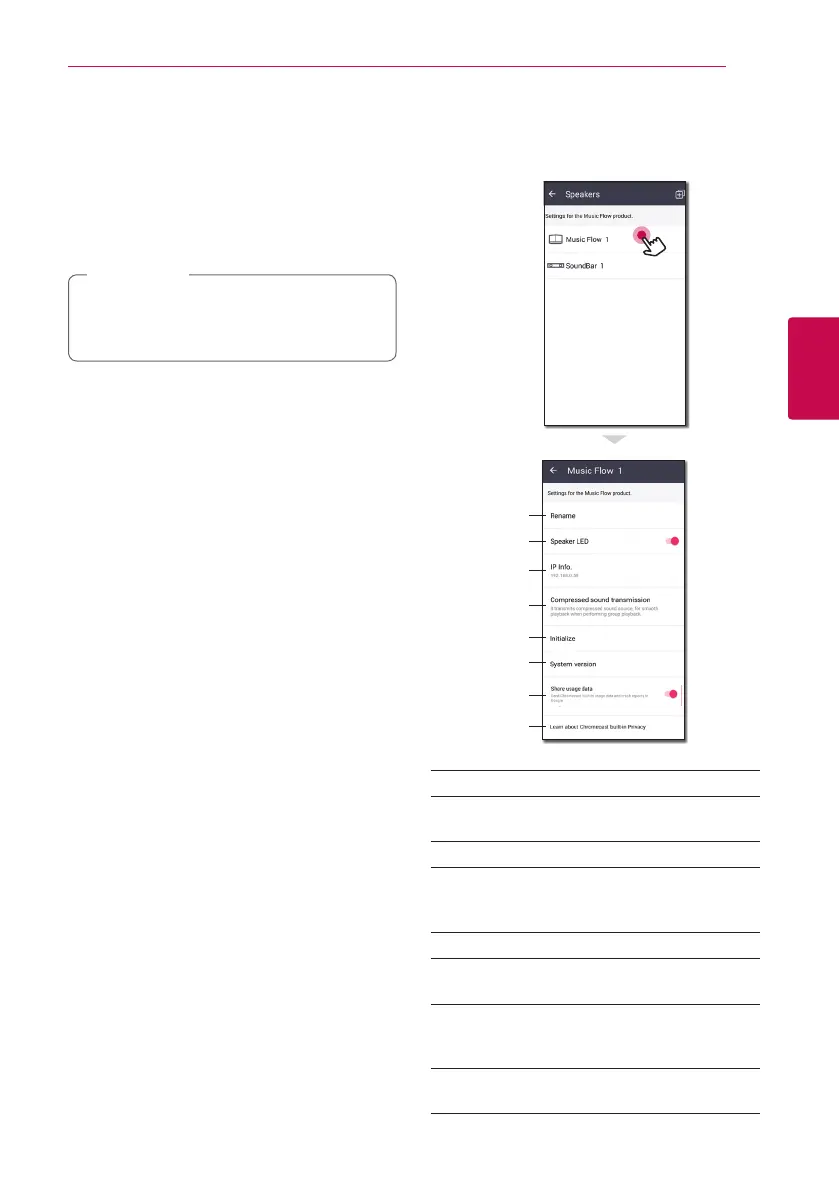
[Speakers] Menu
You can adjust speakers connected to your
network.
a
b
c
d
e
f
g
h
a
Rename – Renames the speaker.
b
Speaker LED – Turns on or o speaker’s LED
indicator.
c
IP Info. – Shows the IP address of the speaker.
d
Compressed sound transmission
– Adjusts
the compression of audio source according to
network status.
e
Initialize – Resets the speaker.
f
System version – Displays the current system
version.
g
Share usage data – Select whether to send
Chromecast usage data and crash reports to
Google.
h
Learn about Chromecast built-in Privacy –
Shows Privacy policy of Chromecast.


 To Next Page
 Loading...