3-14
ONE POINT REPAIR GUIDE
6. NO SOUND
There is no sound output by DIGITAL AUDIO AMP DAMAGE, repair the set according to the
following guide.
6-1. DIGITAL AUDIO AMP DAMAGE
6-1-1. Solution
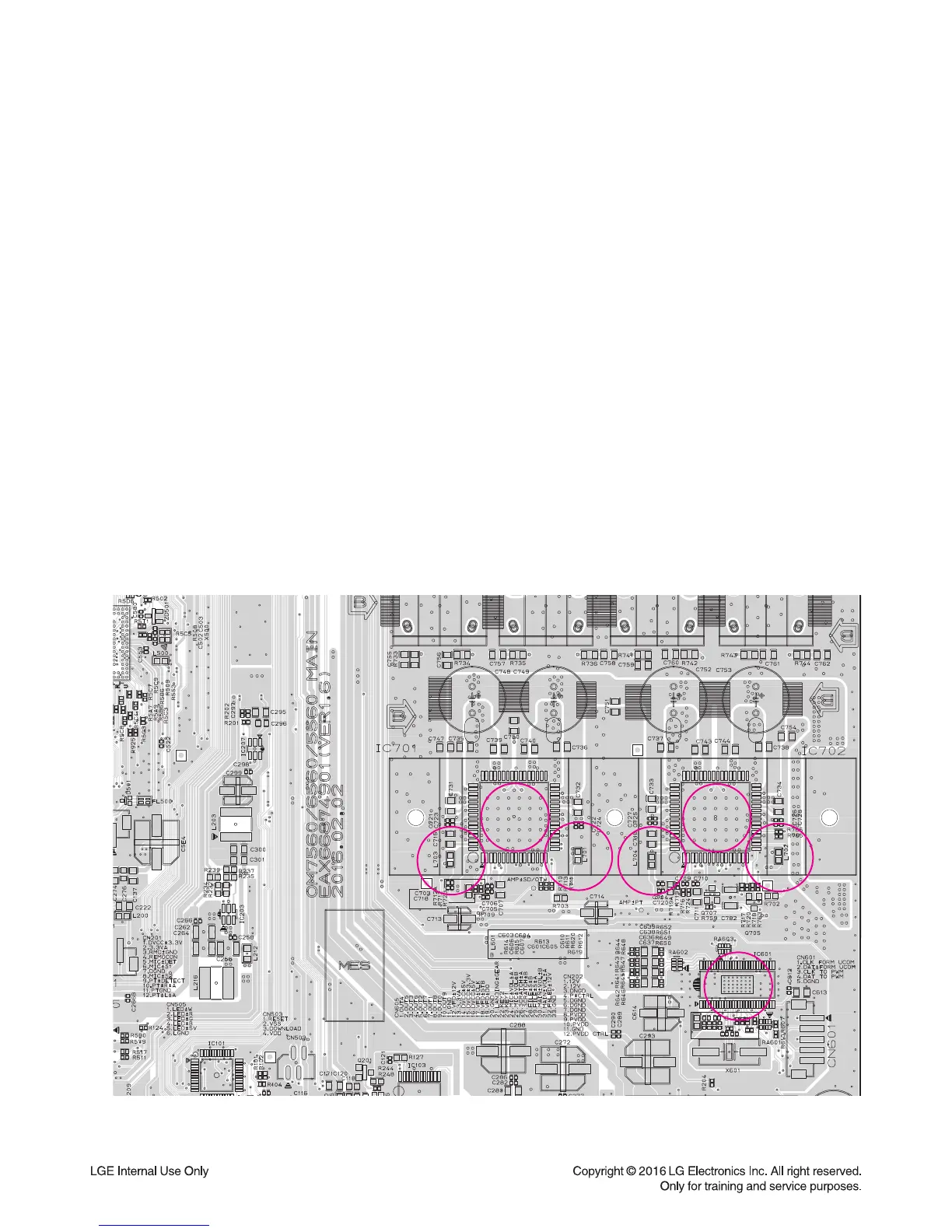
Replace IC701, IC702 on MAIN board.
6-1-2. How to troubleshoot (Countermeasure)
1) Check PWM_FL±, PWM_FR± & PWM_SW± signals from IC601 to IC701 & 702 each input function.
If no signal, check if I2S audio signals are entered to IC601.
2) Check PVDD.
If PVDD is abnormal, check the SMPS.
3) Check AMP_12V for driving the gate of AMP IC.
a. All the powers are normal, but if AMP_12V is low, there is possible for AMP IC to be damaged.
b. Remove L701, L702, L703 and L704 one by one.
When removed a inductance, if AMP_12V is recovered, the IC connected to it was damaged.
c. Replace the IC with a new one.
4) Check the impedance between IC701/IC702_OUT_A/OUT_B & GND.
a. If the impedance is 0 Ω, the IC must be damaged.
b. After removing the heat sink, replace it with a new one.
6-1-3. Service hint (Any picture/ Remark)
< MAIN board top view >


 To Next Page