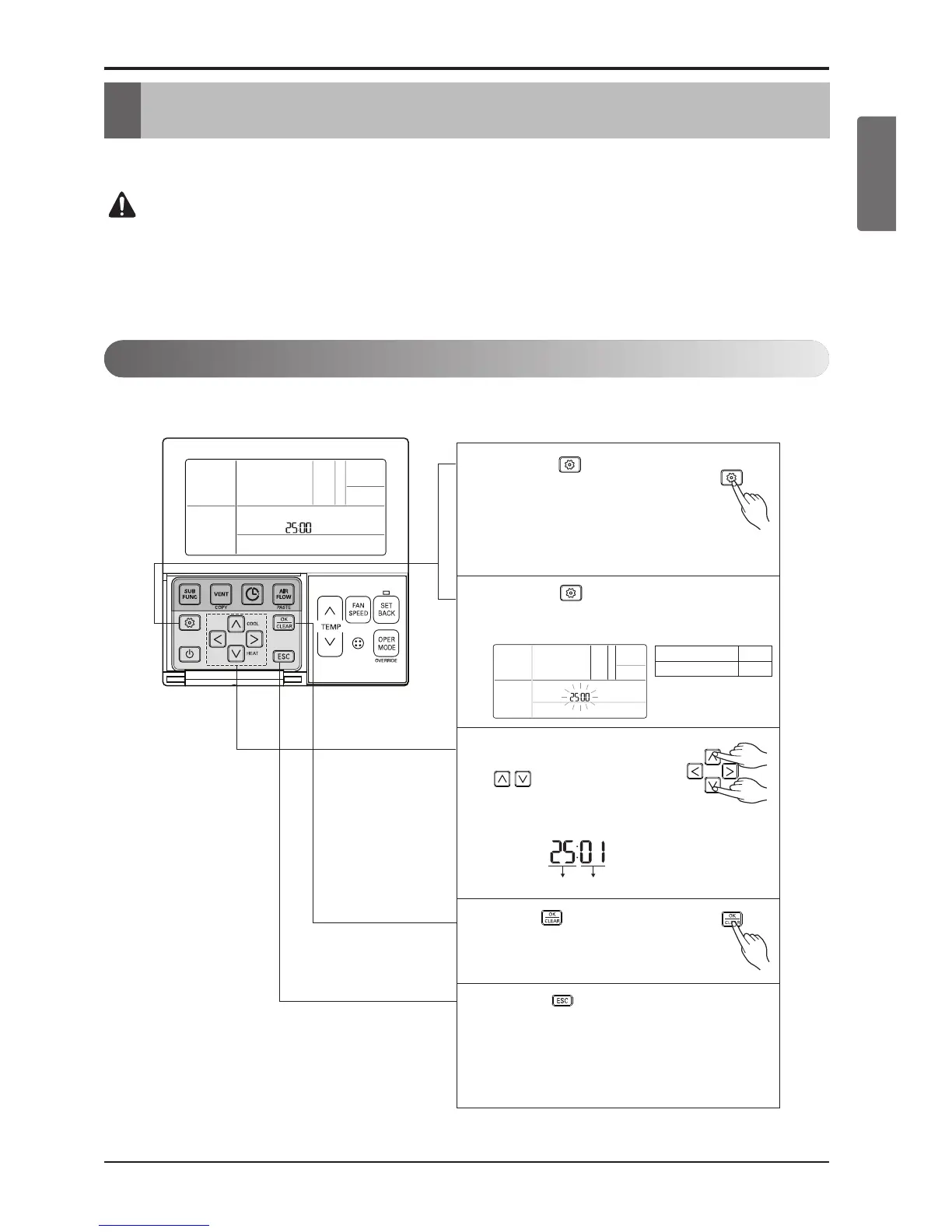
Function Code Existing condition
Select existing condition
of each code by pressing
button.
(00: not installed,
01 : installed)
3
Press button to save.
4
If pressing button long for 3
seconds, it enters into Thermostat
installer setup mode.
- If pressing once shortly, it enters into
user setup mode. Please press
more than 3 seconds for sure.
1
If pressing button repeatedly, it moves to
the selected option function code as picture
below.
2
Pressing button will exit settings mode.
❈ After setup, it automatically gets out of
setup mode if there is no button input for
25 seconds.
❈ When exiting without pressing set button,
the manipulated value is not reflected.
5
Function
Auxiliary heater
Code
25
5. Installer Setting
Wired Remote Controller(Accessory)
Setting feature for indoor unit when Auxiliary Heater Relay Kit is newly installed, or installed unit is removed.
Installer setting mode is to set the detailed function of the remote controller.
If it is not properly set then it may leads to problem to the product , user injury as well
as property damage. Therefore these setting must be done by a certified installer.
Any installation or change carried out by a non certified person, he should be responsi-
ble for the results and it will void free service also.



 To Next Page