35
ENGLISH
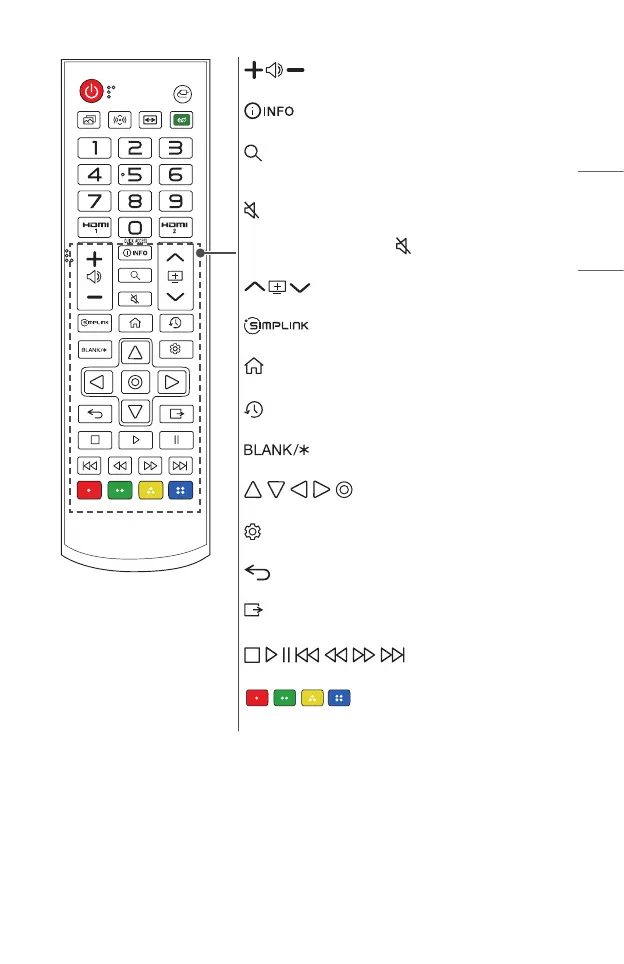
Adjusts the volume level.
Shows information on the current screen.
(SEARCH)
Search allows you to nd and use a variety of content and
information.
(MUTE)
Mutes all sounds.
— Pressing and holding the (MUTE) button displays
the [Accessibility] menu.
Moves to the previous/next page.
Allows you to use the SIMPLINK function.
Accesses the Home menu.
(RECENT)
Displays the list used previously.
Displays a blank screen.
, , , , (OK)
Selects menus or options and conrms your input.
(Q.Settings)
Accesses the Quick Settings.
(Back)
Returns to the previous screen.
(EXIT)
Exits the menu.
, , , , , , (Controlbuttons)
Controls media contents.
These access special functions in some menus.



 To Next Page