17
HOOKUP AND
SETTINGS
Accessory
Accessory
Audio/V
Audio/V
ideo (A/V)
ideo (A/V)
Connections to
Connections to
Recorder
Recorder
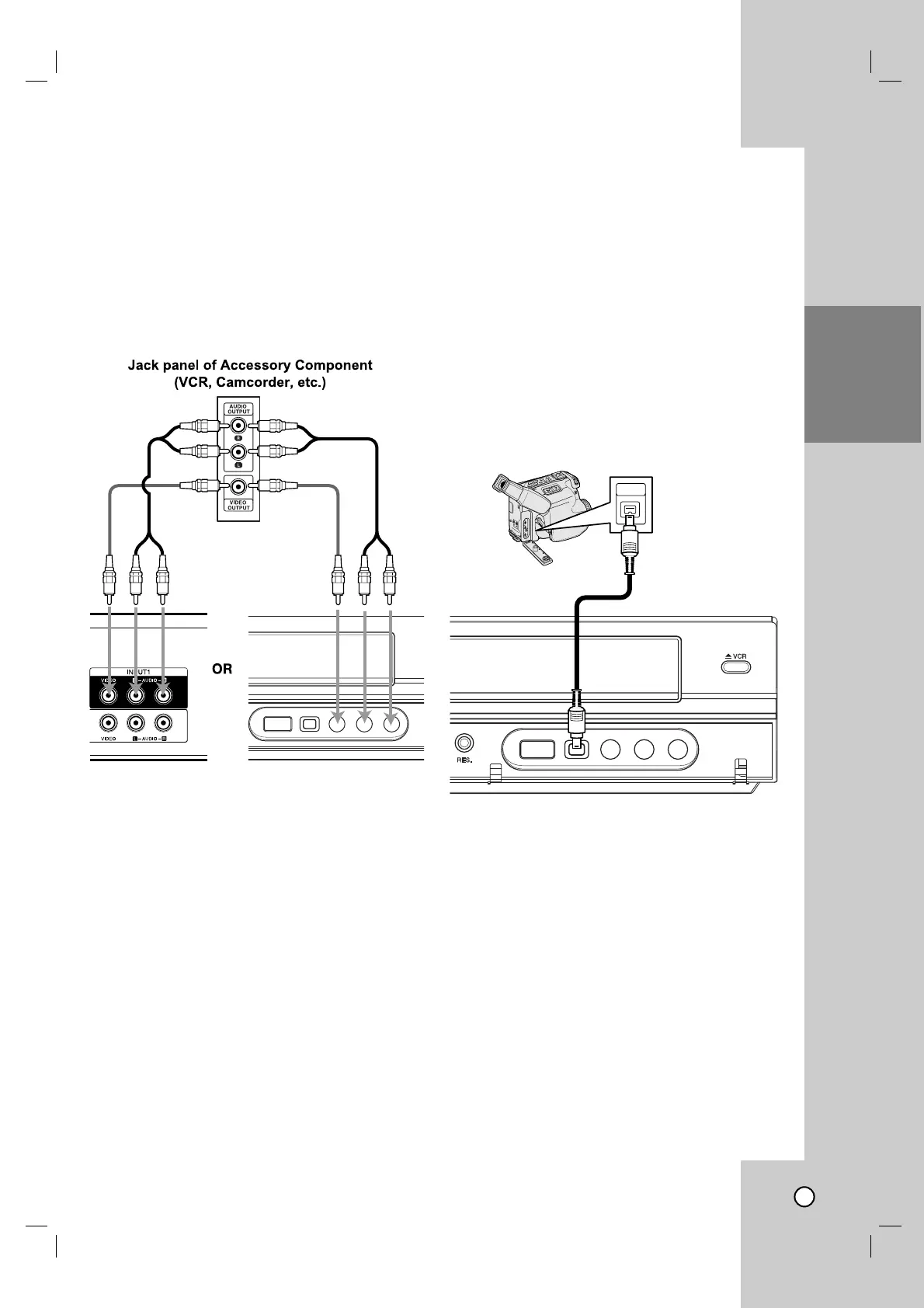
Connect the INPUT 1 or AV IN 2 jacks on the
Recorder to the audio/video out jacks on your acces-
sory component, using the optional audio/video
cables. (Refer to page 43 for [Recording from
External Components].)
Connecting a Digital
Connecting a Digital
Camcorder
Camcorder
Use a DV cable (not supplied) to connect the DV
in/out jack of your DV Digital Camcorder to the front
panel DV IN jack of this Recorder.
Notes:
This jack is for connection to DV equipment only. It
is not compatible with digital satellite tuners or D-
VHS video decks.
Disconnecting the DV cable while recording a con-
tents of the connected digital camcorder may result
in malfunction.



 To Next Page
 Loading...