22
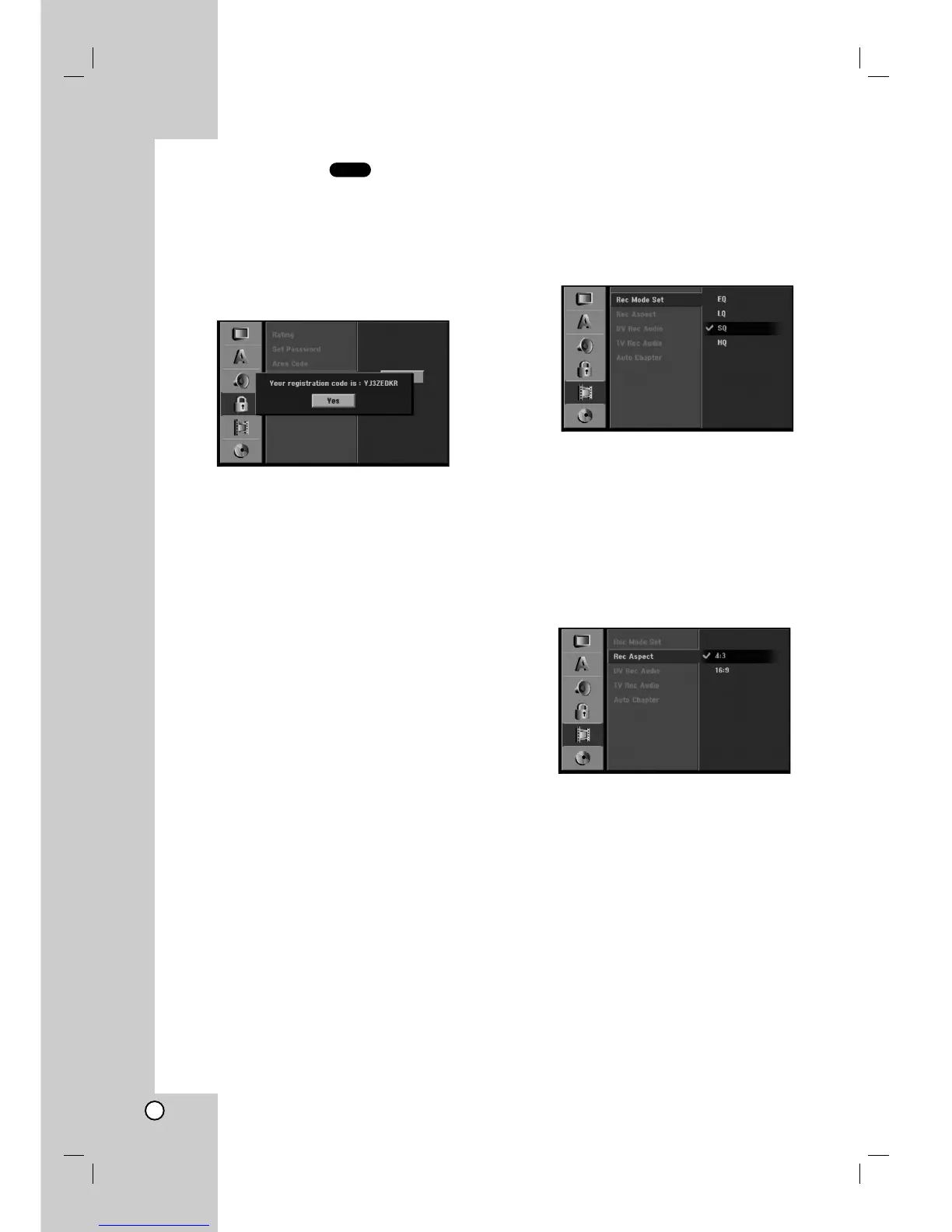
DivX Registration Code
We provide you the DivX® VOD (Video On Demand)
registration code that allows you to rent and purchase
videos using the DivX® VOD service. For more
information, visit www.divx.com/vod.
1. Select [DivX Reg. Code] option then press B.
2. Press ENTER while [View] is selected and the
registration code will appear.
3. Use the registration code to purchase or rent the
videos from Divx® VOD service at
www.divx.com/vod. Follow the instructions and
download the video onto a disc for playback on
this unit.
Note:
All the downloaded videos from DivX® VOD can only
be played back on this unit.
Recording Settings
Record Mode Set
You can set the picture quality for recording;
HQ (High Quality), SQ (Standard Quality),
LQ (Low Quality), EQ (Extend Quality).
1. Select [Rec Mode Set] option then press B.
2. Use v / V to select a desired Record Mode (HQ,
SQ, LQ or EQ).
3. Press ENTER to confirm your selection, then
press SETUP to exit the menu.
Record Aspect
When DVD recording, you can set the recording
aspect ratio to suit the material you’re recording (16:9
or 4:3).
DivX


 To Next Page