32
Playing an Audio CD or MP3/WMA
file
The recorder can play audio CDs and MP3/WMA files
on HDD, CD-ROM, CD-R/RW or DVD±R/RW discs.
Before playing MP3/WMA files, read “About
MP3/WMA audio files” on page 33.
1. Press HOME.
The HOME menu appears.
2. Select a media that contains MP3/WMA or audio
title then press ENTER.
3. Select [MUSIC] option then press ENTER.
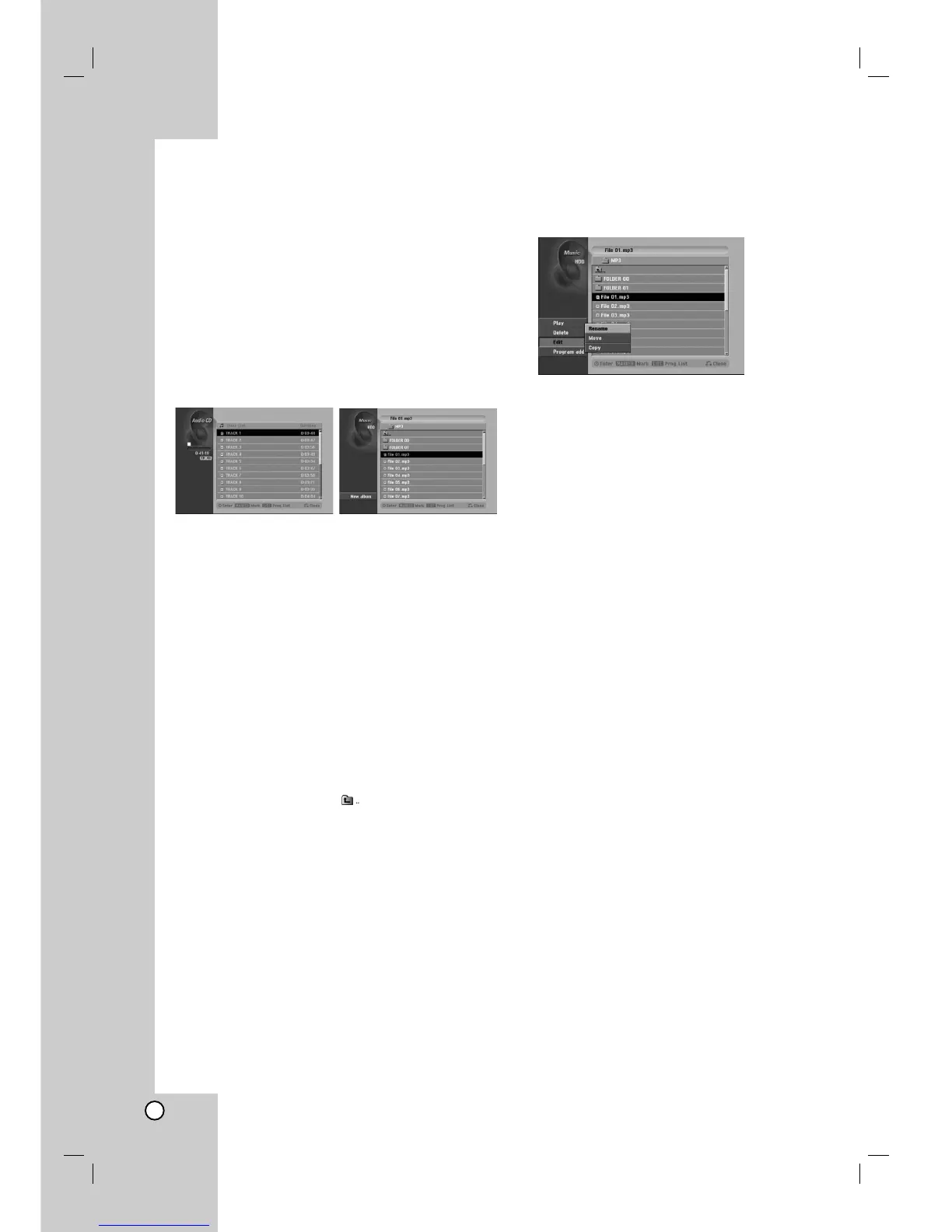
The Audio CD or Music menu appears on the TV
screen.
Audio CD Menu Music Menu
4. Use v/V to select a track then press N (PLAY).
Playback starts.
During playback, the current track’s elapsed
playing time will appear on the front panel display
and menu. Playback will stop at the end of the
disc.
Tips:
Press DISPLAY to view ID3-Tag information for
the MP3 file. If ID3-Tag information is not
present, “Not Checked” will appear. If you select
a folder, the number of subfolders and number
of MP3/WMA files in the folder are displayed.
Press DISPLAY again to remove the
information screen.
If you want to move to the upper directory, use
the v / V to highlight and press ENTER.
You can also display HOME menu to select
another media by pressing RETURN (O).
5. To stop playback at any time, press STOP.
Tip:
You can create new folder. Select [New Album] option
on the Music-HDD menu then press ENTER.
“NONAME##” folder is created.
Audio CD and Music menu options
1. Press v / V to select a folder/file on the Audio CD
or Music menu then press ENTER.
The menu options appear.
2. Press v / V / b / B to select an option, and press
ENTER.
[Play] Start playback the selected title.
[Open] Opens the folder and a list of files in the
folder appears
[Delete] Deletes the file(s) from the media.
[Rename] Edits the file name. (page 37)
[Move] Moves the file(s) to another folder or
media. (page 38)
[Copy] Copies the file(s) to another folder or
media. (page 38)
[Program Add] Adds the track(s) to Program List.
(page 34)
Pause
1. Press PAUSE/STEP (X) during playback.
2. To return to playback, press N (PLAY) or press
PAUSE/STEP (X) again.
Moving to Another Track
Press SKIP . or > briefly during
playback to go to the next track or to return to the
beginning of the current track.
Press SKIP . twice briefly to step back to the
previous track.
On an Audio CD, to go directly to any track, enter
the track number using the numbered buttons (0-9)
during playback.


 To Next Page