11
Installation
Installation
PLC (Power Line Communication) Modem
The PLC (Power Line Communication) Modem is
necessary in order to use the Remote Laundry Monitor.
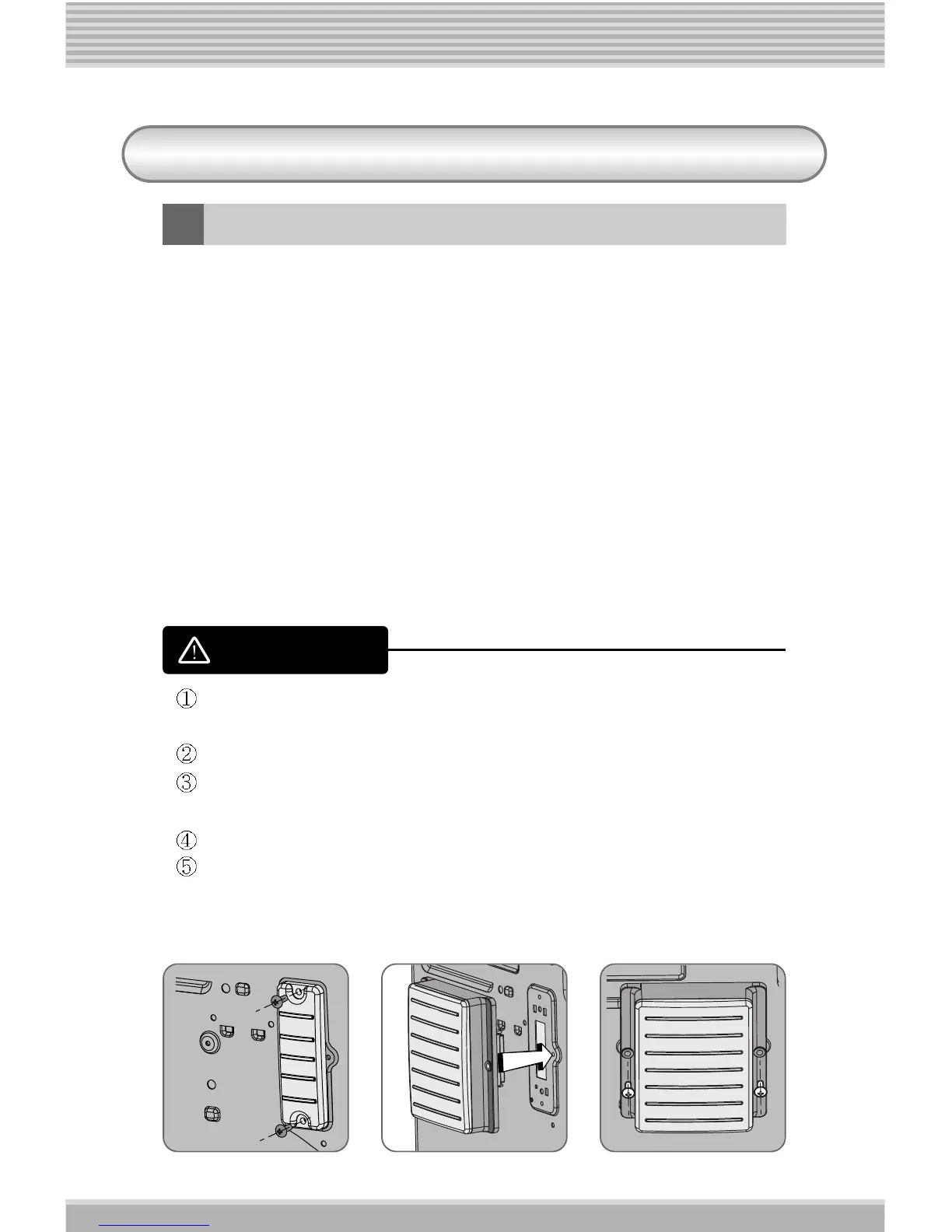
1. Remove the 2 Screws of the Safety Cover on the rear of the
Washing Machine or Dryer. (ref. Picture 1)
2. Place the PLC Modem into position on the appliance.
(ref. Picture 2)
3. Secure the modem with the 2 screws removed from the
safety cover (Refer to Picture 3).
4. Locate the Washing Machine or Dryer where you want.
[Picture 1] [Picture 2] [Picture 3]
Make sure that the appliance is unplugged from the power outlet
before removing the safety cover and installing the modem.
Do not use excessive force when installing the PLC Modem.
Make sure the rubber gasket is in place when the modem is
installed.
Tighten the two screws.
Failure to follow these instructions can damage your modem and
can be dangerous for the user.
WARNING










 To Next Page