12
RLM (Remote Laundry Monitor)
1. Unpack the Monitor parts.
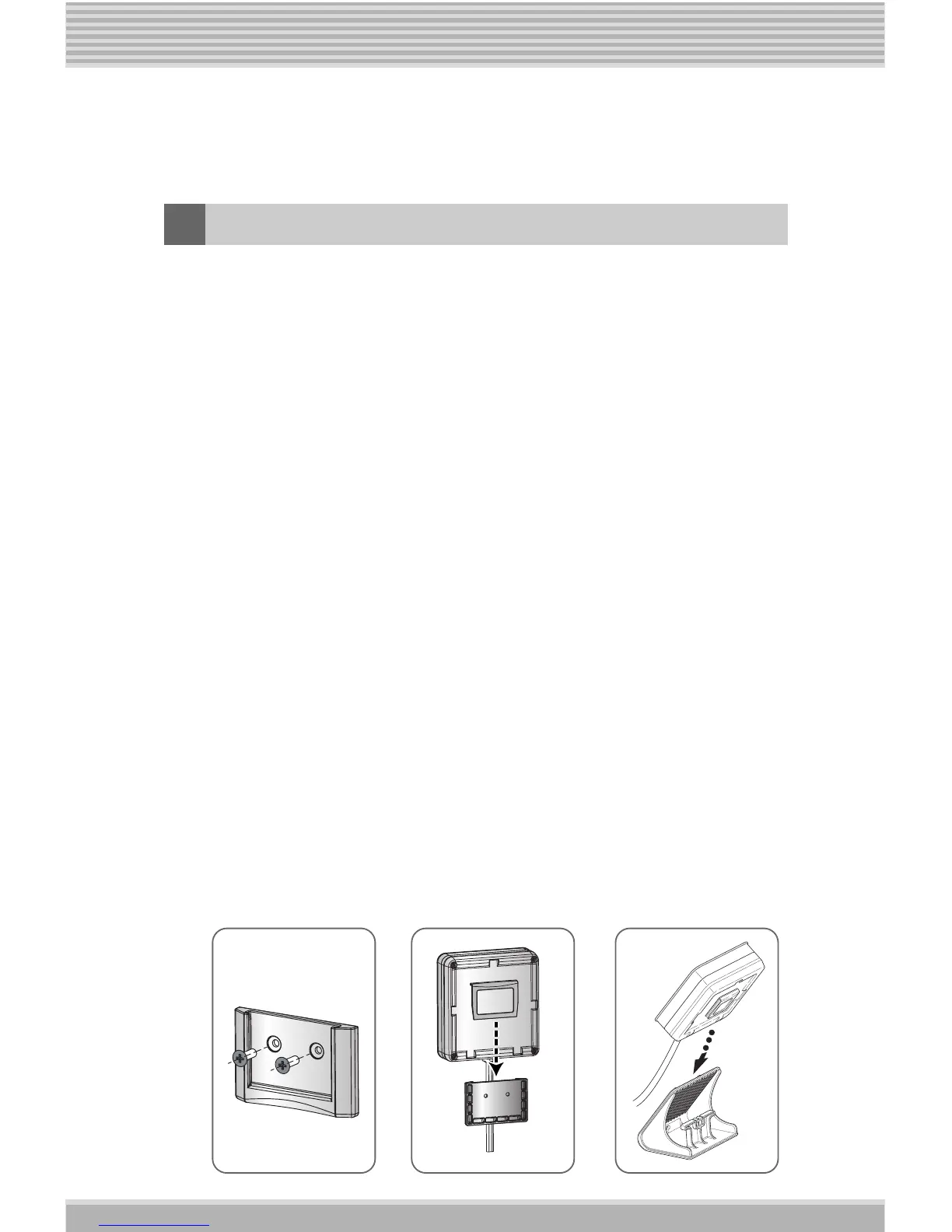
2. (Wall mount) When installing the monitor attach the wall
Hanger Holder with the supplied Screws (2EA) in the place
you have chosen for the monitor. The Hanger Holder must
be mounted securely (See Picture 1.)
3. Insert the monitor's hanger into the wall Hanger Holder
(Picture 2) or the Monitor Stand (Picture 3).
4. Plug the monitor's power cord into an available outlet.
5. Turn on the Washing machine or Dryer with the assembled
PLC modem.
6. Press the Monitor Button and hold it for 3 seconds.
(This is necessary the first time for setting the Home Code.
For more information see Setting the Home Code on the
next page.)
7. You can monitor the operating condition of the Washing
Machine or Dryer.
NOTE: The RLM may take a minute or more to turn on after
installation.
(Reference) Do not let the cord hang loosely or drape in the
way where it can cause someone to trip or fall.
[Picture 1] [Picture 2]
[Picture 3]









 To Next Page