Need help?
Do you have a question about the LG RM1 and is the answer not in the manual?
Provides general troubleshooting steps for common issues with the unit.
Guide to pairing the unit with Bluetooth-enabled devices for music playback.
Steps to reset the unit in case of malfunction or freezing.
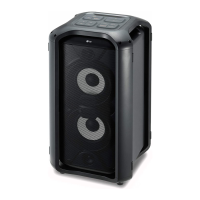
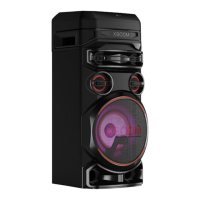
This document is the owner's manual for an LG High Power Speaker System, model RM1. It provides instructions for operating the device, connecting various inputs, and maintaining the unit.
The LG High Power Speaker System is designed to deliver powerful audio, suitable for various listening environments. It features a built-in battery, allowing for portable use, and supports multiple input sources, including USB devices, SD cards, and external portable players via a LINE IN connection. The system also incorporates Bluetooth wireless technology, enabling seamless audio streaming from compatible devices.
The core function of this device is to play high-quality audio from a variety of sources. Users can connect USB flash drives or SD cards to play MP3 files, with support for up to 999 files and 99 folders. The unit recognizes FAT(16/32) and ExFAT file systems for USB/SD storage. For optimal performance, it is recommended to back up all data on storage devices before use. The device also includes a LINE IN input, allowing connection of portable players like MP3 players or PMPs using a 3.5 mm stereo cable. When a portable device is connected to the LINE IN, the unit automatically switches to the LINE function.
A key feature is its Bluetooth wireless technology, which allows users to stream music from Bluetooth-enabled devices such as smartphones, MP3 players, and notebooks. The unit supports Bluetooth version 4.2 and the A2DP (Advanced Audio Distribution Profile) codec. Pairing the speaker with a Bluetooth device is a straightforward process, and once paired, the connection is generally maintained unless the unit is turned off, the Bluetooth device moves too far away, or a new Bluetooth device is connected. The display window indicates the Bluetooth status, showing "bt" and a blinking Bluetooth icon during pairing, and "COnnECtEd" with a steady Bluetooth icon upon successful connection.
For enhanced audio control, the speaker system offers adjustable Bass and Treble levels, which can be set by the user. It also includes microphone inputs (MIC 1/2) with adjustable ECHO volume, making it suitable for karaoke or public speaking applications. The microphone volume can be adjusted using the dedicated MIC VOLUME control.
The unit has a built-in battery, providing portability. It charges when connected to AC power, with a recommended charging time of approximately 4 hours for a full charge. The operating time on battery is also around 4 hours, though this can vary based on battery status and operational conditions. If the battery level is very low, the unit may not turn on or may frequently display "LbAt" (Low Battery) before shutting off.
The speaker system can be mounted on an optional tripod for elevated sound projection. Instructions are provided for safely setting up the tripod, emphasizing the importance of extending the legs fully, tightening screws securely, and inserting a safety pin. It is crucial to ensure the tripod is stable before mounting the speaker to prevent shaking or accidental falls. When using a tripod, it is advised to limit people around the unit to avoid accidents and to remove all connected cables before moving or adjusting the tripod's height.
The speaker system is designed for ease of use with clearly labeled controls on the rear panel. The display window shows the current function and status. Users can switch between input sources (USB, SD, LINE IN, Bluetooth) using the function button. Playback controls include play/pause, skip to next/previous file, and repeat modes (ONE or ALL). For USB/SD playback, files are recognized in a specific folder order, and file names with only numbers are supported.
When using the microphone, it's important to set the MIC VOLUME to minimum or turn off the MIC before connecting or removing the microphone to avoid loud noises. If a howling sound occurs, the microphone should be moved away from the speaker or the sound level decreased. The MASTER VOLUME controls the overall speaker volume.
The unit also features a reset function. In case the unit freezes due to malfunction, pressing and holding the power button for a few seconds will reset it. If the AC power cord is connected, the unit will turn power on after a reset; otherwise, it will remain off.
Proper maintenance ensures the longevity and optimal performance of the speaker system. When shipping the unit, it is recommended to use the original shipping carton and packing materials for maximum protection.
For cleaning the exterior surfaces, a soft, dry cloth should be used. If the surfaces are particularly dirty, a soft cloth lightly moistened with a mild detergent solution can be used. It is crucial to avoid volatile liquids such as insecticide spray, alcohol, benzine, or thinner, as these can damage the surface. Strong pressure when wiping should also be avoided. Additionally, rubber or plastic products should not be left in contact with the unit for extended periods, as this could cause damage.
Regular backup of data on USB devices and SD cards is recommended to prevent data loss. Users are advised not to extract USB devices or SD cards during operation to avoid potential data corruption. If the USB device and SD card are connected simultaneously, the unit can be used by changing the function. The resume point for playback may be cleared if the unit is turned off, the USB/SD device is removed, the power cord is pulled out, or the function is changed.
 General
| Woofer | Yes |
|---|---|
| Speaker type | 1-way |
| Woofer diameter | 20.32 mm |
| Number of drivers | - |
| Speaker placement | Floor, Stand-mountable |
| Audio output channels | 1.0 channels |
| Number of woofer drivers | 1 |
| Woofer diameter (imperial) | 8 \ |
| Impedance | 4 Ω |
| Sensitivity | 101 dB |
| RMS rated power | - W |
| Product color | Black |
| Volume control | Rotary |
| Recommended usage | DJ |
| USB connector type | USB Type-A |
| USB 2.0 ports quantity | USB 2.0 ports have a data transmission speed of 480 Mbps, and are backwards compatible with USB 1.1 ports. You can connect all kinds of peripheral devices to them. |
| Connectivity technology | Wired & Wireless |
| AC input voltage | 110 - 240 V |
| Power source type | AC |
| Power consumption (standby) | 0.5 W |
| Power consumption (typical) | 15 W |
| Package type | Box |
| Package depth | 302 mm |
| Package width | 327 mm |
| Package height | 440 mm |
| Package weight | 5500 g |
| Quantity per pack | 4 pc(s) |
 Weight and Dimensions
| Depth | 250 mm |
|---|---|
| Width | 255 mm |
| Height | 380 mm |
| Weight | 4000 g |


 To Next Page