8
ENGLISH
Playing Music
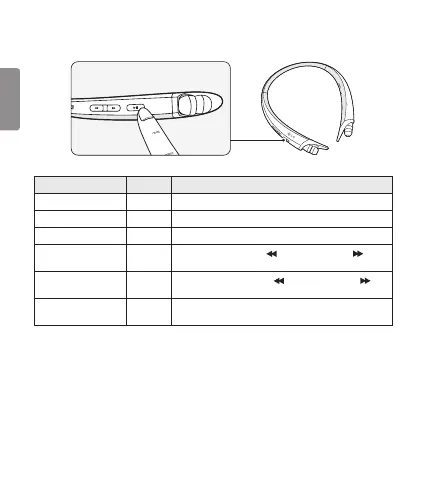
Function Status Description
Play Idle Briey press the Play/Pause/Stop button.
Pause Music on Briey press the Play/Pause/Stop button.
Stop Music on Briey press and hold the Play/Pause/Stop button for 1 second.
Play Previous/Next Song Music on
Briey press the Previous ( ) button or the Next ( )
button.
Rewind/Fast-Forward Music on
Press and hold the Previous ( ) button or the Next ( )
button until you reach the desired part.
Equalizer Music on
Briey press the Play/Pause/Stop button twice to switch
between Bass Boost (Default), Normal, and Treble Boost.
Switching Music Players
To switch to a different music playback device when multiple devices are connected, stop the
currently playing music and then play music from the device of your choice. The HBS-A80’s music
playback and control changes to that device.


 To Next Page