Preparation
15
Before Operation-VCR part
Tuning in TV Stations Manually
In certain areas of the country broadcast signals may
be too weak for your DVD+VCR’s automatic tuning
process to find or assign TV stations correctly.
You must tune in these weaker broadcast stations
manually in order for your DVD+VCR to store them.
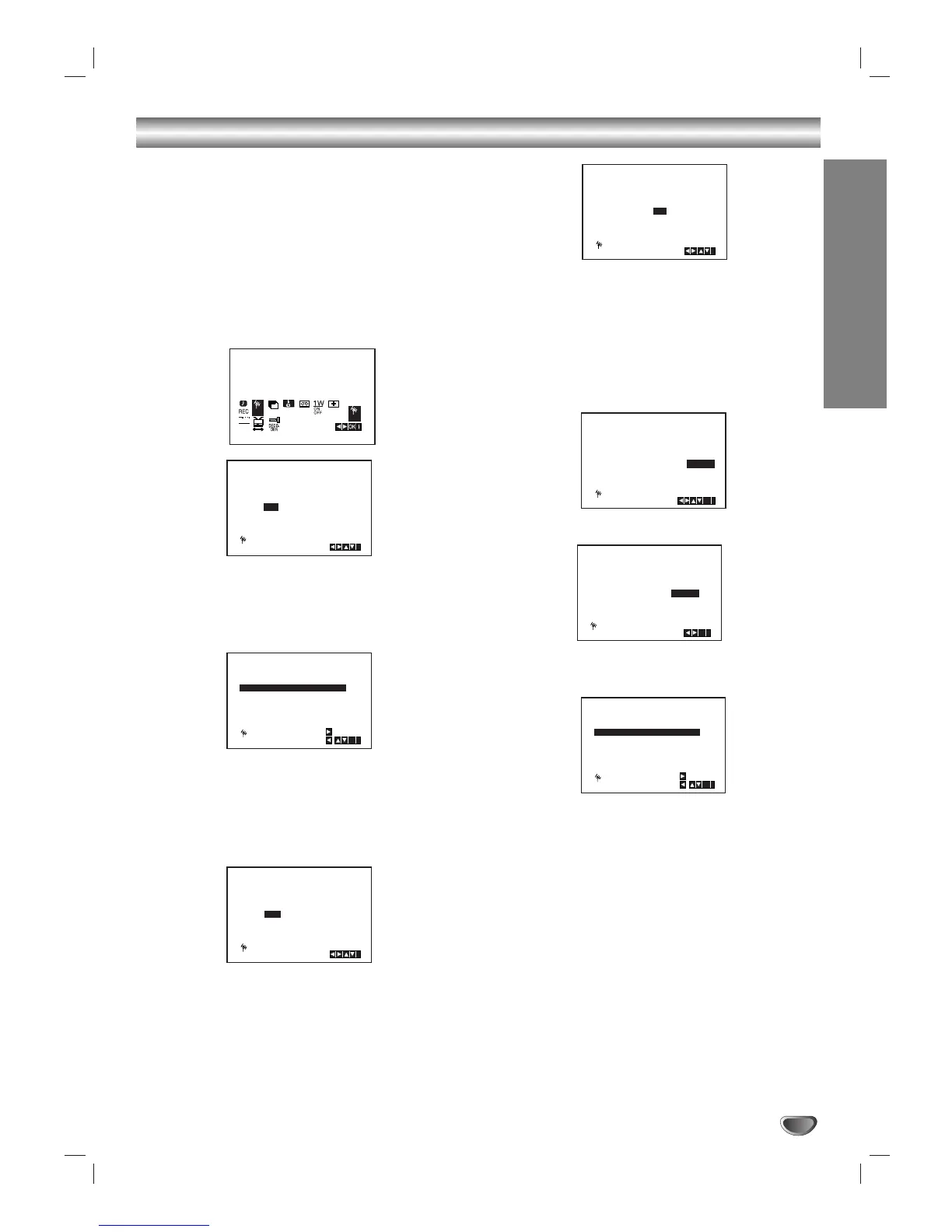
1. Press i.
The main menu will appear on the TV screen.
Press
1 or 2 to select the PR SET.
Press ENTER/OK.
2. Press i.
The station table will appear.
3. Press 3 or 4 to select the programme number that
you want to tune (for example, PR 04).
4. Press ENTER/OK.
Press AV to select C (Standard stations) or S
(Cable stations):
C02 - C69, S01 - S41.
Enter the channel number of station that you want
to
tune, use 3 or 4 to find the required station.
5. Searching will stop when it locates a stations.
Press 2 to select MFT.
Control the fine tuning of the station by using 3 or
4
.
6. Press 2 to select STATION so that you may name
your TV station.
Press ENTER/OK.
7. Use 3 or 4 to select letters and numbers for the
station name.
Use 1 or 2 to move back and forth between
characters.
Press ENTER/OK.
8. Press i, confirm the station placement.
If you wish to manually tune other stations repeat
stages 3 - 8.
9. Press i again.
Your new TV station has now been tuned into your
DVD+VCR.


 To Next Page
 Loading...