21
ENGLISH
Connecting Multiple Monitors
• Images may differ according to the model.
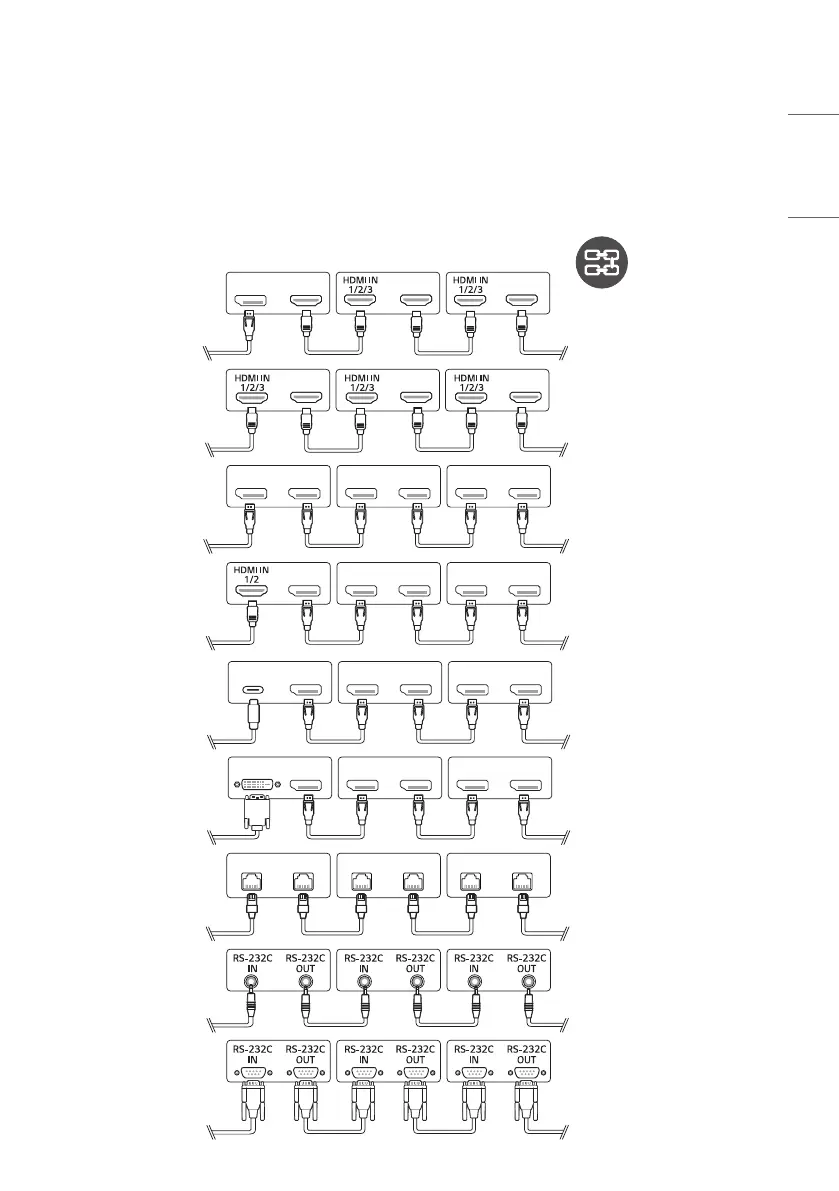
To use multiple products connected to each other, connect one end of the signal input cable to the HDMI/DP Out
connector of first monitor and connect the other end to the HDMI/DP In connector of the second monitor.
DP OUTDP IN DP OUTDP IN DP OUTDP IN
DP OUT DP OUTDP IN DP OUTDP IN
DP OUT
USB Type-C
DP OUTDP IN DP OUTDP IN
DP OUTDP IN DP OUTDP IN
DP OUT
LAN OUT
LAN IN
LAN OUT
LAN IN
LAN OUT
LAN IN
DVI IN
HDMI OUTDP IN HDMI OUT HDMI OUT
HDMI OUT HDMI OUT HDMI OUT


 To Next Page