6
DVD Micro Hi-Fi System ] USER GUIDE
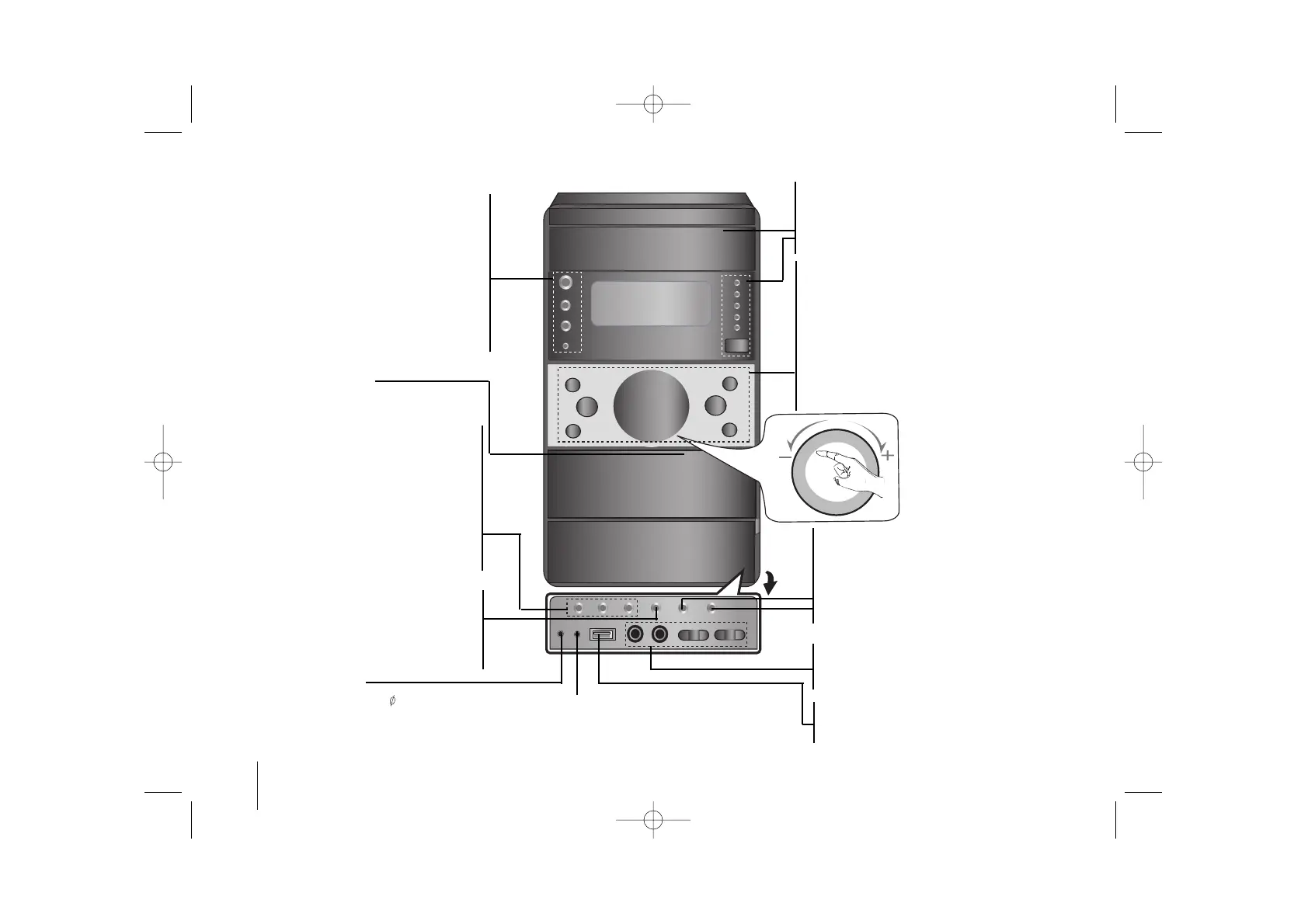
Main unit
POWER 1/]
VSM
(VIRTUAL SOUND MATRIX )
FUNCTION (DVD/CD→USB→AUX→TV-
AUDIO(Optional)→PORTABLE→TAPE→FM
→AM)
STOP/DEMO.
STOP Playback or to clear a program or to
exit. Press STOP/DEMO. in power off state
to demonstrate the function on display win-
dow. To cancel it, press
11
/
]]
or
STOP/DEMO. again.
CD SYNC./ REVERSE MODE
CD SYNC. CD to Tape Synchronized
Recording
REVERSE MODE scroll through a selection
of cassette playing options
Headphone jack
Connect a headphone plug ( 3.5 mm) into the
jack to listen to the sound through head-
phones (not supplied).
5 disc Changeable tray
• TUNNING (-/+) - AUTO TUNING/ REWIND or
FAST FORWARD (
..
or
>>
) -TAPE/ SKIP
(
..
or
>>
) buttons -CD
• PRESET (-/+) - PRESET station - TUNER/
REVERSE PLAY (
bb
) -TAPE(OPTIONAL)
FORWARD PLAY (
BB
) -TAPE
PLAY (
BB
) or X1.5 play- CD(Page 14)
• USB Rec./REC/PAUSE -USB Record (Page20)/
TAPE Record (Page18)
• EQ
(
EQUALIZER Effect)
VOLUME Adjustment
Moves your finger to inside
of touch wheel.
USB connector
Connect a remote USB compatible player
here.
PORTABLE IN For connecting a portable
device and playing it through the system’s
speaker
Disc select buttons
(DISC1,DISC2,DISC3,DISC4,DISC5)
OPEN
PUSH EJECT- TAPE
XDSS -PLUS (
MP3 Optimizer)
Reinforce the treble, bass and surround
effect,XDSS ON will show in the display,press
again for NORMAL (Page 13)
OPEN
DISPLAY MODE
Accesses On - Screen display
MIC1/MIC2 (Optional)
MIC VOL. (Optional)
WOOFER VOL. (XD533 only)
TIMER
CLOCK
SET/RDS-OPTIONAL/ CD PAUSE
SET confirms the time you have selected
when setting the clock.
RDS shows information about radio sta-
tions(see listening to the radio)
CD PAUSE


 To Next Page