EasyManua.ls Logo

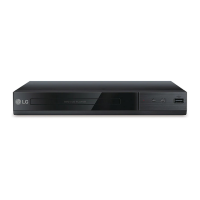
LG DP132H - User Manual

LG DP132H
2 pages
Print Icon
To Next Page IconTo Next Page
Loading...
Data Playback Safety Information
Connecting to your TV Connecting to an Amplifier
Disc Playback
DP132H
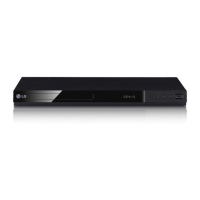
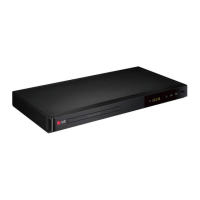
DVD Player
AUDIO / VIDEO OUTPUT
AUDIO OUTPUT (L/R)
PLAY
CHAPTER
LANGUAGE
SUBTITLE
INFORMATION
ENGLISH | SIMPLE MANUAL
To view the instructions of advanced features, visit http://www.lg.com and then download Owner’s Manual.
Some of the content in this manual may differ from your player.
HDMI OUTPUT
T
HDMI OUTPUT
DVD Player
TV
DVD Player
AUX IN
TV
DVD Player
TV
DVD Player
DATA
USB Storage Device
*MFL69497306*
HDMI Cable
Question and Answer IconNeed help?

Do you have a question about the LG DP132H and is the answer not in the manual?

Summary

Connecting to your TV

HDMI OUTPUT

Connect the DVD player to your TV using an HDMI cable for high-quality audio and video.

AUDIO;VIDEO OUTPUT

Connect the DVD player to your TV using AV cables for audio and video signals.

Connecting to an Amplifier

HDMI OUTPUT

Connect the DVD player to an amplifier via HDMI for audio transmission.

AUDIO OUTPUT (L;R)

Connect the DVD player to an amplifier using Left/Right audio cables.

Safety Information

General Safety Precautions

Essential safety guidelines and warnings for operating the DVD player correctly and safely.

Disc Playback

Disc Playback

Instructions and visual guide for playing various disc formats on the DVD player.

Data Playback

Data Playback

Steps to play media files from USB storage devices.

Summary

Connecting to your TV

HDMI OUTPUT

Connect the DVD player to your TV using an HDMI cable for high-quality audio and video.

AUDIO;VIDEO OUTPUT

Connect the DVD player to your TV using AV cables for audio and video signals.

Connecting to an Amplifier

HDMI OUTPUT

Connect the DVD player to an amplifier via HDMI for audio transmission.

AUDIO OUTPUT (L;R)

Connect the DVD player to an amplifier using Left/Right audio cables.

Safety Information

General Safety Precautions

Essential safety guidelines and warnings for operating the DVD player correctly and safely.

Disc Playback

Disc Playback

Instructions and visual guide for playing various disc formats on the DVD player.

Data Playback

Data Playback

Steps to play media files from USB storage devices.

Overview

This document is a simple manual for the LG DP132H DVD Player, designed to guide users through its basic operation, connectivity, and safety information. For advanced features, users are directed to download the full Owner's Manual from the LG website.

Function Description

The LG DP132H is a DVD player designed for home entertainment, capable of playing various disc formats including DVD Video, CD Audio, and data discs containing music, photos, and movies. It offers multiple connectivity options to integrate with different display and audio systems, ensuring a versatile entertainment experience. The player supports both standard definition and high-definition output via HDMI, allowing for clear picture quality on compatible televisions. It also provides analog audio and video outputs for older systems.

Usage Features

Basic Operation:

The manual outlines a straightforward setup process. Users begin by connecting the DVD player to a power source and then to their TV. The connection methods include HDMI for digital video and audio, and analog audio/video (RCA) for older TVs or audio systems. Once connected, the player can be controlled using the included remote control.

Connecting to a TV:

The player offers two primary ways to connect to a TV:

  • HDMI Output: For high-quality digital video and audio, connect an HDMI cable from the player's HDMI OUTPUT to the HDMI IN port on the TV. This single cable carries both video and audio signals, simplifying the connection.
  • Audio/Video Output (Analog): For TVs without HDMI or for users preferring analog connections, the player provides composite video (yellow RCA) and stereo audio (red and white RCA) outputs. These connect to the corresponding VIDEO IN and AUDIO IN (L/R) ports on the TV.

Connecting to an Amplifier:

For enhanced audio experiences, the DVD player can be connected to an amplifier or home theater system:

  • HDMI Output: If the amplifier has HDMI input, connect the player's HDMI OUTPUT to the amplifier's HDMI IN. The amplifier can then pass the video signal to the TV while processing the audio.
  • Audio Output (L/R - Analog): For amplifiers with analog audio inputs, connect the player's AUDIO OUTPUT (L/R) to the AUX IN or other stereo audio input on the amplifier using red and white RCA cables.

Disc Playback:

The manual illustrates the process of playing discs. Users insert a disc into the player, and the player automatically detects the disc type.

  • DVD Video Playback: For DVD Video discs, the player will typically display the disc menu, allowing users to select chapters, languages, subtitles, and other options. The remote control provides dedicated buttons for navigation (up, down, left, right, enter), play, pause, stop, skip, scan, and title/chapter selection.
  • Data Playback (Music, Photo, Movie): The player supports playback of multimedia files from data discs (CD-R/RW, DVD-R/RW) and USB storage devices. When a data disc or USB device is inserted, the player displays a file browser interface, allowing users to navigate folders and select music, photo, or movie files for playback. The interface shows folder and file lists, and users can use the remote to select items and initiate playback.

On-Screen Display (OSD):

The player features an intuitive on-screen display that provides information about the current playback status. This includes:

  • Title/Chapter Information: Displays the current title and chapter number.
  • Time Information: Shows the elapsed time (C) and total time (T) of the current track or disc.
  • Audio Information: Indicates the audio format (e.g., Dolby Digital) and the number of audio channels (e.g., 3/2.1 CH).
  • Subtitle Information: Displays the selected subtitle language.
  • Angle Information: If available on the disc, shows the current viewing angle. The OSD can be accessed and dismissed using the DISPLAY button on the remote control.

Remote Control Functions:

The remote control is central to operating the DVD player. Key buttons include:

  • POWER: Turns the player on or off.
  • OPEN/CLOSE: Opens or closes the disc tray.
  • PLAY/PAUSE/STOP: Standard playback controls.
  • SKIP (<< / >>): Skips to the previous or next track/chapter.
  • SCAN (<< / >>): Fast backward or fast forward playback.
  • SETUP: Accesses the player's setup menu for configuration.
  • DVD MENU/TITLE: Accesses the DVD menu or title menu.
  • LANGUAGE/SUBTITLE: Changes audio language or subtitle language during playback.
  • INFORMATION/DISPLAY: Shows or hides on-screen display information.
  • Navigation Buttons (Up, Down, Left, Right, ENTER): For navigating menus and selections.
  • RETURN: Goes back to the previous menu or screen.
  • Numeric Buttons (0-9): For direct track/chapter selection.

USB Playback:

The player includes a USB port, allowing users to play media files directly from a USB storage device. The process is similar to data disc playback, with a file browser appearing on screen to select files.

Maintenance Features

Safety Information:

The manual emphasizes several safety precautions to ensure safe operation and longevity of the device:

  • Electrical Safety: Warns against the risk of electric shock and advises not to open the unit. Servicing should only be performed by qualified personnel. It also highlights the importance of proper ventilation to prevent overheating and warns against exposing the product to rain or moisture.
  • Laser Safety: States that the product employs a laser system and advises against opening the enclosure to prevent direct exposure to the laser beam.
  • Power Cord: Instructs users to ensure the power cord plug is easily accessible for disconnection from the mains.
  • Battery Safety: Provides instructions for the safe removal and disposal of batteries from the remote control, emphasizing proper recycling to prevent environmental contamination. It also warns against exposing batteries to excessive heat.
  • Liquid Exposure: Cautions that the apparatus should not be exposed to water (dripping or splashing) and that no objects filled with liquids, such as vases, should be placed on the apparatus.

General Care:

While not explicitly detailed as "maintenance features," the safety guidelines implicitly suggest practices for maintaining the device:

  • Ventilation: Keeping ventilation openings clear prevents overheating, which can damage internal components.
  • Environmental Protection: Avoiding exposure to moisture and extreme temperatures protects the electronic circuits.
  • Professional Servicing: Directing complex issues to qualified service personnel ensures that repairs are done correctly without causing further damage or compromising safety.

The manual serves as a quick reference guide, providing essential information for users to get started with their LG DP132H DVD Player and enjoy their media content safely and effectively.

LG DP132H Specifications

General IconGeneral
Product typePortable DVD player
Product colorBlack
Playback modesZoom
Disc types supportedCD-R, CD-RW, DVD+R, DVD+RW, DVD-R, DVD-ROM, DVD-RW
Playback disc formatsCD audio
Audio formats supportedLPCM
Video formats supportedMPEG1, MPEG2, MPEG2-PS, MPEG2-TS, MPEG4, VOB, WMA
Composite video out1
USB 2.0 ports quantityUSB 2.0 ports have a data transmission speed of 480 Mbps, and are backwards compatible with USB 1.1 ports. You can connect all kinds of peripheral devices to them.
Power source typeAC
Power consumption (typical)9 W
Package depth280 mm
Package width297 mm
Package height76.2 mm
Package weight1315 g
Weight and Dimensions IconWeight and Dimensions
Depth203 mm
Width250 mm
Height38.1 mm
Weight907 g

Videos

How to Play a DVD with the LG DP132H Remote Control

Related product manuals