18
OWNER'S INSTRUCTION
ENGLISH
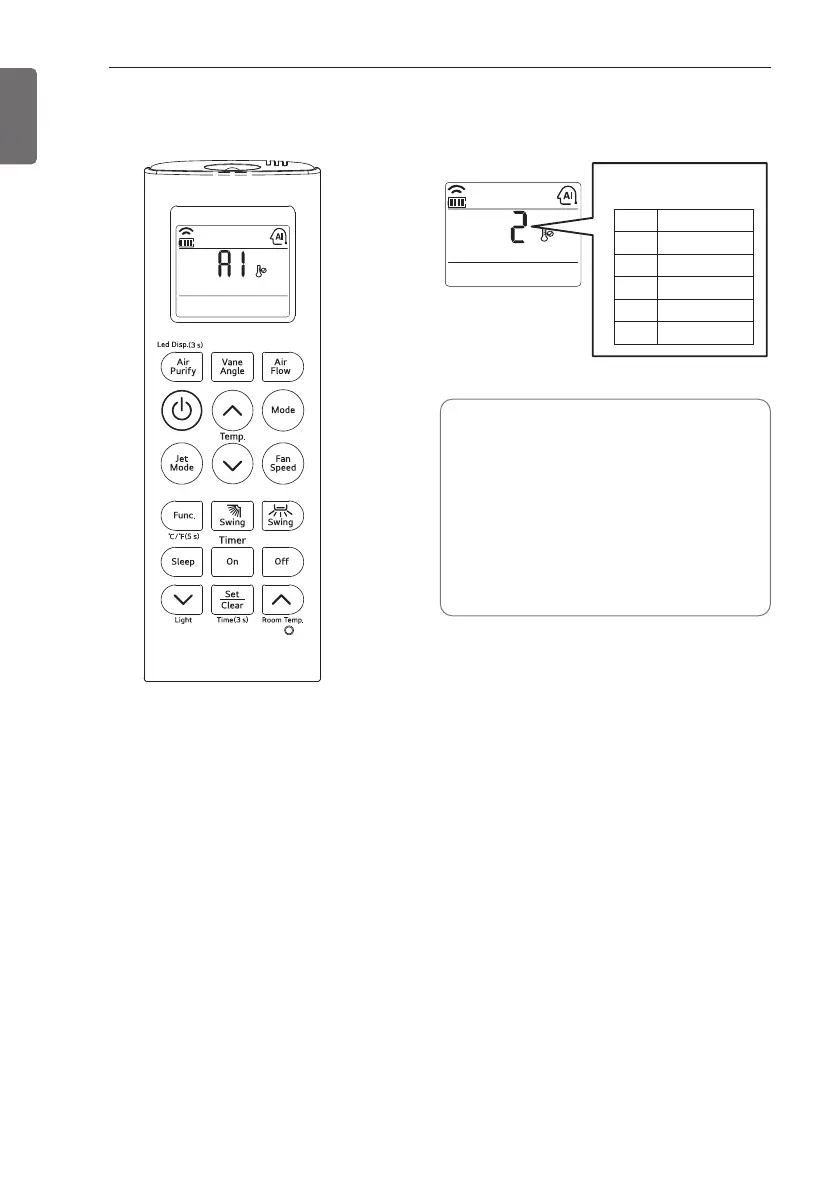
Auto Operation Mode
❈ Please select the code
depend on your feeling.
Code
2
1
0
-1
-2
Feel
Cold
Slightly cool
Neutral
Slightly warm
Warm
1 Press the ON/OFF button.
The unit will respond with beep sound.
2 Press MODE button to select Auto
Operation Mode.
3 Set the desired temperature.
The temperature and fan speed are
automatically set by the electronic controls
based on the actual room temperature.
If you feel hot or cold, press TEMP.
buttons for more cooling or heating effect.
You cannot switch the indoor fan speed. It
has already been set by the Auto
Operation Mode rule.
During Auto Operation Mode
- If the system is not operating as
desired, manually switch to another
mode.
The system will not automatically
switch from the cooling mode to the
heating mode, or from heating to
cooling, then you must set the mode
and the desired temperature again.



 To Next Page