SUB FUNCTION
27
ENGLISH
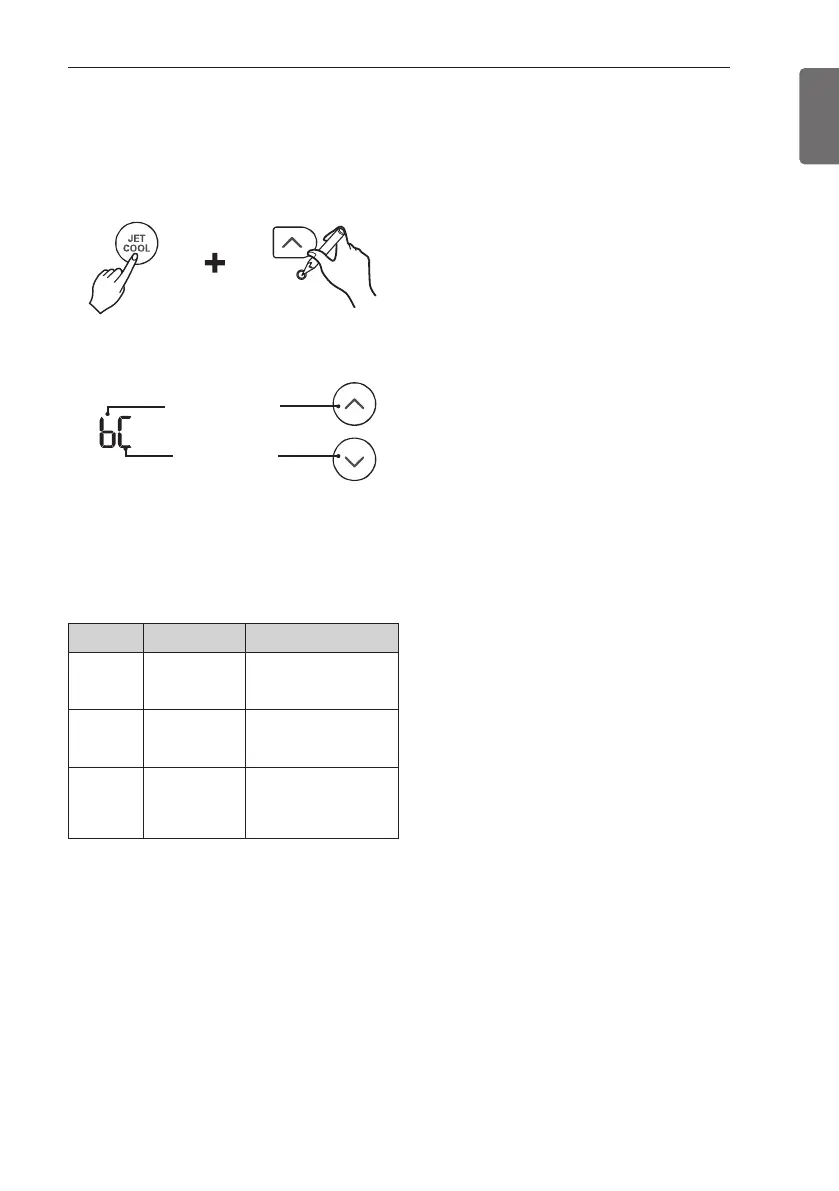
How to set Air quality level
color
1 With the { button pressed, press the
reset button.
2 By using the a or b button, set
function code and setting value.
3 Press the | button toward the indoor
unit 1 time.
Each countries have different standards for
indicating Overall air quality.
Please refer to table below.
4 Reset the remote controller to use the
general operation mode.
Value Step Overall Air Quality.
Type1
(1beep)
4step
(For Korea)
Good/Moderate/
Unhealthy/Poor
Type2
(2beep)
4step
(For Global)
Good/Normal/Bad/
Severe
Type3
(3beep)
6step
(For China)
Good/Moderate/
Unhealthy/Poor/
Very Poor/ Severe
Function code
Setting code



 To Next Page