OPERATING INSTRUCTIONS
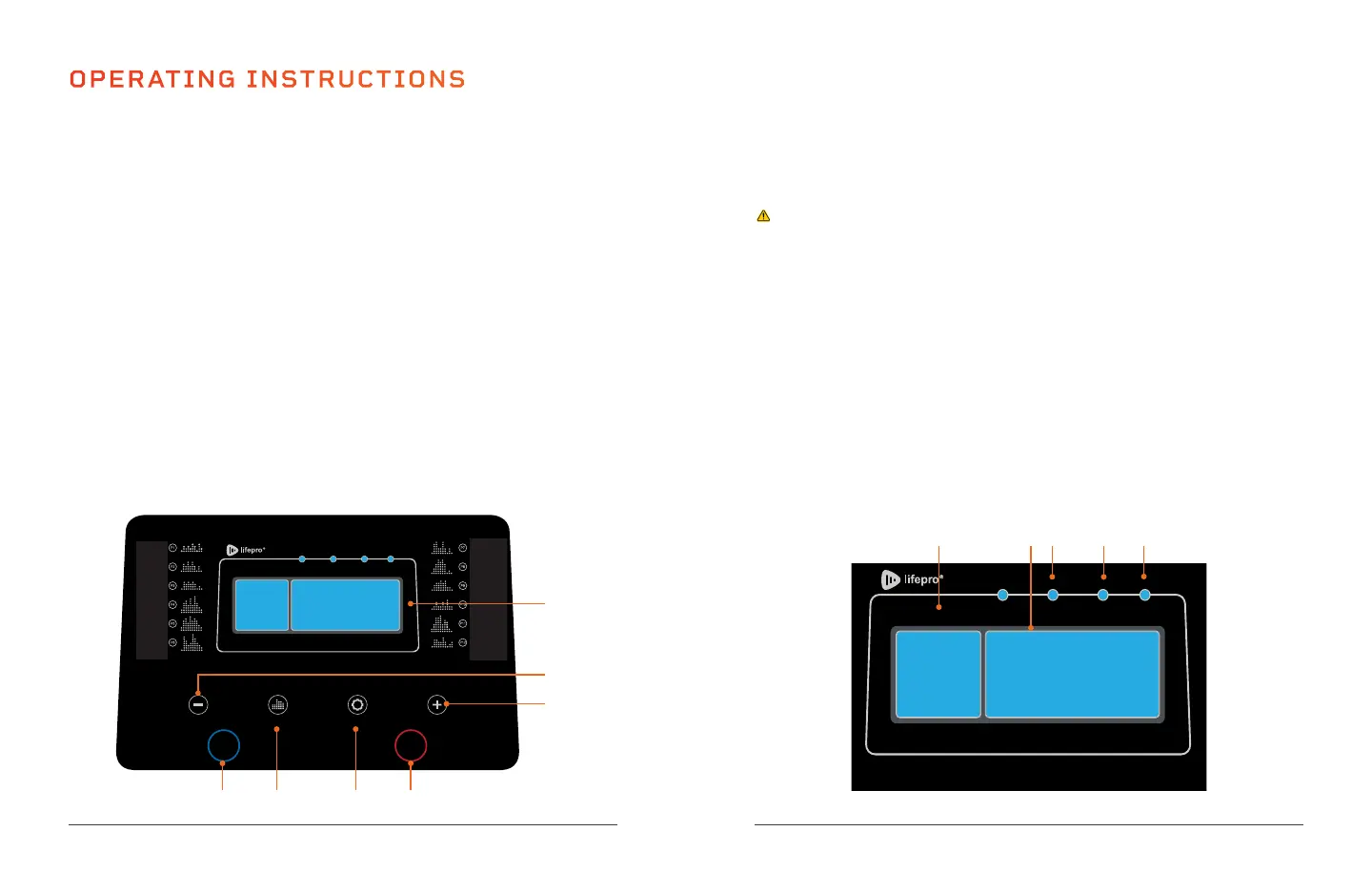
USING THE CONTROL PANEL ON THE CONSOLE
1. Start Button: Press the button to start the running-belt movement
after a countdown. The Power switch must be in the ON position for the
EcoStride to start.
2. Program Button: Toggle through the preset programs P01–P12.
3. Mode Button: Press to toggle through the three goal-defined training
modes: time goal, distance goal, and calorie goal.
4. Stop Button: Press the button to stop running-belt movement.
5. Speed + Button: Use the button to increase the speed, in 0.1 mi/hr
increments, from 0.6 to 6.3 mi/hr. When a goal-defined mode has been
selected, use the button to increase a goal (time, distance, or calories
burned). Hold it down to increase the parameter quickly.
6. Speed - Button: Use the button to decrease the speed, in 0.1 mi/hr
increments, from 0.6 to 6.3 mi/hr. When a goal-defined mode has been
selected, use the button to decrease a goal (time, distance, or calories
burned). Hold it down to decrease the parameter quickly.
7. Display Panel: Displays time, speed, distance, and calories. Also shows
program choice and important error information. Refer to PAGE 20.
DISTANCE DISPLAY
CALORIESTIMESPEEDSCAN MODE
SPEED PROG MODE SPEED
START STOP
1 2 3 4
5
14 EcoStride User Manual Lifepro
6
7
Endurance Training Collection 15
USING THE DISPLAY PANEL
The display panel shows distance, your chosen program, and the display
window alternates between showing speed, time, and calories, as indicated
by the corresponding illuminated LED.
CAUTION: Do not stare down at the display panel for long periods while
the running belt is moving to avoid injury or falling.
1. Distance Window: Shows the distance run (0 to 61.5 miles) or the
distance remaining until your training distance goal is reached.
2. Display Window: Alternates between showing the time elapsed,
distance run, calories burned, and speed.
3. Speed Indicator LED: Indicates the value shown in the display window
is the speed in mi/hr (0.6 to 6.3 mi/hr).
4. Time Indicator LED: Indicates the value shown in the display window is
the running time elapsed in minutes and seconds (0 to 99 minutes) or
the time remaining until your training time goal is reached.
5. Calorie Indicator LED: Indicates the value shown in the display window
is the number of calories burned (0 to 990 calories) or the calories
remaining until your calorie goal is reached.
DISTANCE DISPLAY
CALORIESTIMESPEEDSCAN MODE
SPEED PROG MODE SPEED
START STOP
253.062*160.22mm
3 4 521


 To Next Page