16 Electrostride User Manual Lifepro
Recovery + Fitness Collection 17
OPERATING INSTRUCTIONS
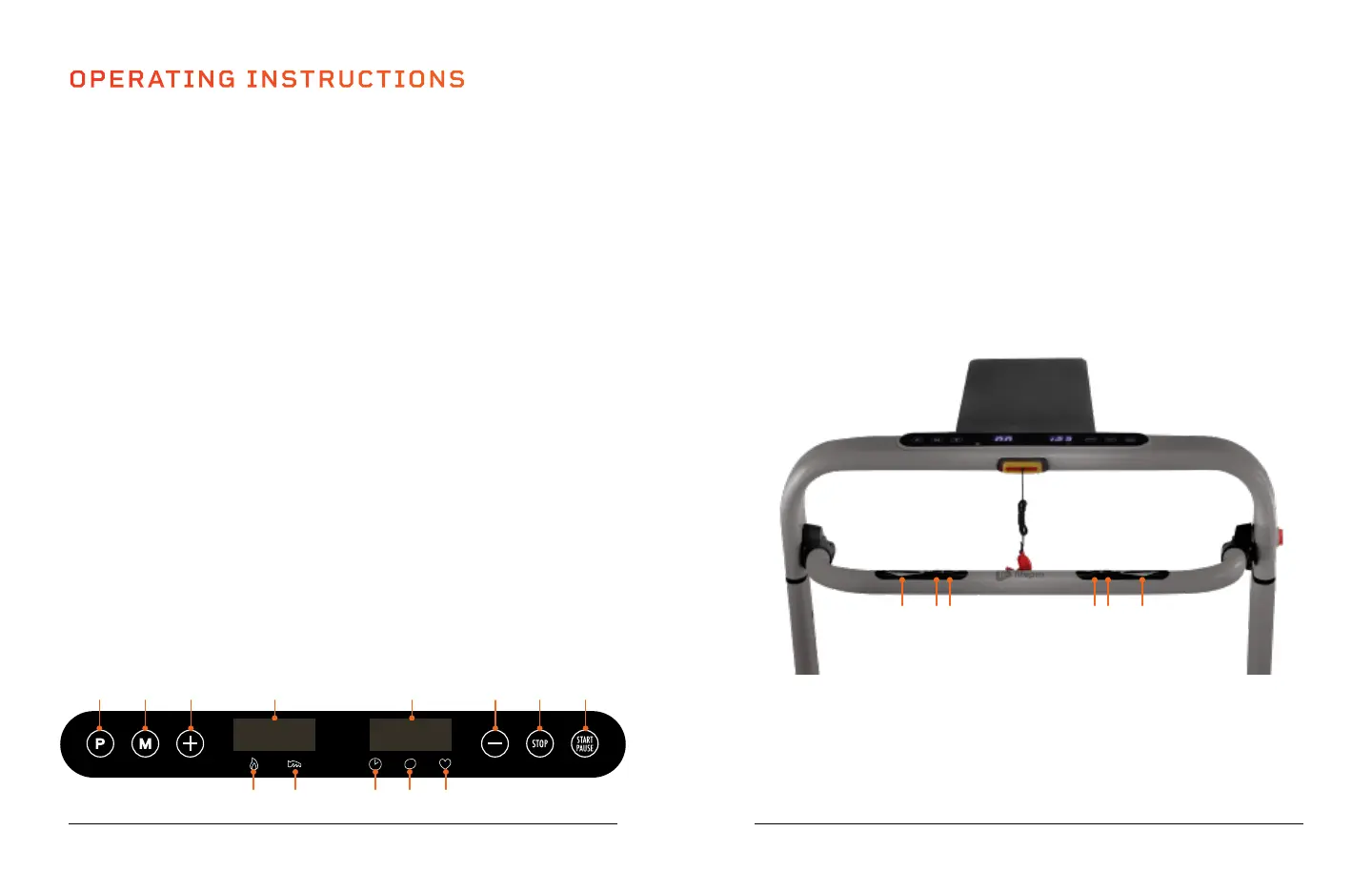
USING THE KEYPAD TO OPERATE THE ELECTROSTRIDE
1. Program Button: Choose a program. While the treadmill is stopped, press the
button to toggle through the programs: 0.0 (manual workout), P01-P36 (preset
programs), U01- U03 (user programs), B-11 (BMI calculator).
2. Mode Button: When creating a manual workout, press the Mode button to toggle
through the three training modes, time goal, distance goal, and calorie goal, to
further customize your workout.
3. + Button: Increase the speed, in 0.1 mi/hr increments, from 0.6 - 8.7 mi/hr.
4. Calorie/Distance Window: The window alternates between showing the calories
burned and training distance in miles.
5. Calorie Indicator LED: Indicates the value shown in the Calorie/Distance window
is the number of calories burned during the current workout.
6. Distance Indicator LED: Indicates the value shown in the Calorie/Distance
window is the current training distance in miles.
7. Time/Speed/Pulse Window: The window alternates between showing the training
time, speed in mi/hr, and pulse.
8. Time Indicator LED: Indicates the value shown in the Time/Speed/Pulse window
is the current workout time.
9. Speed Indicator LED: Indicates the value shown in the Time/Speed/Pulse window
is the current speed, in mi/hr.
10. Pulse Indicator LED: Indicates the value shown in the Time/Speed/Pulse window
is the current pulse, when holding the hand sensors on the handrail.
11. - Button: Decrease the speed, in 0.1 mi/hr increments, from 0.6 - 8.7 mi/hr.
12. Stop Button: Stop the current workout and the movement of the running belt. The
motor will slow the running deck to a smooth stop. All settings will be reset.
13. Start/Pause Button: Start a manual workout or begin the selected training
program after a 5 second countdown. During training, press the button to pause
the current workout for 5 minutes. Press the button a second time, within the 5
minutes, to resume the program. After 5 minutes, the program will reset and all
values will return to zero.
USING THE PULSE SENSORS AND HANDRAIL CONTROLS
1. Hand Pulse Sensors: Place your hands on the sensors. The current pulse rate will
show in the Time/Speed/Pulse Window.
2. Stop Button: Stop the current workout and the movement of the running belt.
The motor will slow the running deck to a smooth stop. All settings will be reset.
3. Start/Pause Button: Start a manual workout or begin the selected training
program after a 5 second countdown. During training, press the button to pause
the current workout for 5 minutes. Press the button a second time, within the 5
minutes, to resume the program. After 5 minutes, the program will reset and all
values will return to zero.
4. Increase Speed Button: Increase the speed, in 0.1 mi/hr increments.
5. Decrease Speed Button: Decrease the speed, in 0.1 mi/hr increments.
S
1 112 123 4
5 86 9 10
7
13
1 2 3 4 5 1


 To Next Page