10 Legra User Manual Lifepro
Wellness Recovery Collection 11
OPERATING INSTRUCTIONS
Please read the operating instructions before using the Legra.
Keep this manual for reference.
CHARGING THE BATTERY
• Charge your Legra for up to 4 hours before using it for the first time.
• To charge:
1. Plug the USB-C end of the included charging adapter into the USB-C
charging port on the side of the massager.
2. Plug the adapter into a wall outlet.
• The four Battery LEDs will flash during charging to indicate battery
charge level:
• 4 LEDs flash = 75-100% • 2 LEDs flash= 25-50%
• 3 LEDs flash = 50-75% • 1 LED flashes = <25%
• The Battery LEDs will stop flashing and all four will remain lit for five
minutes and then turn off, when the battery is fully charged.
• Always unplug the charging adapter as soon as the device is fully
charged.
• During use, the four Battery LEDs indicate the current battery level:
• 4 LEDs lit = 75-100% • 2 LEDs lit = 25-50%
• 3 LEDs lit = 50-75% • 1 LED lit = <25%
• For best results, charge the battery before it reaches 25%.
• When the battery is very low, all of the lights on the screen will turn
on, flash three times, and then the device will shut down automatically.
Charge the device before trying to use it again.
• Average run-time varies depending on the settings used (heat, vibration,
low/high intensity, etc.). Average run-time is 2–3 hours per charge when
using heat and/or operating at higher intensities. Average run-time is
3–4 hours when not using heat and/or operating at lower intensities.
V1
V2
BATTERY IN DICATOR
5
6
10
9
11
3
4
8
1 72
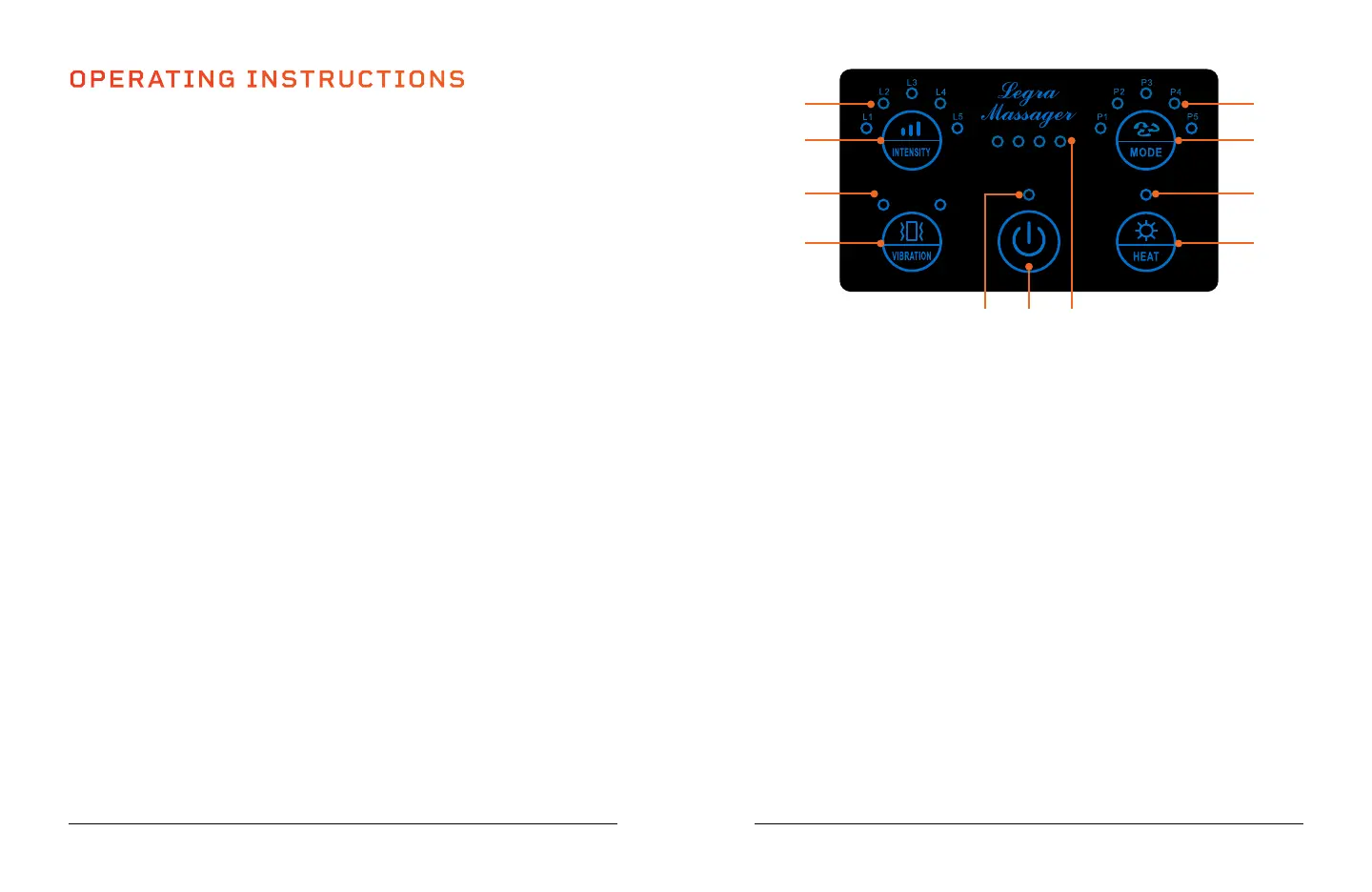
USING THE CONTROL PANEL
1. Power Button: Turn on/off the Legra.
2. Power Button LED: When lit, power is on.
3. Vibration Button: Press once to turn on pulse vibration. Press a
second time to switch to continuous vibration. Press a third time to
turn off vibration. Vibration is off by default.
4. Vibration LEDs (2): When V1 LED is lit, pulse vibration is on. When
V2 LED is lit, continuous vibration is on.
5. Intensity Button: Toggle through the five air pressure intensity levels
(L1–L5). The default intensity is L3.
6. Intensity LEDs (5): LEDs indicate which intensity level is selected.
7. Battery LEDs (4): LEDs indicate remaining battery level during use
and flash during charging to indicate charging progress.
8. Heat Button: Turn on/off the heat function. Heat is off by default.
9. Heat LED: When lit, heat is on.
10. Mode Button: Toggle through the five massage modes (P1–P5). The
default mode is P1.
11. Mode LEDs (5): LEDs indicate which mode is selected.


 To Next Page