10 WaverMini User Manual Lifepro Recovery + Fitness Collection 11
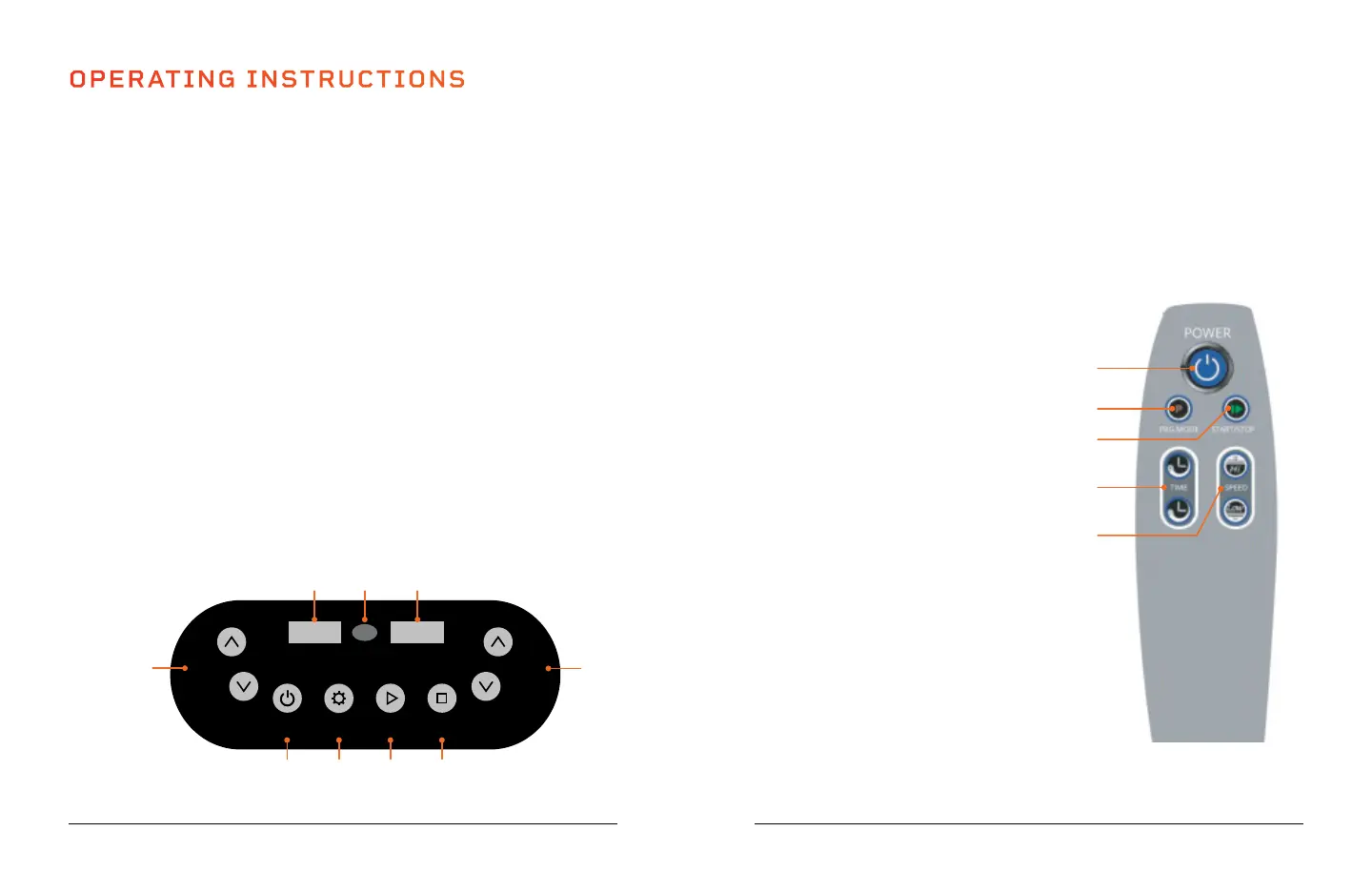
USING THE REMOTE TO OPERATE THE WAVERMINI
1. Power Button: Press the button to power the WaverMini on and
off.
2. Mode Button: Press the button to select a preset program
(P00-P09) or to select manual mode (HA) to create a custom
workout.
3. Start/Stop Button: Ensure power is
turned ON. Press the button to activate
the selected program or begin a
custom workout in manual mode.
Press again to stop the selected
program or manual mode workout.
4. Time Increase/Decrease
Buttons*: Select manual mode
(HA). Press the buttons to set the
time duration before beginning
the manual mode workout.
5. Speed Increase/Decrease
Buttons*: Press Start to begin a
custom workout in manual mode.
Speed will automatically begin at
level 1. Then, press the Increase/
Decrease Speed buttons to adjust
vibration speed.
1
2
4
3
5
OPERATING INSTRUCTIONS
USING THE DISPLAY PANEL TO OPERATE THE WAVERMINI
1. On/Off Button: Press the button to power the WaverMini on and off.
2. Mode Button: Press the button to select a preset workout program
(P00-P09) or to select manual mode (HA) to create a custom workout.
3. Start Button: Ensure power is turned ON. Press the button to activate
the selected program or begin a custom workout in manual mode.
4. Stop Button: Press the button to stop the selected program or manual
mode workout.
5. Speed Increase/Decrease Buttons*:
Press Start to begin a custom
workout in manual mode. Speed will automatically begin at level 1.
Then, press the Increase/Decrease Speed buttons to adjust vibration
speed.
6. Speed Display: The display shows vibration speed for the current
program or custom workout.
7. Remote: Infrared receiver window for the remote.
8. Mode/Time Display:
Alternates between showing time remaining and the
current mode (preset program: P00-P09 or manual mode: HA).
9. Time Increase/Decrease Buttons*:
Select manual mode (HA). Press
the buttons to set the time duration before beginning the manual
mode workout.
ON/OFF
MODE/TIME
SPEED
MODE START STOP
TIME
SPEED
9
1 2 3 4
8 7 6
5
*Speed and time cannot be adjusted for preset programs. *Speed and time cannot be adjusted for preset programs.








 To Next Page