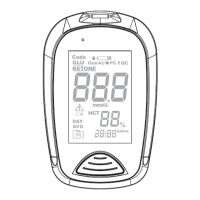
With the hour/minute flashing in sequence, press M to select the
correct hour/minute. Press S and go to the next alarm setting.
NOTICE:
When the alarm beeps, press M to switch it off. Otherwise, it will
beep for 2 minutes then switch off.
7. Setting the backlight
The default setting for meter backlight ("BL") is set to ON. Press M to
switch between “On” and “OFF”. Press S.
Congratulations! You have completed all settings!
THE THREE MEASURING MODES
For Blood Glucose Testing
This meter provides you with three modes for measuring; General,
AC, and PC. You can switch between each mode by:
1. Start with the meter switched off. Insert a test strip to turn on the
meter. The screen will display a flashing “ ” and “Gen”.
2. Press M to switch between General, AC, and PC modes.
For β-Ketone Testing
The meter provides you with one mode for measuring, Gen. You can
start with the meter switched off. Insert a test strip to turn on the meter.
The screen will display a flashing “ ”” and “Gen”.
NOTE:
• These parameters can ONLY be changed in the setting mode.
• If the meter is idle for 3 minutes during the setting mode, it will switch
off automatically.


 To Next Page