In Canada - Auto Control Medical (Toll-Free): 1-800-461-0991
E-11
USING THE MONITOR WITH AC ADAPTER
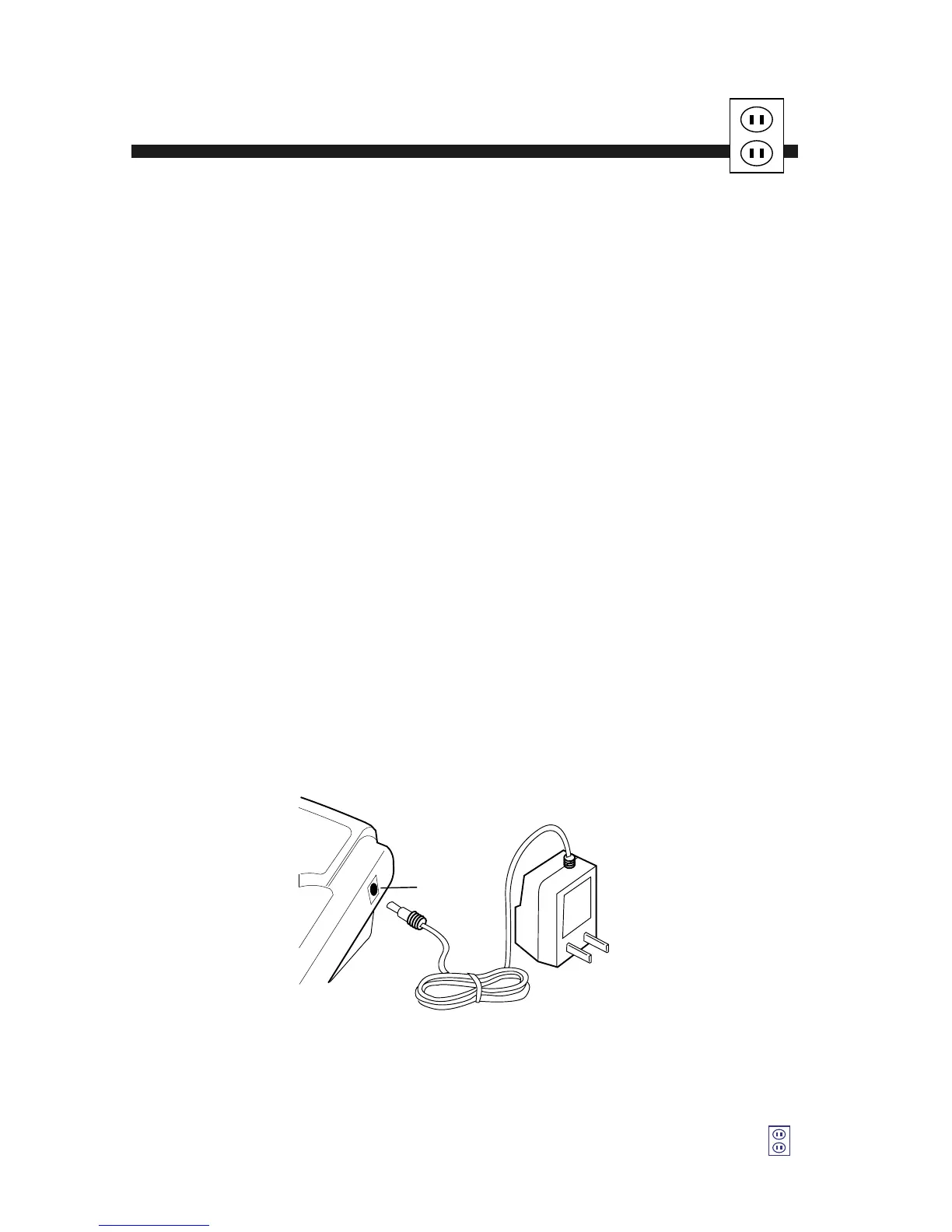
The UA-774 has an AC adapter jack to allow you to supply power from an
outlet in your home. We recommend you use only the LifeSource AC adapter
to avoid potential damage to the monitor.
Connecting the AC adapter to the monitor:
1. Gently insert the AC adapter plug into a 120V AC outlet.
2. Connect the AC adapter plug into the jack on the right side
of the monitor.
Disconnecting the AC adapter from the monitor:
1. Turn the unit off by pressing the START button.
2. Disconnect the plug from the jack of the monitor quickly.
3. Gently remove the AC adapter from the outlet.
NOTE: If monitor has batteries and an AC adapter connected, the measure-
ments stored in memory will be lost if AC adapter is unplugged from the
wall first. To ensure that measurements remain in memory, make sure the
unit is off and that the jack plugged into the monitor is removed quickly
before unplugging adapter from the wall.





 To Next Page