12
TOOLS AND HARDWARE REQUIRED / OUTILS ET QUINCAILLERIE REQUIS / INSTRUMENTAL Y HERRAJE REQUERIDOS
SECTION 2 (CONTINUED) / SECTION 2 (SUITE) / SECCIÓN 2 (CONTINUACIÓN)
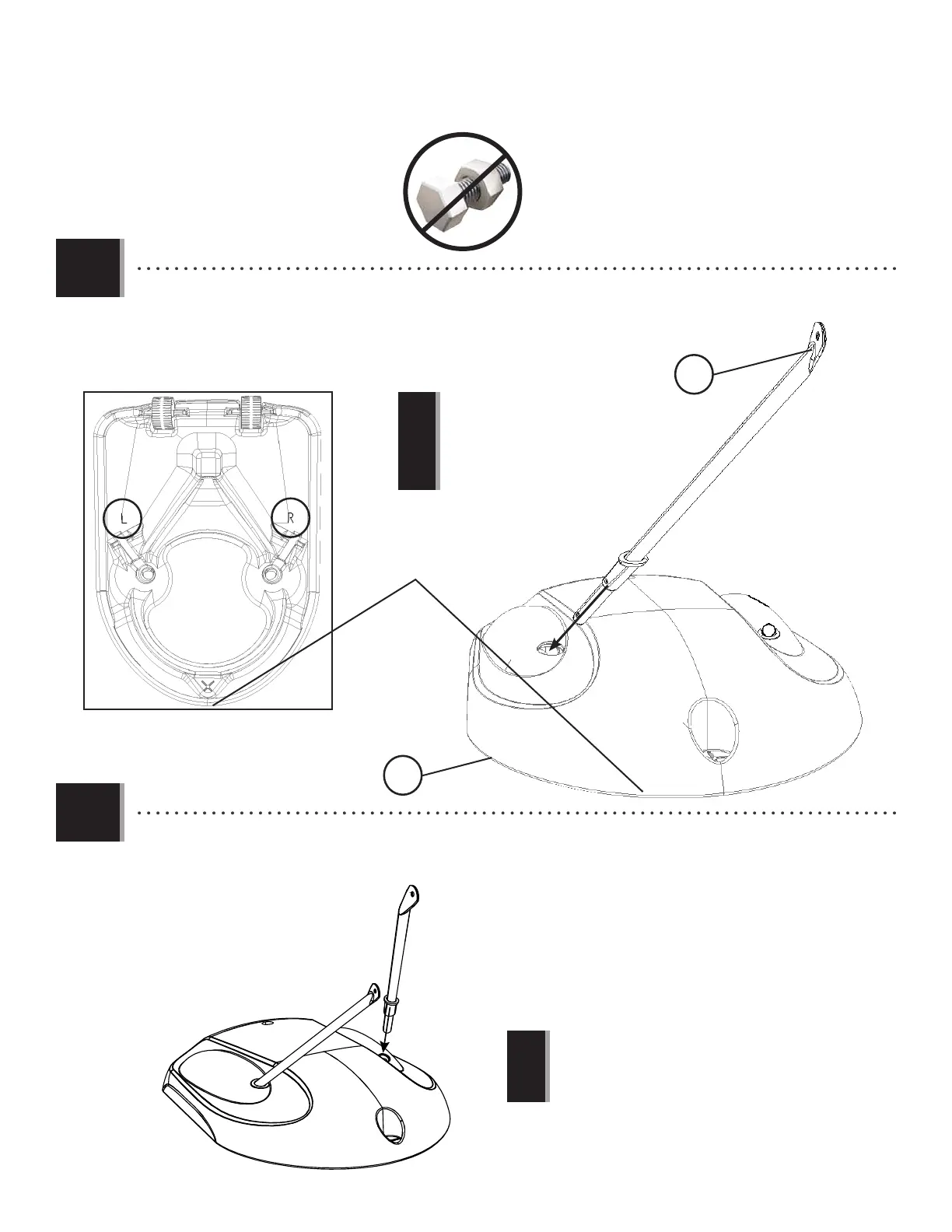
2.4
• Slide the right brace (ALK) into place through the top of the base, with the fl attened
end pointing out toward the front edge as shown.
• Faire glisser le support droit (ALK) en place à travers la partie supérieure de la base,
avec l’extrémité aplatie orientée vers le bord avant comme indiqué.
• Deslizar el soporte derecho (ALK) en su lugar por la partie supérieure de la base, con el
extremo aplatado orientado hacia el borde delantero como se indica.
ALK
Front edge
Bord avant
Borde delantero
Bottom view
Vue inférieure
Vista inferior
2.5
• Repeat step 2.4 to insert the left brace (ALI) into the base.
• Répéter l’étape 2.4 pour insérer le support gauche (ALI) dans la base.
• Repetir el paso 2.4 para insertar el soporte izquierdo (ALI) en la base.
• The right brace is marked with a letter “R”
sticker.
• Le support droit est marqué avec l’autocollant
« R ».
• El soporte derecho tiene una etiqueta
autoadhesiva marcada con la letra «R».
• The left brace is marked with a letter “L” sticker.
• Le support gauche est marqué avec l’autocollant «
L » .
• El soporte izquierdo tiene una etiqueta autoadhesiva
marcada con la letra «L».
!
!




 To Next Page