19
TOOLS AND HARDWARE REQUIRED
X SECTION 2 (CONTINUED)
ATG (x8)
CPY
CPY
CPX
CPW
ATG
ATG
ATG
ATG
ATG
ATG
ATG
ATG
1
1
2
2
3
3
4
4
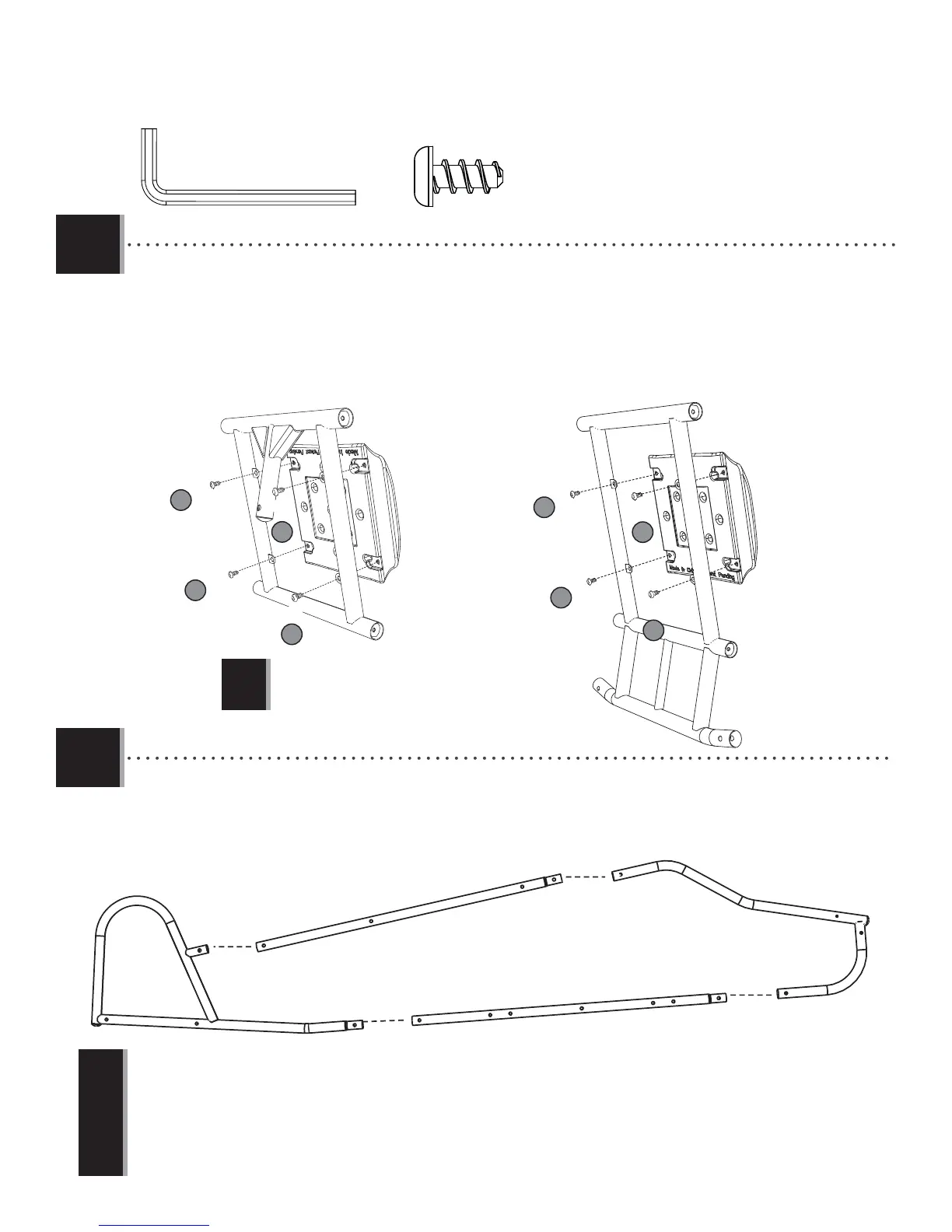
• Place the hardware in the order shown.
!
2.1
• Connect a Cockpit Backrest (CPY) to the Back Seat Back Support (CPX) and Front Seat Back Support (CPW). Secure using
the hardware shown. Do not overtighten. Make sure the seats are placed so the sticker is right side up.
2.2
CPU
CPV
CPT
CPS
• Begin the fuselage assembly by connecting the Front Fuselage (CPS) to the Top Fuselage (CPU) and the Bottom Fuselage
(CPV). Slide this assembly into the Rear Fuselage (CPT).
!
• Repeat this step to assemble the other side of the Fuselage. Make sure the dimpled holes on each assembly face opposite directions.
These dimpled holes will need to face the outside of the Fuselage as shown in Sec 2.4.
3/16 in/po (≈5 mm)
(2)




 To Next Page