10
10
GETTING READY TO COOK
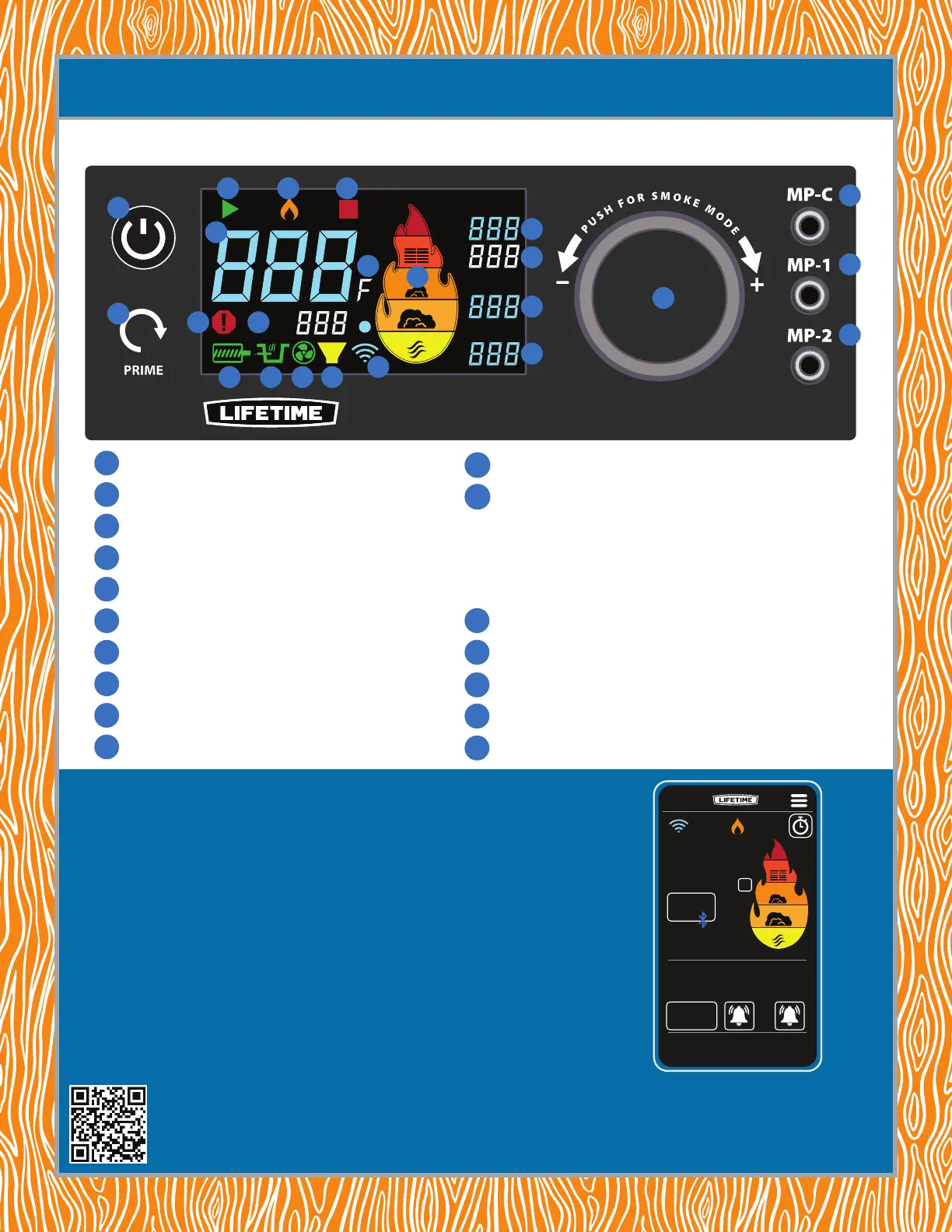
CONTROLLER KEY
TRY THE LIFETIME
®
GRILL APP
MP-2
SET
SET
MP-1
MP-C
LOW
1
3 4 5
6
9
15
14
14
16
17
17
17
14
11
10
131212 12
7 8
2
205
º
--- ---
MP-C MP-1 MP-2
355
º
205
355
F
37:05
TOTAL TIME
The purpose of the app is to allow you to monitor your cook without having to be next to the grill.
With the Lifetime® Grill app you can;
• Monitor the temperature of your grill
• Monitor the temperature of your food
• Be alerted to timers you have set
• Be alerted to any problems with the grill
• Set temperatures for the grill to reach
Note: for safety reasons, turning the grill on is not available on the app. Also, changing the
temperature while on Wi-Fi outside of your home Wi-Fi is not allowed. However, you can still
monitor temperatures outside of your home Wi-Fi. It is not recommended that you leave your grill
cooking if traveling long distances from it.
POWER ON/OFF
PRIME BUTTON
START-UP INDICATOR
COOK INDICATOR
SHUTDOWN INDICATOR
CHAMBER TEMPERATURE
ERROR INDICATOR
SET CHAMBER TEMPERATURE
TEMPERATURE UNITS
FLAME GRAPHIC TEMPERATURE GAUGE
6
7
8
9
10
1
2
3
4
5
12
13
14
15
16
17
11
http://go.Lifetime.com/grill-app-help
For information on using and troubleshooting the Lifetime® Grill app, use your phone to follow the QR code, or enter the link
address in your browser. There you will nd instructions and videos for using and troubleshooting the app.
BLUETOOTH
®
& Wi-Fi INDICATOR
OPERATING INDICATORS
AUGER MOTOR
PELLET IGNITOR ROD
BLOWER FAN
LOW PELLET INDICATOR
MEAT PROBE TEMPERATURES
MP-C (MEAT PROBE CONTROL) TEMPERATURE SET
SET TEMPERATURE KNOB
MEAT TEMPERATURE PROBE SOCKETS


 To Next Page