11
11
GETTING READY TO COOK
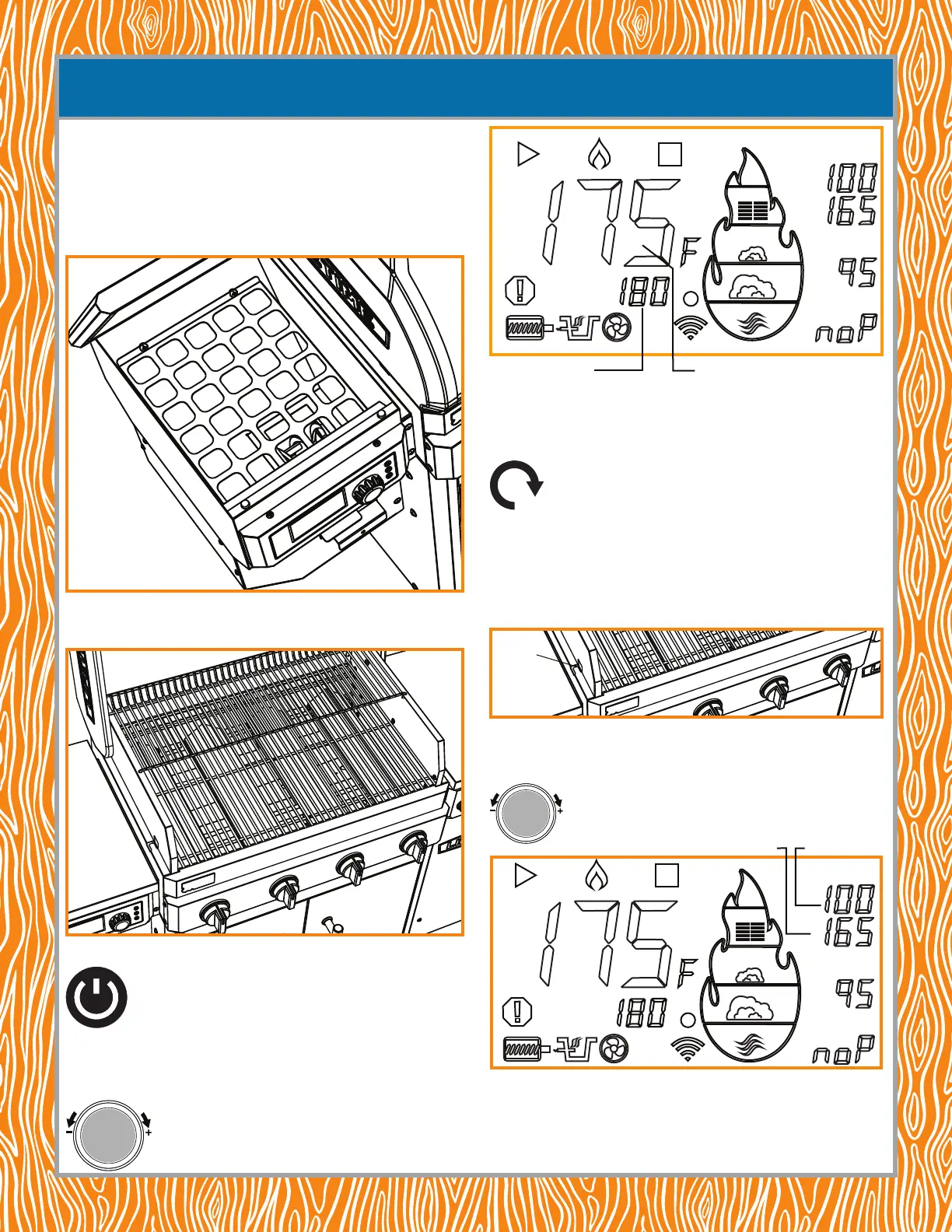
NOTE: for a quicker startup, push in and hold the primer button to prime the burn pot.
Priming the burn pot simply means using the auger to get the pellets to the burn pot.
Continue pushing the primer button until you hear pellets drop into burn pot.
6. If using a meat probe, do the following:
• Plug a meat probe into the MP-C jack and thread it through hole in the cook box wall and
into the meat. This should be done before turning on the smoker. The tip
of the probe should be in the thickest part of the meat.
• Set the meat on the grate and close the lid.
• Push the Smoke Mode button twice to activate the MP-C temperature. Turn the knob to
set the temperature and push it again to conrm. The temperature will ash for three
seconds before setting. Start smoking.
NOTE: when a meat probe is NOT inserted, the control panel will display “noP,” i.e., “no Probe.”
NOTE: to shutdown the smoker when finished, push and hold the power button. The shutdown procedure
lasts about 15 minutes, keeps the fan blowing to cool down the auger system but turns off the auger
feeding the pellets to the burn pot. DO NOT unplug the smoker before the shutdown procedure ends. The
pellets remaining in the burn pot need to burn off. The surfaces will still be too hot to the touch.
SET
SET
MP-C
MP-1
MP-2
USING THE PELLET SMOKER FOR THE FIRST TIME USING THE SMOKER
CONTROL PANEL
You should perform a rst-use heat cleaning before using your smoker/grill for the rst
time. Refer to BEFORE USING YOUR NEW LIFETIME® GRILL & PELLET SMOKER
FOR THE FIRST TIME. ENSURE THE GRILL IS AT LEAST 4 FT 1.2 M AWAY
FROM ANY COMBUSTIBLE SURFACE.
1. Fill the hopper with pellets—up to 28 lb.
2. Open the grill lid and plug in the smoker.
NOTE: ALWAYS keep the lid open while starting the grill or smoker.
3. Push the ON/OFF button on the smoker control panel.
4. Push in the smoker temperature control knob to activate Smoke Mode.
5. Turn the knob to set the desired temperature and push the knob again to conrm the
desired temperature.
Desired temperature
Actual temperature
P
U
S
H
F
O
K
E
M
O
D
E
Hole
SET
SET
MP-C
MP-1
MP-2
Desired temperature Actual temperature
PRIME
P
U
S
H
F
O
K
E
M
O
D
E


 To Next Page