12
12
COOKING MODES
The smoker runs temperatures between 180°F (≈82°C) and 400°F (≈204°C). The auger
automatically feeds the burn pot with pellets, creating the smoke automatically. There are,
however, two specic modes:
1. Warming (LO) and
2. High Smoke (HS)
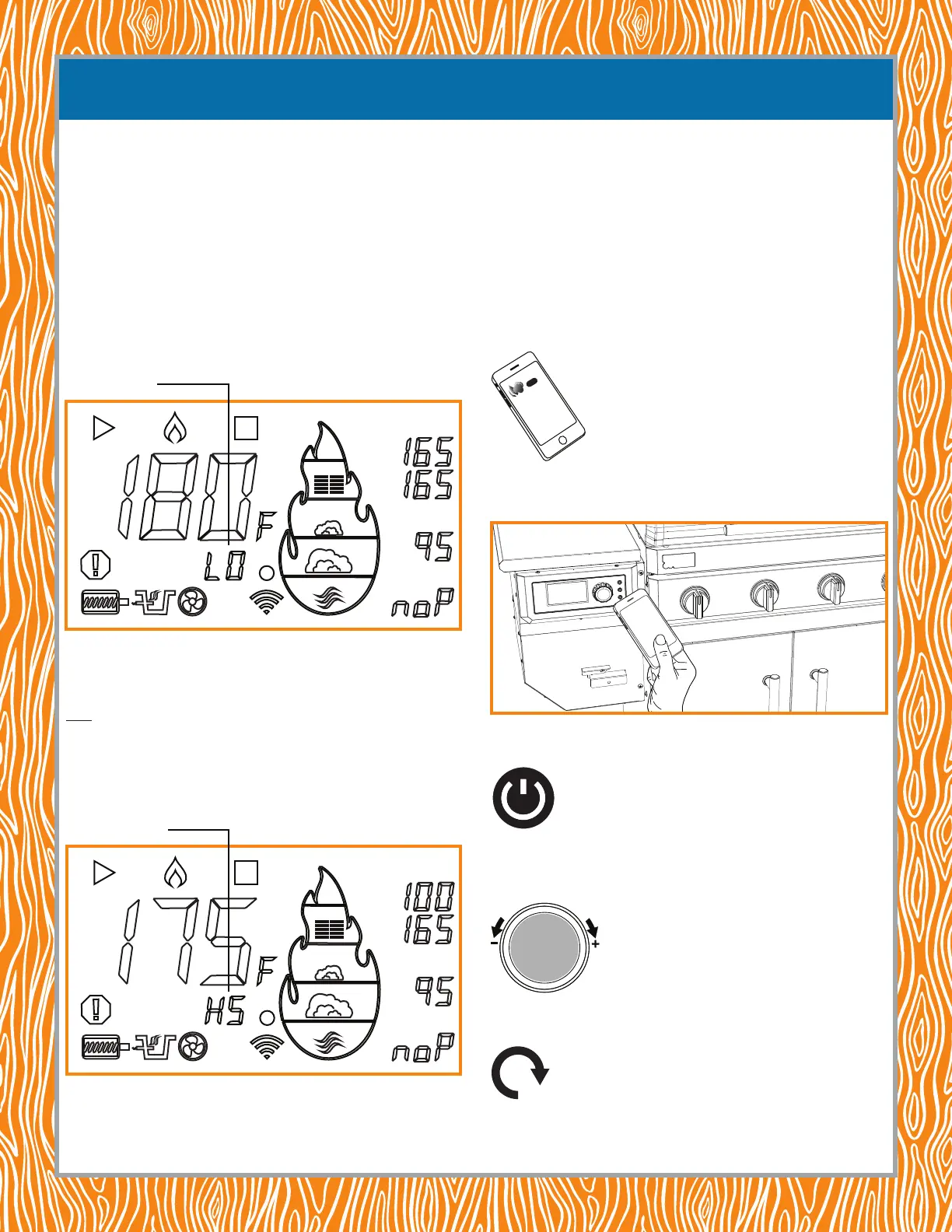
Warming Mode (Automatic): The smoker enters Warming Mode (LO) automatically when
the internal temperature of the meat detected by the MP-C (Meat Probe-Control) equals the
temperature entered by the cook for the MP-C. The letters “LO” appear on the display (shown),
indicating the smoker has entered, or is in, Warming Mode. The controller automtically begins to
lower the chamber temperature to 180°F (≈82°C), just keeping the meat warm.
High Smoke Mode (Manually Set): High Smoke Mode (HS) is a low-temperature mode
but with extra smoke. If you’d like to increase the mouth-watering smoke avor of your meat,
set the smoker to High Smoke Mode (HS) by turning the temperature control knob to one click
below 180°F (≈82°C). Do this by pressing the temperature control knob once and turning it one
click counterclockwise below 180°F (≈82°C). The letters “HS” will appear on the display (shown),
indicating the smoker has entered, or is in, High Smoke Mode.
NOTE: this smoke mode can be set by using the Control Panel on the smoker or by using the
Lifetime® Grill app on your phone.
GETTING READY TO COOK
SET
SET
MP-C
MP-1
MP-2
High Smoke Mode (HS)
Warming Mode (LO)
SET
SET
MP-C
MP-1
MP-2
USING THE PELLET SMOKER FOR THE FIRST TIME WITH THE LIFETIME® GRILL
APP
NOTE: you should perform a rst-use heat cleaning before using your grill and pellet
smoker for the rst time. Refer to BEFORE USING YOUR NEW LIFETIME® GAS GRILL
& PELLET SMOKER FOR THE FIRST TIME.
1. Fill the hopper with pellets—up to 28 lb. Open the grill lid and plug in the smoker.
NOTE: ALWAYS keep the lid open while starting the grill or smoker.
2. Connect your iPhone or Android device to your local Wi-Fi and turn on Bluetooth®.
NOTE: you should connect to a 2.4 GHz bandwidth. Do not connect to a 5 GHz bandwidth.
3. Download the Lifetime® Grill app by going to the app store on your iPhone or Android
device and install the app.
4. Launch the Lifetime® Grill app, create an account and sign in.
5. Select “Yes” when asked to allow the app to use Bluetooth®.
6. Hold the phone near the grill until it connects to the smoker using Bluetooth®.
7. On the control panel, push the ON/OFF button on the smoker control panel.
NOTE: for safety reasons, the smoker cannot be started with the app.
8. On the control panel, push the smoker temperature control knob to enable Smoke Mode.
The auger will start turning, feeding the burn pot with pellets.
NOTE: for safety reasons, Smoke Mode cannot be started with the app.
NOTE: to move pellets more quickly to the burn pot, depress and hold the Primer button.
You should hear pellets drop into the burn pot.
P
U
S
H
F
O
K
E
M
O
D
E
GET
PRIME


 To Next Page
 Loading...