13
13
9. Push SET on your phone and select the desired temperature from the menu.
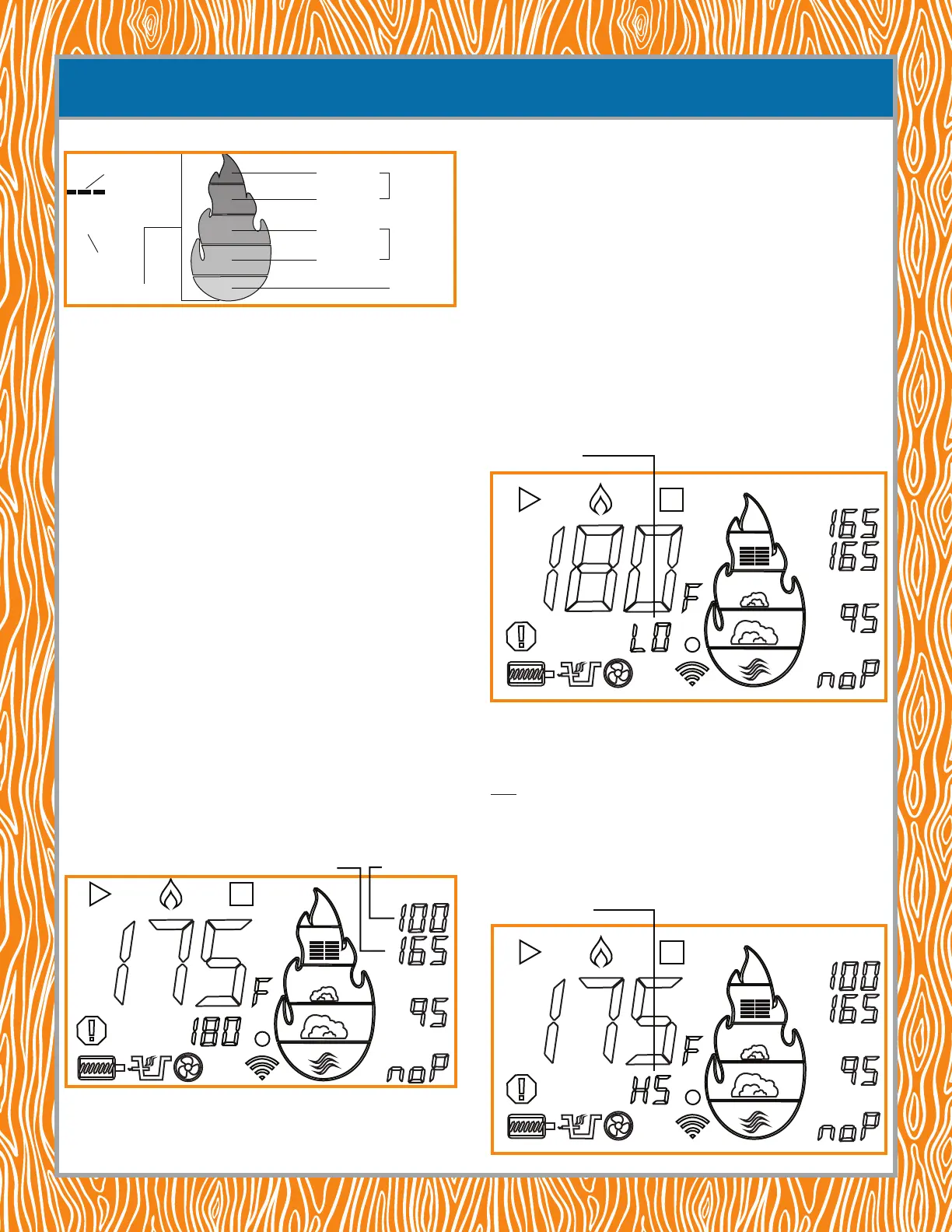
NOTE: when setting the temperature, the ame gauge lights up, indicating the temperature
range chosen. After conrming the temperature, the ame gauge light turns o but then
changes color to match the rising temperature range in the cook box. The ame gauge
functionality is for the cook box temperature only.
Grilling Zones: these two zones are used for grilling and searing meats with temperatures
ranging from 251°F–700°F, cooking your meats faster. For safety reasons, the internal
temperatures of your meats should reach these minimum amounts:
• beef, sh and pork—145°F
• poultry—165°F
You can let them get hotter by leaving them on longer. But, don’t leave them on too long—
the longer the grilling time, the dryer the foods.
Smoking Zones: these two zones are used for slower cooking with temperatures ranging
from 171°F–250°F. The temperatures are lower so it takes longer for the internal temperatures
of the meats to reach the minimum safe levels:
• beef, sh and pork—145°F
But, for that fall-o-the-bone goodness, the temperature should be around 190°F for
beef and 215°F for pork throughout the smoking.
• poultry—165°F
Warming Zone: this zone keeps your food warm until everything is ready to be set on the
table.
USING THE MEAT PROBES TO WATCH THE INTERNAL TEMPERATURE OF MEATS
NOTE: this can be done for all three meat probes: MP-C, MP-1 and MP-2. The meat probes must be
inserted to use this feature. See step 6 on the previous page.
NOTE: when the MP-C temperature reaches the set temperature, the smoker will automatically change
to a LO setting to keep your meat warm. When MP-1 and MP-2 temperatures reach their respective set
temperatures, a notification will be sent to your phone.
NOTE: when a meat probe is not inserted into the control panel, the panel will display “noP,”
i.e., “no Probe.”
10. Wait for the actual temperature to reach the desired temperature and start smoking.
GETTING READY TO COOK
SET
SET
MP-C
MP-1
MP-2
Desired temperature
Actual temperature
SET
F
Desired
temperature
Flame gauge
Actual
temperature
Grilling Zones
Smoking Zones
Warming Zone
351°F–700°F
251°F–300°F
201°F–250°F
171°F–200°F
NOTE: to shutdown the smoker when finished, push and hold the power button. The shutdown procedure
lasts about 15 minutes, keeps the fan blowing to cool down the auger system but turns off the auger feeding
the pellets to the burn pot. DO NOT unplug the smoker before the shutdown procedure ends. The pellets
remaining in the burn pot need to burn off. The surfaces will still be too hot to the touch.
COOKING MODES
The smoker runs temperatures between 180°F (≈82°C) and 400°F (≈204°C). The auger
automatically feeds the burn pot with pellets, creating the smoke automatically. There are,
however, two specic modes:
1. Warming (LO) and
2. High Smoke (HS)
Warming Mode (Automatic): The smoker enters Warming Mode (LO) automatically when
the internal temperature of the meat detected by the MP-C (Meat Probe-Control) equals the
temperature entered by the cook for the MP-C. The letters “LO” appear on the display (shown),
indicating the smoker has entered, or is in, Warming Mode. The controller automtically begins to
lower the chamber temperature to 180°F (≈82°C), just keeping the meat warm.
High Smoke Mode (Manually Set): High Smoke Mode (HS) is a low-temperature mode
but with extra smoke. If you’d like to increase the mouth-watering smoke avor of your meat,
set the smoker to High Smoke Mode (HS) by turning the temperature control knob to one click
below 180°F (≈82°C). Do this by pressing the temperature control knob once and turning it one
click counterclockwise below 180°F (≈82°C). The letters “HS” will appear on the display (shown),
indicating the smoker has entered, or is in, High Smoke Mode.
NOTE: this smoke mode can be set by using the Control Panel on the smoker or by using the
Lifetime® Grill app on your phone.
SET
SET
MP-C
MP-1
MP-2
High Smoke Mode (HS)
Warming Mode (LO)
SET
SET
MP-C
MP-1
MP-2


 To Next Page
 Loading...