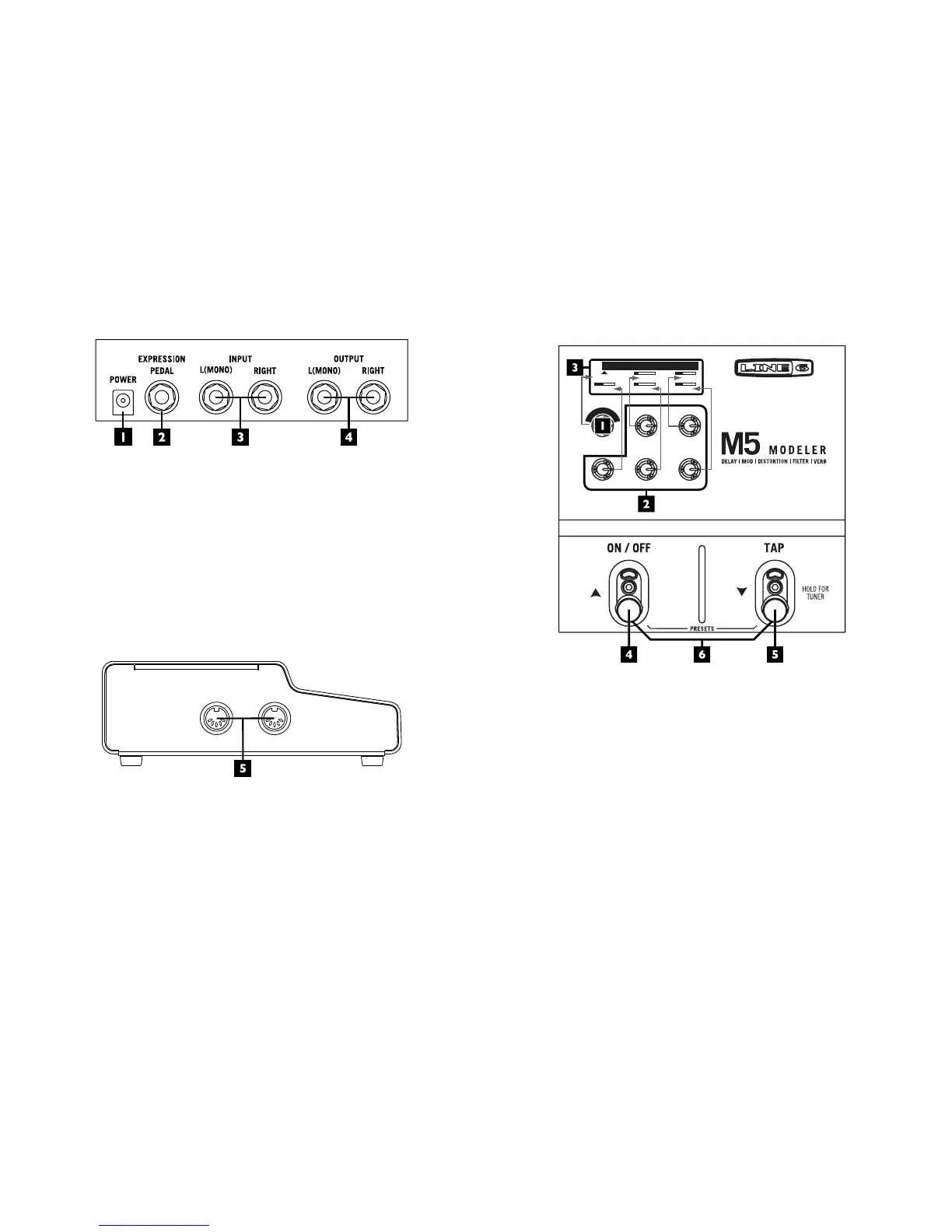
1. Power - Connect the included 9VDC 500mA Power Supply here to
power the unit.
2. Expression Pedal - Compatible with standard expression pedals,
includingtheLine6EX-1.Controleffects parametersinrealtimeby
assigning them to this expression pedal input. The Line 6 expression
pedalisapassive10Kohmmonolineartaperpot,usingastandard1/4
inch mono instrument cable.
3. Stereo Input - Whenconnectingyourguitarorothermonosourceuse
the
L(MONO) input.
4. Stereo Output - For mono output, use the L(MONO) output.
MIDI
OUTIN
SAVE PRESET - PRESS
AND HOLD MODEL SELECT
SETUP - HOLD TAP AND
PRESS MODEL SELECT
5. MIDI In/Out - Allowsyoutoremotecontrolpresetchanges,expression
pedals, and tap tempo plus dump and receive preset data via MIDI
SystemExclusivemessages.
STOMPBOX
M
O
D
E
L
S
E
L
E
C
T
P
R
E
S
S
F
O
R
T
Y
P
E
Growler
MIX
FILTER
0.84HZ
1A
FREQ
PITCH
Q
1. Model Select - Press in the knob to select an effect type (Delay,
Modulation,Distortion,FilterorReverb)youwant.Thenturntheknob
to scroll through available effect models.
2. Parameter Knobs - Usetheseknobstoeditcurrenteffectsettingsshown
in your display. These knobs control the setting locations as shown in
the diagram above.
NOTE:Fornecontrolofaneditparameter,press
and hold
TA P while turning the PARAMETER KNOB.
3. Display - Your display will show all the settings for the selected effect. The
displayilluminatesthecolorofcurrenteffecttype(Distortion–yellow,
Delay–green,Modulation–blue,Filter–purple&Reverb–orange).



 To Next Page