SETTING UP IN THE STUDIO: OUTPUTS
3 • 5
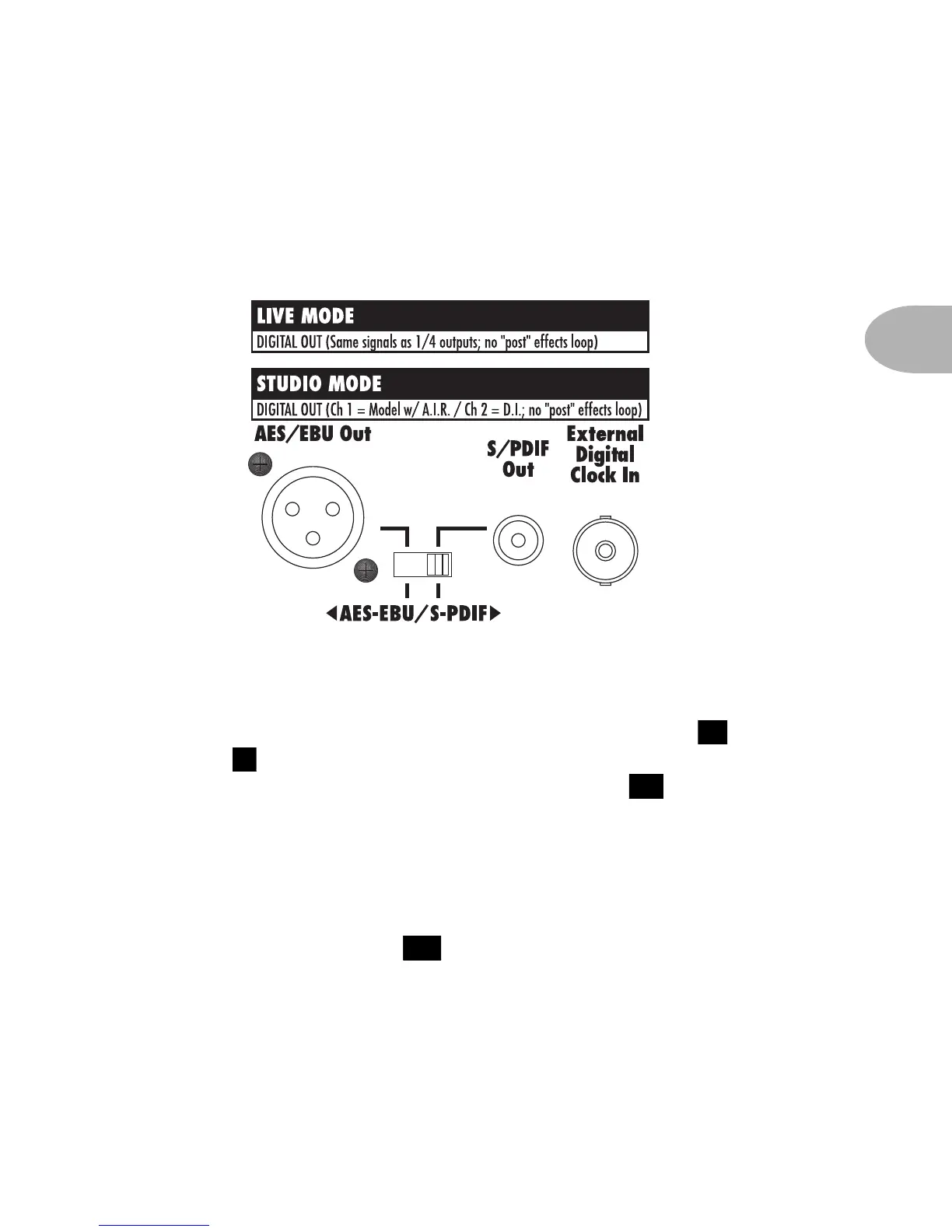
Digital Outputs and Clock – Your POD includes connections for both
AES-EBU and S-PDIF format, 24 bit digital output, as well as a connection
for digital clock:
When hooking up the digital outputs, make sure you set the selector switch
for either AES-EBU (that’s the big XLR connector) or S-PDIF (that’s the
little RCA/phono connector). Note that the Channel Volume and
Output knobs should both set as high as possible to get maximum
output. Digital Out Gain (hold TAP and turn Reverb knob) can give
you additional digital output level, as described in Chapter 2. Also, note
that the loop does not affect the digital output signal.
The External Digital Clock In connector receives a clock signal from your
digital mixer or recorder, synchronizing POD’s digital output to your system.
The front panel Digital Sync switch determines POD’s output sample
rate (44.1KHz or 48KHz), and whether it will sync its output to the external
clock source (in which the output sample rate will be determined by the
device supplying the clock).
11
5
12
20



 To Next Page