RESET
BTAUX
RESET
BTAUX
22
Additional Feature
Area Radio Frequency Adjustment:
Note: If operating the unit in the USA do not
change the area.
To Change the Area:
1.
Press the AM/FM button and
“rAdIO” appears in the display.
2.
Press and hold the VOL/TONE knob until
“SEtUP” appears in the display
.
3. Press the button and “US” or
“OCEAn” will be displayed
.
4. Press the
or
button to change
the setting to “US” or “OCEAn”
.
5. Press the button to save the setting. The unit
will clear all the station settings. After waiting
a few seconds the unit will exit program
ming.
EQ
1
AS/PS
2
SLP
3
ALM
4
DISP
5
DIM
6
PUSH
A B
AUX
AM/FM
DISC
SPEAKER
The LCD display may fail to function normally
due to the vehicle’s battery condition, and could
require resetting the radio microprocessor if:
• The vehicle has been “jump started”
from a dead battery condition.
• The vehicle battery becomes very
low and is quick-charged.
• The vehicle battery is removed and replaced.
Should any of these conditions occur, simply
press and release the RESET button on the
radio front panel using the tip of a ball point
pen. This will reset the radio microprocessor
to the original factory settings. After pressing
the RESET button you should recheck to
see if the radio functions normally.
Reset Button
EQ
1
AS/PS
2
SLP
3
ALM
4
DISP
5
DIM
6
PUSH
A B
AM/FM
DISC
SPEAKER
Reset Button
BT / AX
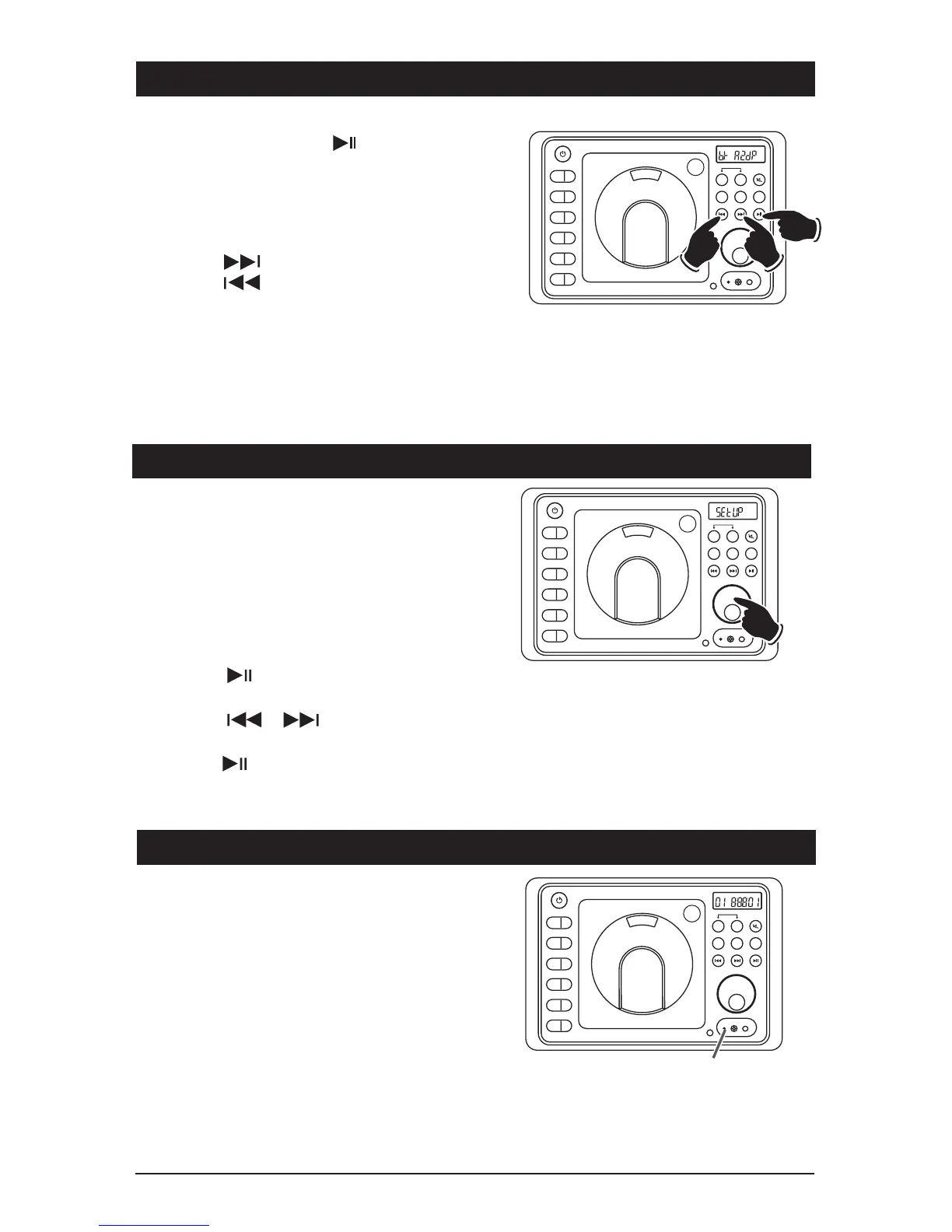
BT Operation (Continued)
BT Operation:
Play/Pause Button:
Press the
button to pause the
BT playback. Press again to resume playback.
Note: The RV4800 display will not show the playback
is pause. The mobile device will show that the
playback is paused.
Changing the Track:
Press the
button to select a higher track.
Press the
button to select a lower track.
Sound Controls: Use the sound controls on the
RV4800 to adjust the volume and sound quality.
Note: For maximum sound output, the media device volume must be set at 100%. Due to factors
beyond the radio’s control, maximum audio output may be lower than desired due to music bit rate,
music recording level, differences in the music device’s BT module output and differences in the out-
put levels of different BT media devices. This is normal and should not be considered a defect.
EQ
1
AS/PS
2
SLP
3
ALM
4
DISP
5
DIM
6
PUSH
A B
AM/FM
DISC
SPEAKER
BT / AX
RESET
BTAUX


 To Next Page