7
Sound Controls
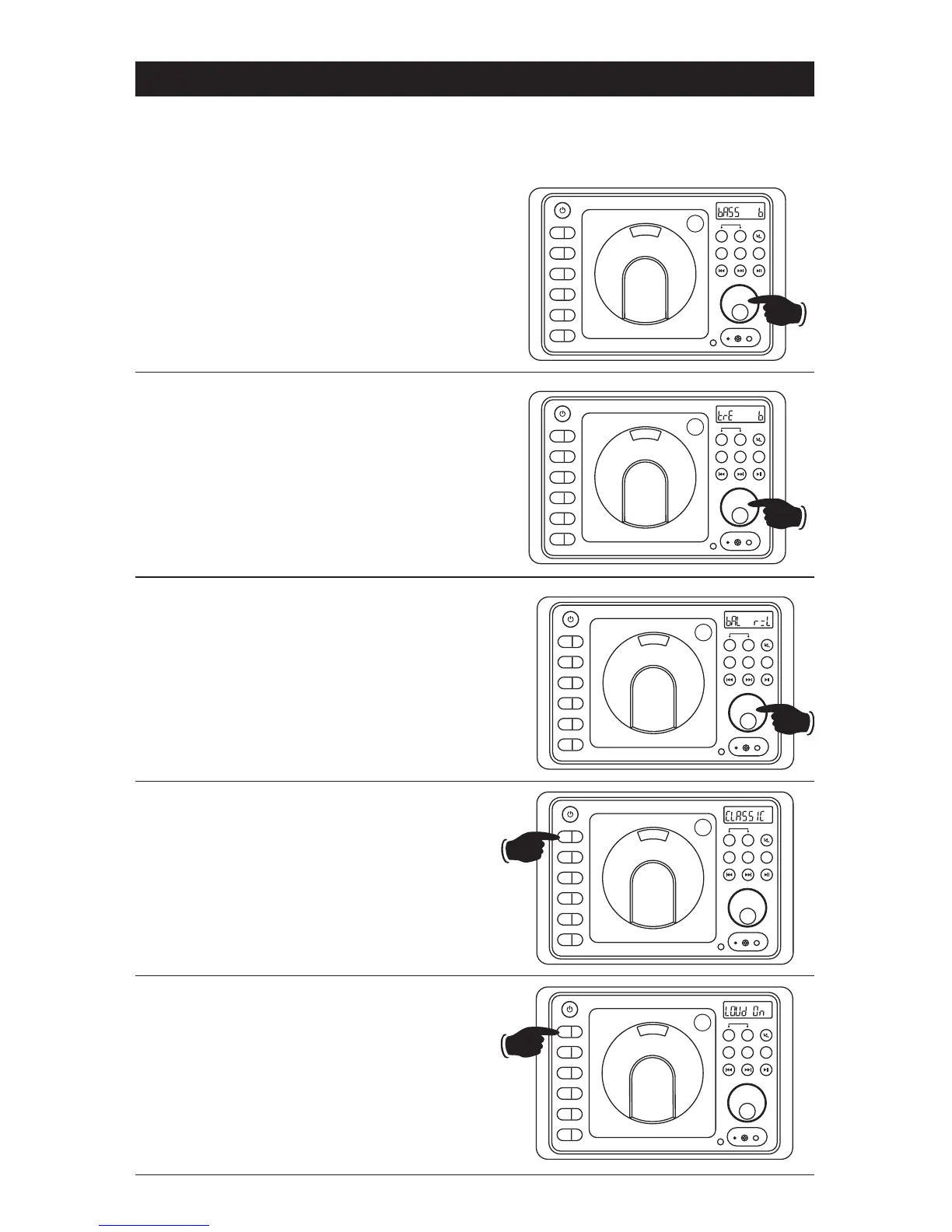
Bass:
Select the Bass mode by pressing the VOLUME
knob. Increase the Bass by rotating the VOLUME
knob clockwise. Decrease the Bass by rotating the
knob counterclockwise. After 6 seconds control
reverts back to volume control.
Bass, Treble and Balance Control
Select the desired sound mode by pressing the VOLUME knob. The modes will be displayed in the
following order: Bass, Treble, Balance and Volume.
Balance:
Select the Balance mode by pressing the VOLUME
knob. Adjust the Balance by rotating the knob.
r
-
-
L = Equal sound right and left
r 7 = Right speaker only
L 7 = Left speaker only
After 6 seconds control reverts back to
volume control.
Treble:
Select the Treble mode by pressing the VOLUME
knob. Increase the Treble by rotating the VOLUME
knob clockwise. Decrease the Treble by rotating
the knob counterclockwise. After 6 seconds
control reverts back to volume control.
Equalizer (EQ):
Press the EQ button to choose between the
preset equalizer settings: Flat, Classic, Rock,
Pop and Jazz as indicated in the display area.
Loud:
To boost high and low tones at low volume
levels, press and hold the EQ button until “LOUd
On” appears in the display. To deselect, press
and hold the EQ button again until “LOUd OFF”
appears in the display.
Hold
EQ
1
AS/PS
2
SLP
3
ALM
4
DISP
5
DIM
6
PUSH
EQ
1
AS/PS
2
SLP
3
ALM
4
DISP
5
DIM
6
PUSH
EQ
1
AS/PS
2
SLP
3
ALM
4
DISP
5
DIM
6
PUSH
EQ
1
AS/PS
2
SLP
3
ALM
4
DISP
5
DIM
6
PUSH
EQ
1
AS/PS
2
SLP
3
ALM
4
DISP
5
DIM
6
PUSH
A B
AM/FM
DISC
SPEAKER
A B
AM/FM
DISC
SPEAKER
A B
AM/FM
DISC
SPEAKER
A B
AM/FM
DISC
SPEAKER
A B
AM/FM
DISC
SPEAKER
BT / AX
BT / AX
BT / AX
BT / AX
BT / AX
RESET
BTAUX
RESET
BTAUX
RESET
BTAUX
RESET
BTAUX
RESET
BTAUX


 To Next Page
 Loading...