EasyManua.ls Logo

Linear AM-KP - User Manual

Linear AM-KP
2 pages
Print Icon
To Next Page IconTo Next Page
Loading...
AM-KP
Access
Control
Keypad
Installation
Instructions
INTRODUCTION
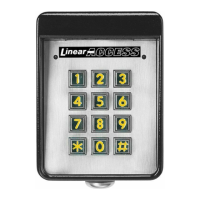
The AM-KP keypad is designed for use with Linear’s AE1000Plus,
AE2000Plus
, and AM3Plus access control systems. The keypad is housed
in a rugged cast aluminum enclosure. The die-cast keys have bright, easy-
to-read yellow graphics. Each key has a positive tactile “click” feel when
pressed. An internal sounder signals when a key is pressed.
The keypad can be mounted to a pedestal or directly to a wall. A keylock
secures the keypad to the mounting backplate.
An incandescent panel lamp lights the keypad for nighttime use. Red, green
and yellow indicators show power, access and lockout conditions.
The AM-KP is normally powered from the controller, or can be powered
locally from a 12 VDC power supply. Robust static and lightning protection
circuits safeguard the keypad’s electronics.
A rotary switch selects the keypad’s PBUS device address. Each PBUS
device connected to the controller must be set to a different PBUS device
address.
1. AM-KP FEATURES
2. PLAN INSTALLATION 3. MOUNT BACKPLATE 4. ROUTE CABLE
*
5
6
7
8
9
0
#
1
2
3
4
NIGHT LIGHT
YELLOW "LOCKOUT"
INDICATOR
RED/GREEN POWER/ACCESS
INDICATOR
TACTILE
KEYPAD
POWER/DATA
TERMINALS
PBUS
DEVICE
ADDRESS
SELECTOR
(1-6)
SOUNDER
KEYLOCK
LOBBY
ACCOUNTING
SERVICE
SALES
COMPUTER
ROOM
V.P.
V.P.
SALES
PURCH.
ENGINEERING
BATH
BATH
STOR.
COPIER
AREA
CHIEF
ENG.
LAB
PRESIDENT
CONTROLLER
COMMERICAL
INSTALLATION
AM-KP
ACCESS
KEYPADS
CARD
READERS
(USING AM-CRI
INTERFACE)
APARTMENT GATE
INSTALLATION
PLAN THE LOCATIONS
FOR CONTROL AND
REMOTE DEVICES
AM-KP
ON
PEDESTAL
CONTROLLER
PLAN CABLE RUNS
BETWEEN CONTROL
AND REMOTE DEVICES
APARTMENTS
*
5
6
7
8
9
0
#
1
2
3
4
PEDESTAL
MOUNT BACKPLATE WITH
SECURITY BOLTS AND LOCKNUTS
USE CONCRETE
WEDGE ANCHORS
OR MOLLY ANCHORS
WALL MOUNTING
CABLE LENGTH FORMULA FOR EACH KEYPAD USED IN SYSTEM
CABLE RUN CABLE TYPE FORMULA
300 FEET MAXIMUM
BELDEN 9931 (24 AWG)
WEICO 9405 (20 AWG)
EACH AM-KP KEYPAD EQUALS 9 LOAD UNITS
FEET x LOAD UNITS < 3,000 MAXIMUM
FEET x LOAD UNITS < 10,000 MAXIMUM
500 FEET MAXIMUM
HOMERUN WIRE
EACH KEYPAD
(1000 FEET WIRE MAXIMUM
ALLOWED IN SYSTEM)
PRINTER’S INSTRUCTIONS:
INSTL, INSTR, AM-KP- LINEAR P/N: 211560 E - INK: BLACK - MATERIAL: 20 LB. MEAD BOND - SIZE: 11.000” X 8.500” - SCALE: 1-1 - SIDE 1 OF 2
Question and Answer IconNeed help?

Do you have a question about the Linear AM-KP and is the answer not in the manual?

Summary

AM-KP Keypad Introduction

Keypad Description and Operation

Details the keypad's rugged design, tactile keys, sounder, and indicators for user feedback.

Power and Protection Features

Covers power options (controller or 12 VDC) and robust static/lightning protection.

AM-KP Keypad Features and Components

Keypad Interface and Indicators

Describes tactile keypad, night light, lockout, and power/access indicators for operational status.

PBUS Device Address Selector

Explains the rotary switch for setting the PBUS device address (1-6) for controller communication.

Installation Planning and Cable Routing

Device and Cable Run Planning

Guides on planning locations for control/remote devices and cable runs between them.

Cable Load Unit Calculations

Details cable routing specifications and formulas for load units based on cable type and length.

AM-KP Keypad Mounting Procedures

Pedestal and Wall Mounting

Covers mounting the backplate to pedestals or walls using appropriate hardware.

Keypad Connection and Configuration

Keypad to Controller Wiring

Provides the wiring diagram for connecting the AM-KP keypad to the access control system controller.

PBUS Device Address Configuration

Instructions for setting the unique PBUS device address switch (1-6) using a screwdriver.

Local Power Supply Connection

Details how to connect an external 12 VDC power supply for local power operation.

Securing, Programming, and Testing

Keypad Case Securing

Instructions on hooking the keypad onto the backplate and using the key to secure it.

Controller Programming

Steps to program the controller to recognize and configure the remote keypad receiver.

Keypad Functionality Test

Guide for testing keypad operation, including indicator status and relay activation.

Linear Product Limited Warranty

Warranty Terms and Conditions

Outlines the twelve (12) month warranty against defects and limitations on consequential damages.

Summary

AM-KP Keypad Introduction

Keypad Description and Operation

Details the keypad's rugged design, tactile keys, sounder, and indicators for user feedback.

Power and Protection Features

Covers power options (controller or 12 VDC) and robust static/lightning protection.

AM-KP Keypad Features and Components

Keypad Interface and Indicators

Describes tactile keypad, night light, lockout, and power/access indicators for operational status.

PBUS Device Address Selector

Explains the rotary switch for setting the PBUS device address (1-6) for controller communication.

Installation Planning and Cable Routing

Device and Cable Run Planning

Guides on planning locations for control/remote devices and cable runs between them.

Cable Load Unit Calculations

Details cable routing specifications and formulas for load units based on cable type and length.

AM-KP Keypad Mounting Procedures

Pedestal and Wall Mounting

Covers mounting the backplate to pedestals or walls using appropriate hardware.

Keypad Connection and Configuration

Keypad to Controller Wiring

Provides the wiring diagram for connecting the AM-KP keypad to the access control system controller.

PBUS Device Address Configuration

Instructions for setting the unique PBUS device address switch (1-6) using a screwdriver.

Local Power Supply Connection

Details how to connect an external 12 VDC power supply for local power operation.

Securing, Programming, and Testing

Keypad Case Securing

Instructions on hooking the keypad onto the backplate and using the key to secure it.

Controller Programming

Steps to program the controller to recognize and configure the remote keypad receiver.

Keypad Functionality Test

Guide for testing keypad operation, including indicator status and relay activation.

Linear Product Limited Warranty

Warranty Terms and Conditions

Outlines the twelve (12) month warranty against defects and limitations on consequential damages.

Linear AM-KP Specifications

General IconGeneral
BrandLinear
ModelAM-KP
CategoryIntercom System
LanguageEnglish

Related product manuals