4. You can also download LINGDU GPS Player from www.lingdu.us >
Support > Downloads and install it on your computer.
5. Install the LINGDU GPS Player on your computer. (Note: Please close or
ignore the prompt of the anti-virus software, we confirm that it will not
bring any security impact to your computer.)
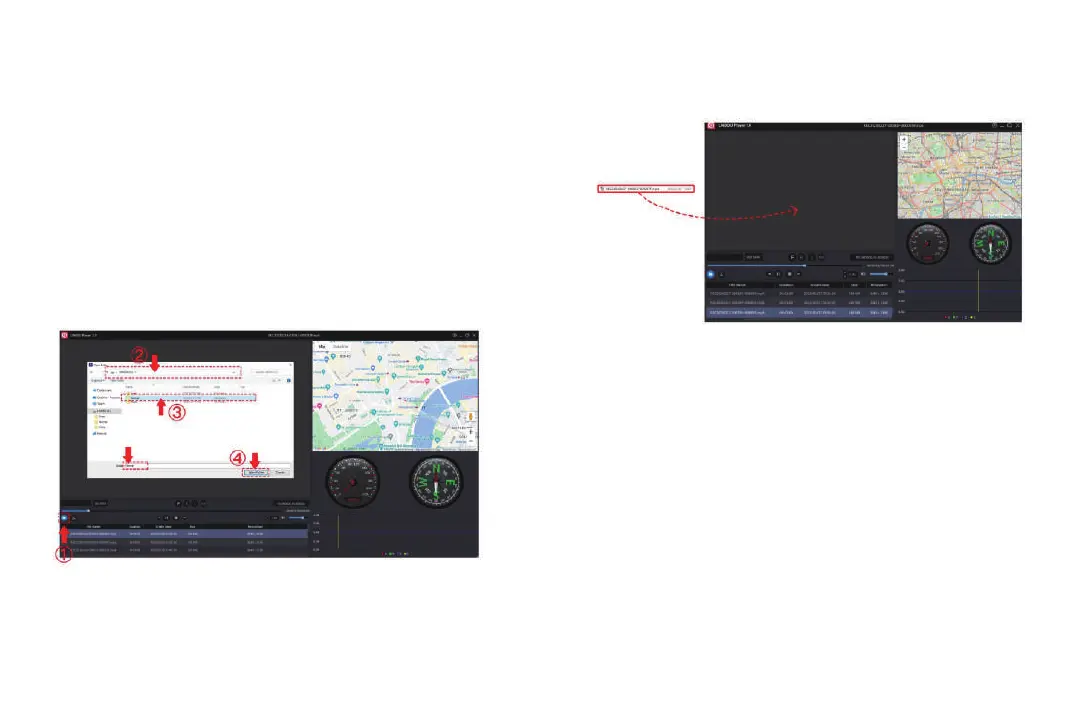
6. You can click the ‘Open Files’ button to browse and select the Movie or
EMR folder of the microSD card on the LINGDU GPS Player. It will show all
files in the Normal or Event or Parking folder. Or you can also drag the
video files directly to the launcher screen.
7. There are two ways to play video.
A, Click File-Open icon to choose the folder which you want to play, click to
start play. (Note that you can ONLY select one folder to play and see no
video files)
B, Select from ‘My Computer’ and find the memory card disk, choose the
video file you want to play, you can drag and drop the file directly to the
player. You can get the GPS information on the player.
EN-33 EN-34



 To Next Page