EasyManua.ls Logo

Lingraphica AllTalk - Copying an Icon to a Different Page

Lingraphica AllTalk
49 pages
Print Icon
To Next Page IconTo Next Page
To Previous Page IconTo Previous Page
Loading...
Speech-Generating Device User Guide | 33
Copying an Icon to a Different Page
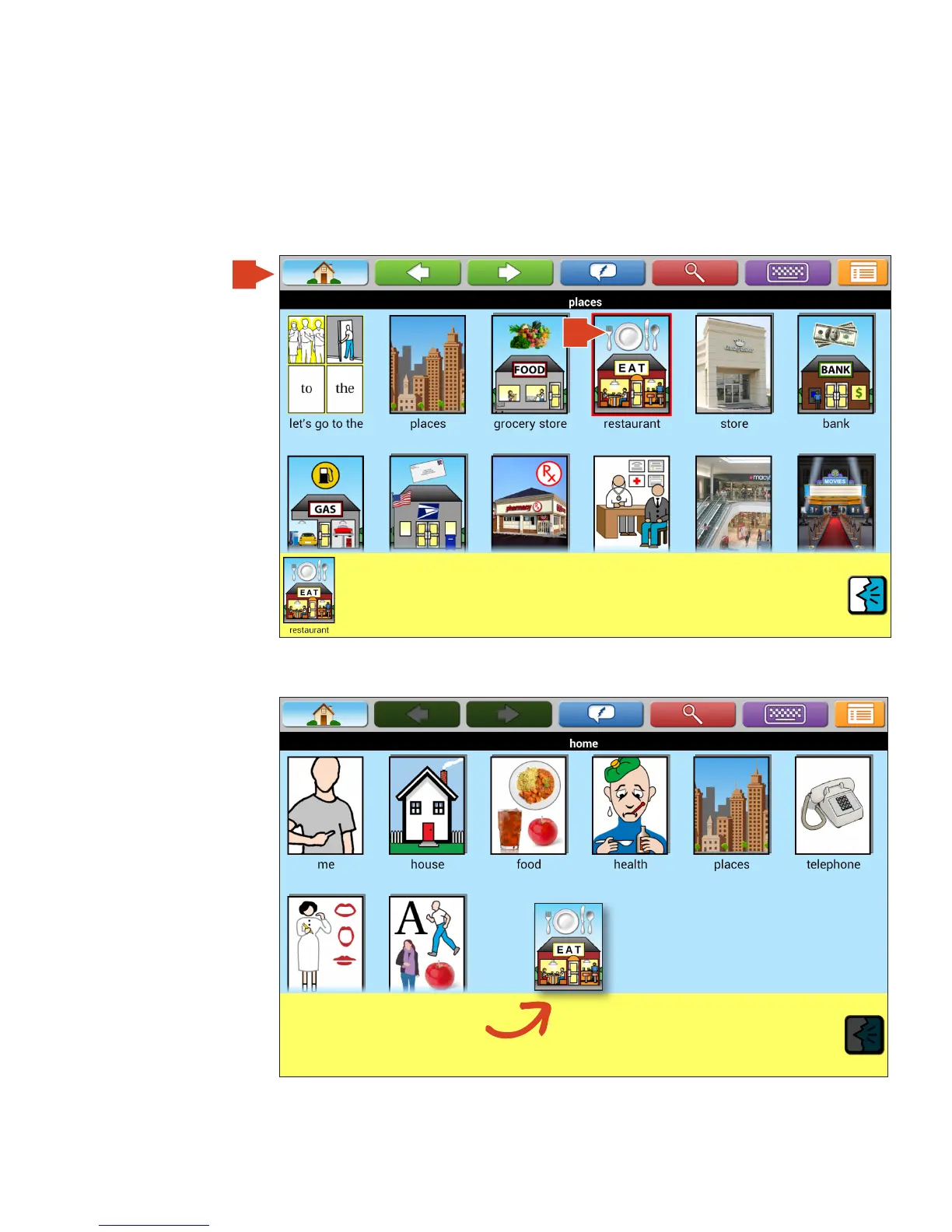
With the auto add icons and auto add page icons to workspace enabled you can easily copy an icon on one page to
another. Note, in order to do this, the Workspace must be shown.
1. Touch the icon.
2. Touch the Home
button to return to
Home Page.
NOTE: If auto add icons
to workspace is off then
Touch and hold the
icon and then drag and
drop the icon into the
Workspace.
3. Touch and hold icon
in Workspace until
icons in Picture
Gallery start dancing
(TouchTalk and
MiniTalk only); then
drag and drop icon into
Picture Gallery.
2
1

Table of Contents

Related product manuals