Speech-Generating Device User Guide | 36
Changing Phrase Icons
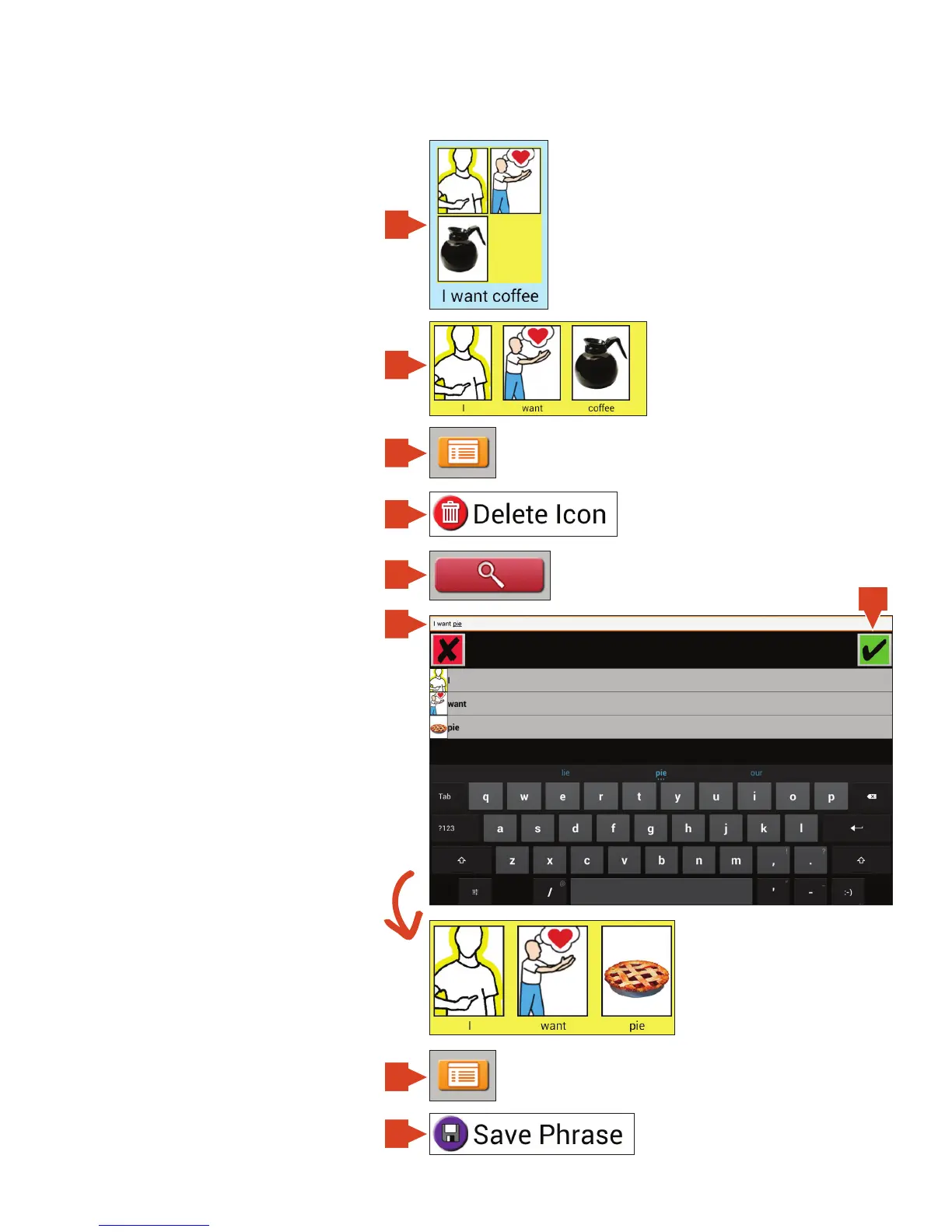
Changing icons in a phrase
With the auto add icons to workspace
enabled you can easily move phrase icons
into the Workspace. Note, in order to do
this, the Workspace must be showing.
1. Touch the phrase icon.
2. Touch the icon from the phrase
that you wish to delete.
3. Touch Menu.
4. Touch Delete Icon.
5. Search for a new icon by touching
Search.
6. Then type in text for a word or phrase
that you would like to add. If it is a single
word touch that photo first otherwise
touch the green check mark to add the
word or phrase to the workspace.
7. Save phrase to current page by
touching Menu.
8. Touch Save Phrase.
TouchTalk and MiniTalk
keyboard shown.
1
5
3
7
8
2
4
6b
6a


 To Next Page