Speech-Generating Device User Guide | 17
Navigation Modes
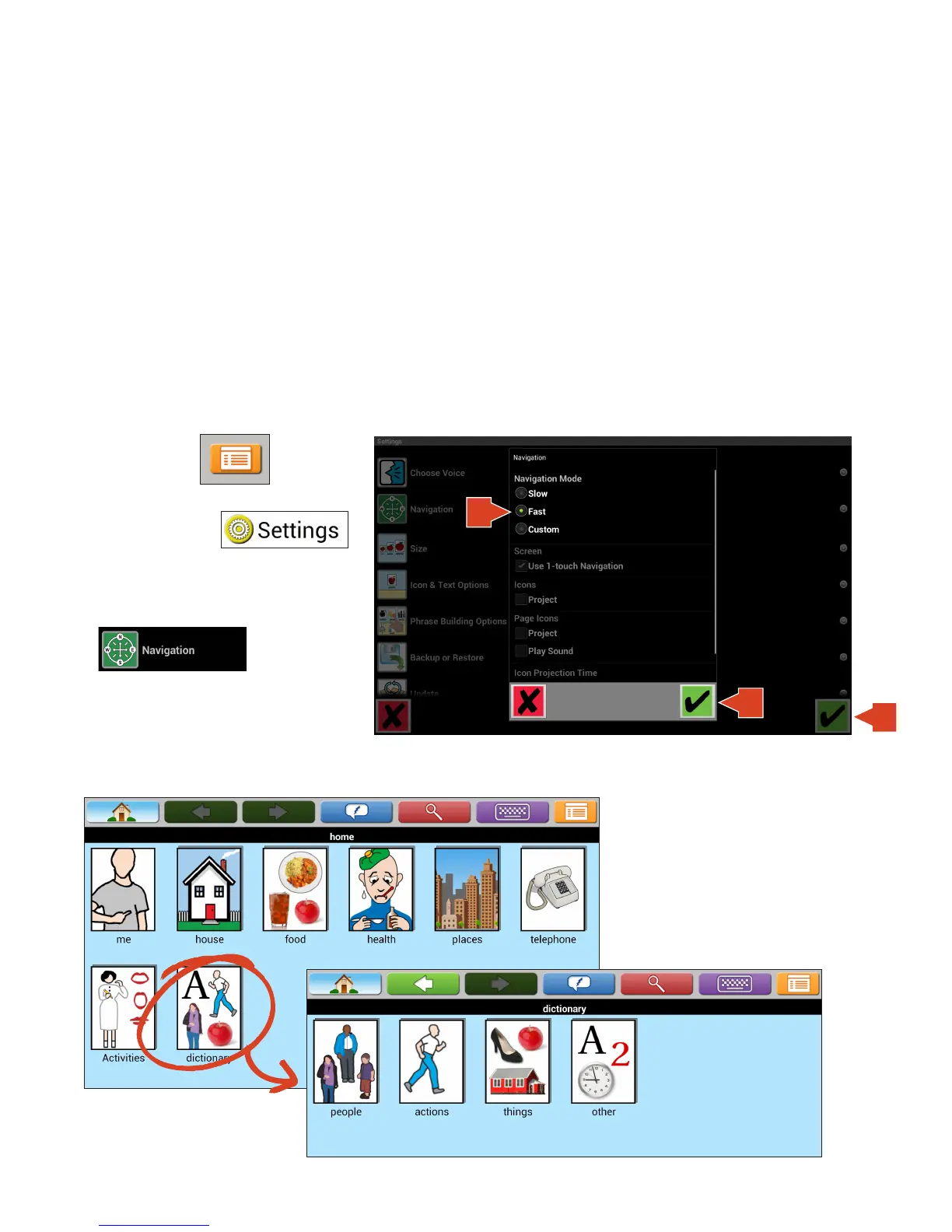
There are three different navigation modes.
Slow Navigation: The slow setting enables all of the feedback systems the device has to offer. In this setting the
one-touch navigation remains on. This feature allows you to automatically enter a page by touching only once on
the icon. The icons and phrase icons will project for two seconds and the page icons will project and speak the
word or phrase.
Fast Mode: The fast setting lets you navigate to a desired icon quickly without the added feedback systems. Fast
navigation has one-touch navigation on, the icons and phrase icons will not project, and page icons will not project
and will not speak the word or phrase.
Custom Navigation: Custom navigation allows you to choose if each setting is on or off.
1. Touch Menu.
2. Touch Settings.
3. Touch Navigation.
Finding icons on all devices: Additional icons can be found behind the Dictionary page.
4
5
6


 To Next Page