27
Chapter 5: Using the Wireless Network Monitor
Creating a New Profile
Wireless-G USB Network Adapter with Wi-Fi Finder
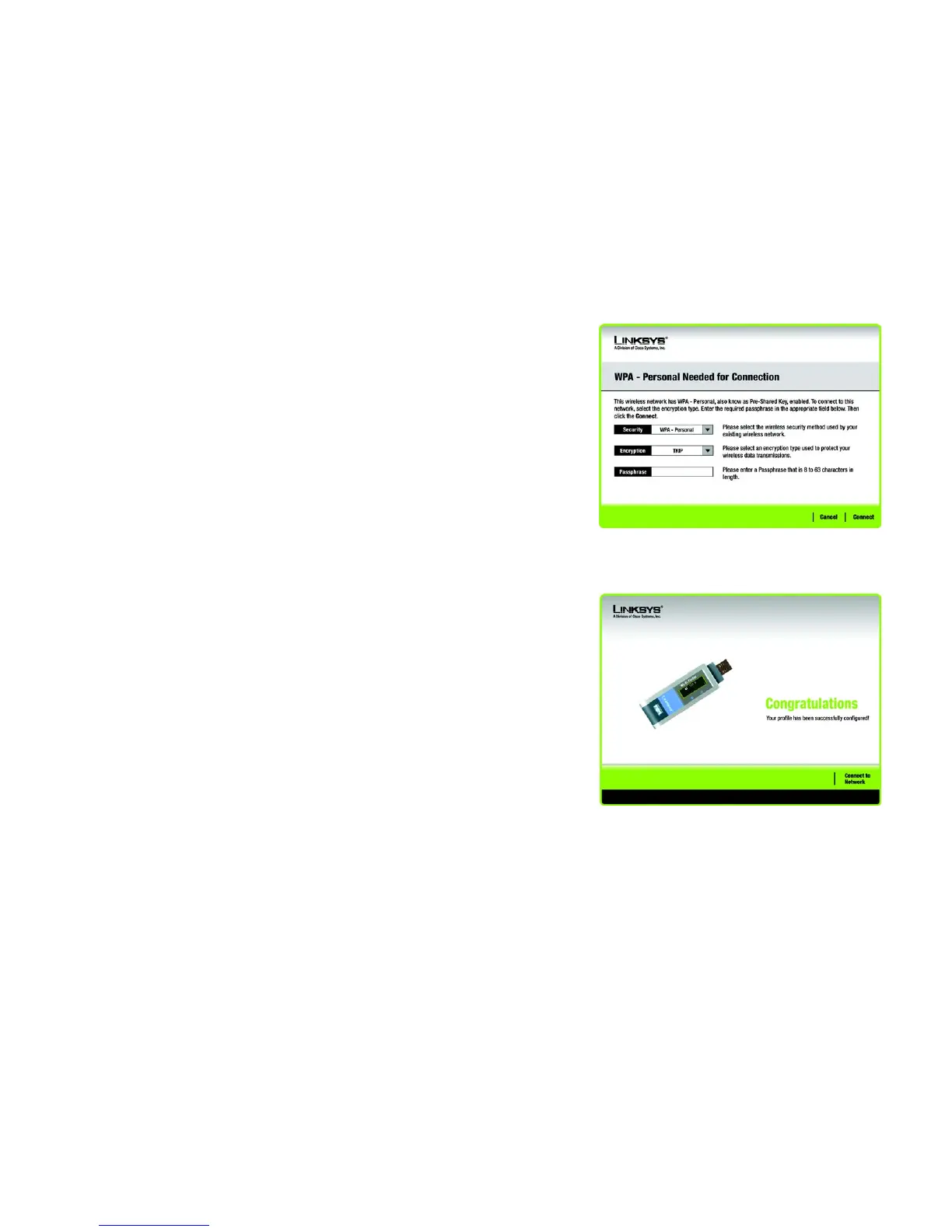
WPA-Personal Needed for Connection
Encryption - Select the type of algorithm you want to use, TKIP or AES, from the Encryption drop-down
menu.
Passphrase - Enter a Passphrase, also called a pre-shared key, of 8-63 characters in the Passphrase field.
The passphrase must match the devices on your wireless network.
Then, click Connect and proceed to the Congratulations screen. To cancel the connection, click Cancel.
2. After the software has been successfully installed, the Congratulations screen will appear. Click Connect to
Network to connect to your network.
Congratulations! The profile has been configured.
Figure 5-15: WPA-Personal Needed for Connection
Figure 5-16: The Congratulations Screen



 To Next Page