SLEEP TIME SETTING
- Press SLEEP button on remote control repeatedly to select SLEEP TIME directly.
Available options: Off, 10/20/30/60/90/120/180/240 minutes.
VIDEO SIZE SETTING
- Press ASPECT button on remote control repeatedly to select VIDEO SIZE directly.
Available options: Auto, 4:3, 16:9, Zoom1, Zoom2.
NOTE: If there’s no signal, pressing ASPECT button will not work. And the available video
size may be different for different input source.
MULTIAUDIO SETTING
- Press AUDIO button on remote control repeatedly to select desired audio language.
NOTE: To enable this function, make sure that the channel you are viewing supports
multi-audio languages.
INFORMATION DISPLAY
- Press DISPLAY button on remote control to display information of current program.
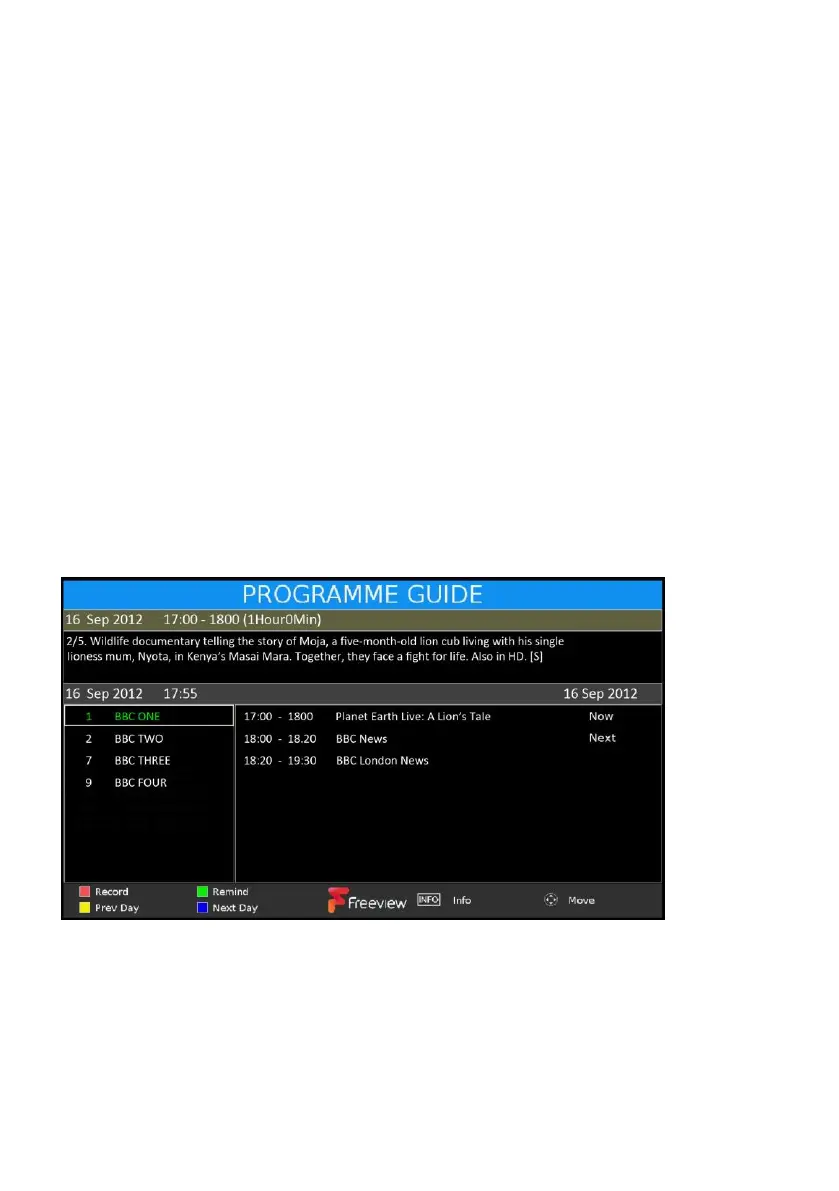
TV GUIDE (FOR DTV MODE ONLY)
- Press GUIDE button on remote control to enter EPG menu page.
- Press UP/DOWN navigation button to select preferred program
- Press LEFT/RIGHT navigation button to switch between left column and right column.
- Press RED button to enter recorder setting page.
- Press GREEN button to enter reminder setting page.
- Press YELLOW button to display program guide of previous day.
- Press BLUE button to display program guide of next day.



 To Next Page